Hello 
I managed to write a little script to run cava in transparent terminator profile.
Please test it if you can…
#!/bin/bash
#: Usage: transparent-cava (height in pixels) (width full or half)
#: example transparent-cava 100 half
#: default is 200px height and full width

CONFIG_DIR="$HOME/.config/terminator"
CONFIG_FILE="$CONFIG_DIR/cava-transparent"
if [ ! -f $CONFIG_FILE ]; then
cat <<EOF > ${CONFIG_FILE}
[global_config]
  dbus = False
[keybindings]
[profiles]
  [[default]]
    allow_bold = False
    background_darkness = 0.0
    background_type = transparent
    cursor_blink = False
    cursor_color = "#aaaaaa"
    font = Sans 4
    show_titlebar = False
    scrollbar_position = hidden
    scroll_on_keystroke = False
    use_custom_command = True
    custom_command = cava
    use_system_font = False
[layouts]
[plugins]
EOF
fi

CAVA_HEIGHT=${1:-200}
CAVA_WIDTH=${2:-full}
WIDTH=$(wmctrl -d|grep "*"|awk '{print $4}'|cut -d'x' -f1)
HEIGHT=$(wmctrl -d|grep "*"|awk '{print $4}'|cut -d'x' -f2)
TOP=$((HEIGHT-CAVA_HEIGHT))
LEFT=0
if [ "$CAVA_WIDTH" != "full" ];then
LEFT=$((WIDTH/4))
WIDTH=$((WIDTH/2))
else
:
fi

terminator -b -g "${CONFIG_FILE}" -T cavatransparent --geometry "${WIDTH}x${CAVA_HEIGHT}+${LEFT}+${TOP}"
Please save above code as transparent-cava in ~/bin directory, make it executable and test.
Usage:
transparent-cava #without arguments it defaults to 200px height and full width
transparent-cava 100 half # 100px height half width
Picom must be enabled to have transparency effect.
Cava config I use
~/.config/cava/config
## Configuration file for CAVA. Default values are commented out. Use either ';' or '#' for commenting.
## Modified by benChile for Mabox
[general]

# Smoothing mode. Can be 'normal', 'scientific' or 'waves'. DEPRECATED as of 0.6.0
; mode = normal

# Accepts only non-negative values.
; framerate = 60

# 'autosens' will attempt to decrease sensitivity if the bars peak. 1 = on, 0 = off
# new as of 0.6.0 autosens of low values (dynamic range)
# 'overshoot' allows bars to overshoot (in % of terminal height) without initiating autosens. DEPRECATED as of 0.6.0
; autosens = 1
; overshoot = 20

# Manual sensitivity in %. If autosens is enabled, this will only be the initial value.
# 200 means double height. Accepts only non-negative values.
; sensitivity = 100

# The number of bars (0-200). 0 sets it to auto (fill up console).
# Bars' width and space between bars in number of characters.
; bars = 0
; bar_width = 2
; bar_spacing = 1


# Lower and higher cutoff frequencies for lowest and highest bars
# the bandwidth of the visualizer.
# Note: there is a minimum total bandwidth of 43Mhz x number of bars.
# Cava will automatically increase the higher cutoff if a too low band is specified.
; lower_cutoff_freq = 50
; higher_cutoff_freq = 10000


# Seconds with no input before cava goes to sleep mode. Cava will not perform FFT or drawing and
# only check for input once per second. Cava will wake up once input is detected. 0 = disable.
; sleep_timer = 0


[input]

# Audio capturing method. Possible methods are: 'pulse', 'alsa', 'fifo', 'sndio' or 'shmem'
# Defaults to 'pulse', 'alsa' or 'fifo', in that order, dependent on what support cava was built with.
#
# All input methods uses the same config variable 'source'
# to define where it should get the audio.
#
# For pulseaudio 'source' will be the source. Default: 'auto', which uses the monitor source of the default sink
# (all pulseaudio sinks(outputs) have 'monitor' sources(inputs) associated with them).
#
# For alsa 'source' will be the capture device.
# For fifo 'source' will be the path to fifo-file.
# For shmem 'source' will be /squeezelite-AA:BB:CC:DD:EE:FF where 'AA:BB:CC:DD:EE:FF' will be squeezelite's MAC address
; method = pulse
; source = auto

; method = alsa
; source = hw:Loopback,1

; method = fifo
; source = /tmp/mpd.fifo
; sample_rate = 44100
; sample_bits = 16

; method = shmem
; source = /squeezelite-AA:BB:CC:DD:EE:FF

; method = portaudio
; source = auto


[output]

# Output method. Can be 'ncurses', 'noncurses' or 'raw'.
# 'noncurses' uses a custom framebuffer technique and draws only changes
# from frame to frame. 'ncurses' is default if supported
#
# 'raw' is an 8 or 16 bit (configurable via the 'bit_format' option) data
# stream of the bar heights that can be used to send to other applications.
# 'raw' defaults to 200 bars, which can be adjusted in the 'bars' option above.
; method = ncurses

# Visual channels. Can be 'stereo' or 'mono'.
# 'stereo' mirrors both channels with low frequencies in center.
# 'mono' outputs left to right lowest to highest frequencies.
# 'mono_option' set mono to either take input from 'left', 'right' or 'average'.
; channels = stereo
; mono_option = average

# Raw output target. A fifo will be created if target does not exist.
; raw_target = /dev/stdout

# Raw data format. Can be 'binary' or 'ascii'.
; data_format = binary

# Binary bit format, can be '8bit' (0-255) or '16bit' (0-65530).
; bit_format = 16bit

# Ascii max value. In 'ascii' mode range will run from 0 to value specified here
; ascii_max_range = 1000

# Ascii delimiters. In ascii format each bar and frame is separated by a delimiters.
# Use decimal value in ascii table (i.e. 59 = ';' and 10 = '\n' (line feed)).
; bar_delimiter = 59
; frame_delimiter = 10


[color]

# Colors can be one of seven predefined: black, blue, cyan, green, magenta, red, white, yellow.
# Or defined by hex code '#xxxxxx' (hex code must be within ''). User defined colors requires
# ncurses output method and a terminal that can change color definitions such as Gnome-terminal or rxvt.
# if supported, ncurses mode will be forced on if user defined colors are used.
# default is to keep current terminal color
; background = white
; foreground = green


# Gradient mode, only hex defined colors (and thereby ncurses mode) are supported,
# background must also be defined in hex  or remain commented out. 1 = on, 0 = off.
# You can define as many as 8 different colors. They range from bottom to top of screen
 gradient = 1
 gradient_count = 8
 gradient_color_1 = '#59cc33'
 gradient_color_2 = '#80cc33'
 gradient_color_3 = '#a6cc33'
 gradient_color_4 = '#cccc33'
; gradient_color_5 = '#cca633'
; gradient_color_6 = '#cc8033'
; gradient_color_7 = '#cc5933'
; gradient_color_8 = '#cc3333'


[smoothing]

# Percentage value for integral smoothing. Takes values from 0 - 100.
# Higher values means smoother, but less precise. 0 to disable.
; integral = 77

# Disables or enables the so-called "Monstercat smoothing" with or without "waves". Set to 0 to disable.
; monstercat = 0
; waves = 0

# Set gravity percentage for "drop off". Higher values means bars will drop faster.
# Accepts only non-negative values. 50 means half gravity, 200 means double. Set to 0 to disable "drop off".
; gravity = 100


# In bar height, bars that would have been lower that this will not be drawn.
; ignore = 0


[eq]

# This one is tricky. You can have as much keys as you want.
# Remember to uncomment more then one key! More keys = more precision.
# Look at readme.md on github for further explanations and examples.
; 1 = 1 # bass
; 2 = 1
; 3 = 1 # midtone
; 4 = 1
; 5 = 1 # treble
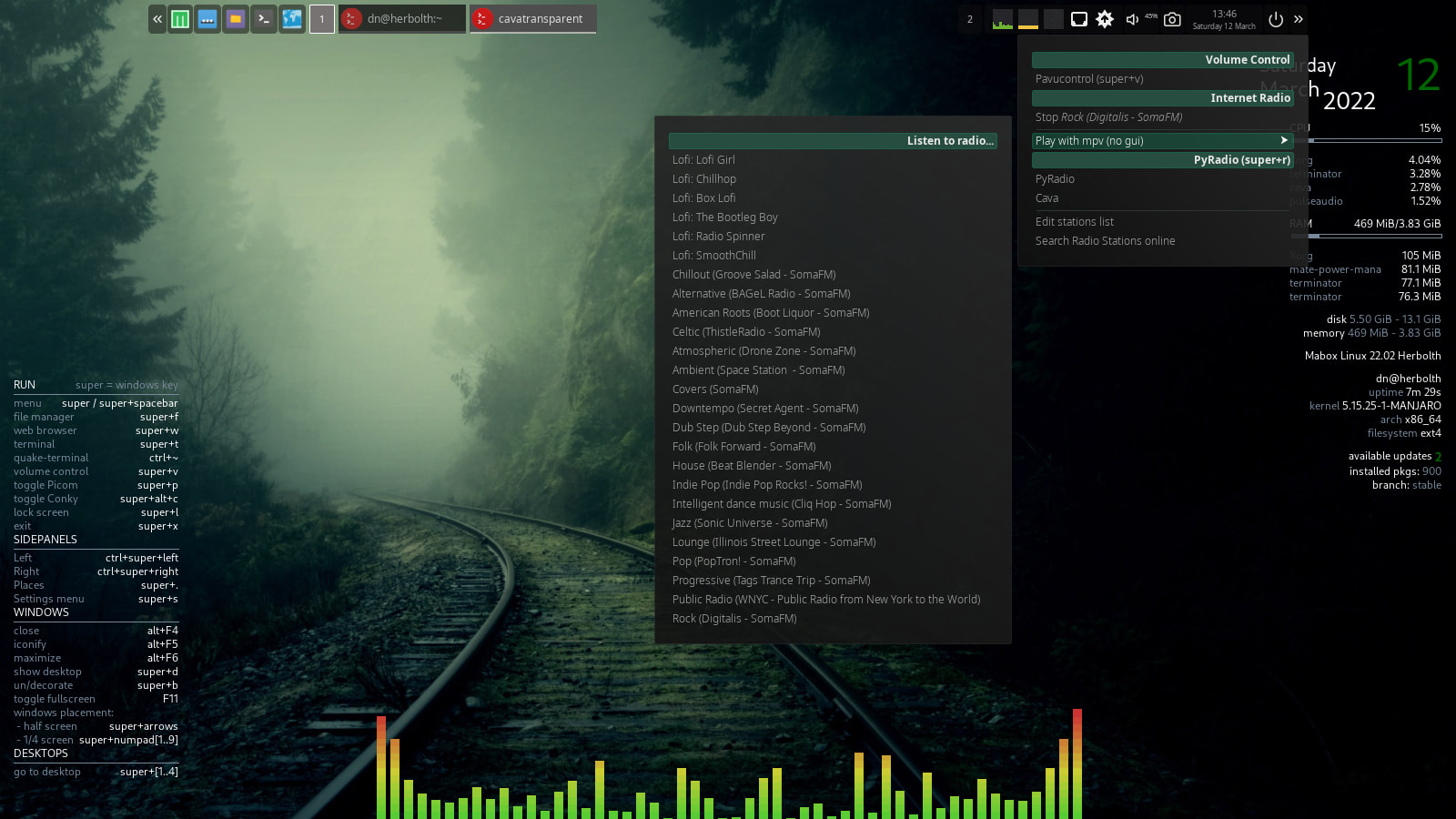
After some more testing and integration with tint2 volume executor menu I plan to ship it with mabox-tools update.
@ben_chile big thanks for the idea and sharing important info