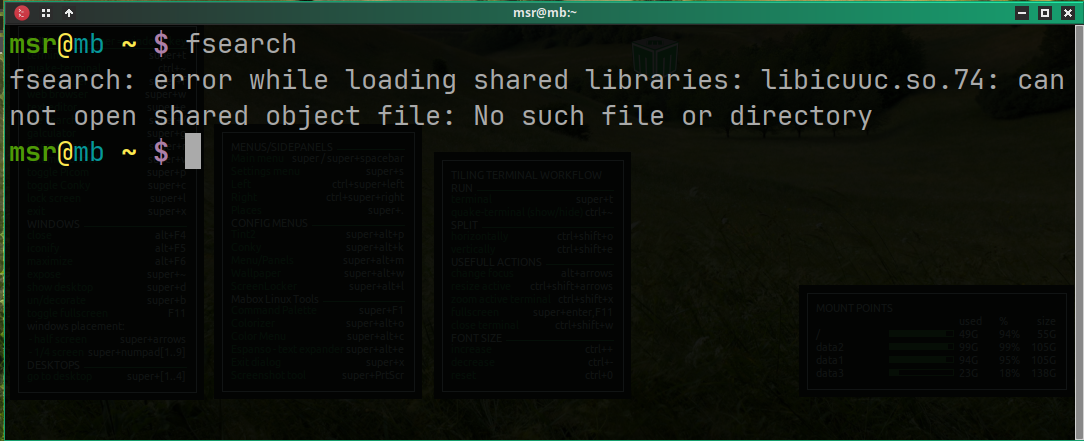
[solved] FSearch stopped working

Hi guys and happy new year 2024.

Right before leaving the city for vacations I noted that FSearch was not working. When executed in the console it says:

fsearch: error while loading shared libraries: libicuuc.so.73: cannot open shared object file: No such file or directory

The first and simplest (uninstall/reinstall) didn’t work. Reading here and there I found a plausible cause related to compiling and such (which I found odd as nothing weird happened lately with my beloved Mabox). Anyway, I went ahead and run:

yay -S --rebuildall $(pacman -Qm)

This took more than three hours, almost filled two filesystems and didn’t fix the problem either. Any idea or tips please? :thinking:

2 Likes

Hi @M0nst3r and happy new year :slight_smile:

Thanks for info, I forgot to check it against latest updates… rebuilt fsearch is already uploaded to Mabox repo :smiley:

That was really fast (and awesome :sunglasses:).

The new FSearch v0.2.3 notification just showed up and the problem fixed in seconds.

Thank you. :+1:

It happens again after the last update

1 Like

Recompiled against new icu, and uploaded to Mabox repo.

Thanks for info @msrosyidi :slight_smile:

1 Like

Thank you. :+1:

1 Like

Hello! I’m reviving an old post…
it happened again… I thought I could solve it following @M0nst3r 's proposed solution, with no success:

fsearch: error while loading shared libraries: libicuuc.so.75: cannot open shared object file: No such file or directory

I have reinstalled, uninstalled and installed FSearch from pacman… now I’m relying on Catfish, but I missing fsearch…

Hi @Rhuks,
Works fine here.
Seems your system is not fully updated… as icu is currently at 76 version.
Try to update it:

yay -Syyu

Thank you, @napcok , but icu 76.1-1 is already installed.

:blush: pacman -Qi icu
Name : icu
Version : 76.1-1

And yay said that all is in order?

$ yay -Syyu
[sudo] password for rhuks: 
:: Synchronizing package databases...
 maboxlinux             22,2 KiB  8,04 KiB/s 00:03 [################] 100%
 core                  139,9 KiB   123 KiB/s 00:01 [################] 100%
 extra                   8,3 MiB  2,25 MiB/s 00:04 [################] 100%
 DEB_Arch_Extra         10,1 KiB  7,39 KiB/s 00:01 [################] 100%
:: Searching AUR for updates...
:: Searching databases for updates...
 -> Packages not in AUR: manjaro-openbox-maia  manjaro-openbox-matcha  systemd-fsck-silent  ueberzugpp-x11  xcmenu
 there is nothing to do

Please check if you have this fsearch compilation installed (compilation number = 4)

$ pacman -Qi fsearch
Name            : fsearch
Version         : 0.2.3-4

Maybe your fsearch is installed from somewhere else? (not from Mabox repo?)

Installed…

pacman -Qi fsearch
Name            : fsearch
Version         : 0.2.3-4

Hello!
I don’t know if it was an orthodox solution, but it works:
pacman said fsearch was installed, then, I remove it. Just too curious, I run “fsearch” in the terminal, and shows the same issue about the libicuuc, as fsearch was installed. Why?

Then, I found in /usr/local/bin a fsearch binary… I removed all fsearch mentions and installed fsearch from pacman: solved.