¡¡¡Me alegra!!! Buen fin de semana 
I’m glad!!! Have a nice weekend
¡¡¡Me alegra!!! Buen fin de semana
I’m glad!!! Have a nice weekend
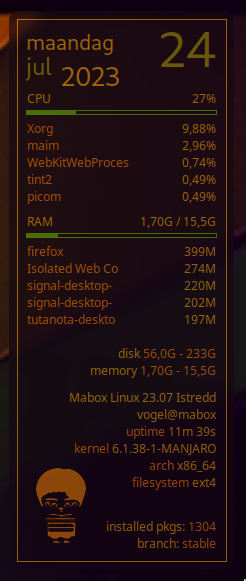
I like playing with animations. So i found a conky line to show a random slideshow of pix.
${exec cd ~/Path/to/images/folder ; /usr/bin/convert -format png -resize 160x120 "`/bin/ls *.png *.jpg 2>/dev/null | /usr/bin/shuf -n1`" /dev/shm/current.png}${image /dev/shm/current.png -p 12,320 -s 100x100 -n}${voffset 100}
GIF - conky mabox logo animated . . . Using about 7 images.
I am thinking of animating a little “puppet”, walking inside conky, or something else unnecessary.
The only obstacle i face is to show the pix in order(sequence) and not random. Can’t see the one-liner yet.
ps the animation is quicker than in reality. Just for the gif.
EDIT: typo Path command.

I worry about the use of resources and the elements that could generate distraction, that’s why I avoid this kind of things, my PC is old and I can’t add ram or a better processor so I remove everything that can consume resources and my time to use the computer is very short.
My dedication to Conky has more to do with a learning process, to see how it works and to know the codes, I hope someday to be able to create scripts that work.
Have success with your animation and find out how to sequence it, maybe if someday I have a better machine, I will add it.
Translated with DeepL Translate: The world's most accurate translator (free version)
Fair enough … That’s indeed a good point.
You too, have fun with the conky code.

Hi, @muz!
Sorry for the late response. I tried the animation you shared. I like it a lot, but not for wallpapers. I think same as @Claudio. It gets me distracted a lot XDXDXD
But I find it very useful for screenshots, for example, so I can start a new, dedicated conky for that.
Thanks for the idea  !
!
I am learning a lot with Mabox. I truly love it.
Please, do the animation! It looks fun!


But i also have my minimalist periods . . .
Don’t understand this part. It’s for any pix you like.
Boy changes color.

Perhaps this is a good time to explain why I am into animation and moving nonsensical things.
From '95 to 2018 co-founder of a theater group that made outdoor physical visual location theater (raw and poetic).
I find it interesting to invert things, pull them apart and give them different color or shape.
I am fascinated o.a Polish and Czech animators, among others. (stop motion)
Hi, muzqs!
I just said that I will use the conky code for screenshots, that’s all ;D
so all i have to do is replace the selected area in the .config and restart conky and it should work?
Restart is not needed, if you edit config of already running Conky just save file and Conky will detect changes and reload itself.
Hint
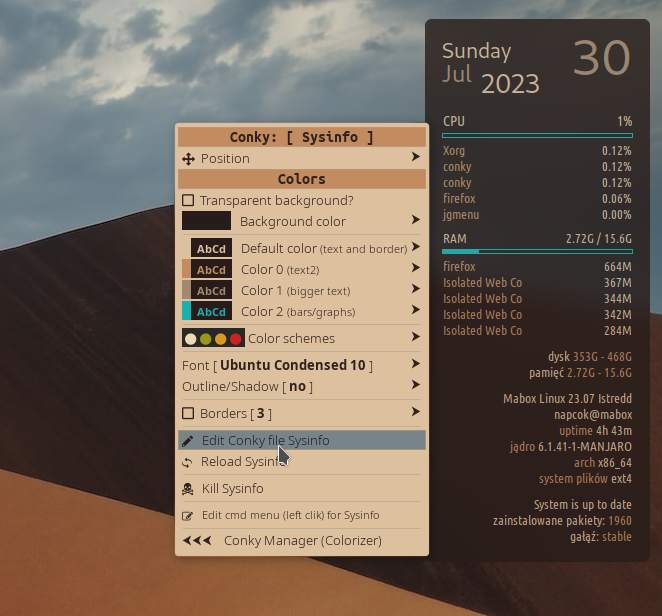
You have a link to edit Conky in right-click context menu.
Hint2
super + c is binded to start/stop Conky session (all running Conkys). Press it twice to reload all Conkies.
Might be useful when you did fatal mistake in Conky config… Use Undo Ctrl + z (in Geany editor) to revert changes and then reload Conky session (super +c twice)
Excellent. I’ll play around with it!
I tried it but nothing happened, what image are you referring to? Sorry for my ignorance but I don’t understand how it works.
I could not make much progress. Some issues are very confusing to me and I find it difficult to move forward.
Hi @Claudio ,
did you change ~/Path/to/pix/png/jpg .
I am sorry maybe not clear enough indeed.
It needs to be a folder with images. Not an image it self. It will search in that folder.
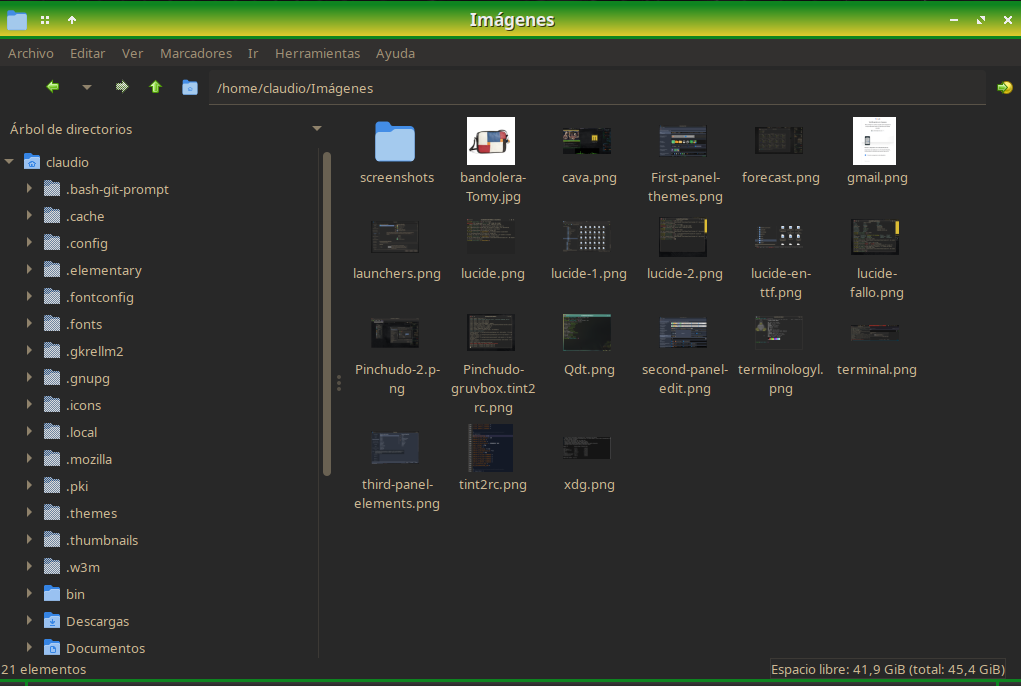
Hi, @muzqs It doesn’t work, nothing happens when I change de path yo post to
/home/claudio/Imágenes.
Maybe I’m doing something wrong or I’m missing something, I don’t know yet.
Hi Claudio,
The only thing i can think of is maybe the placing of the image is not right for you. (-p 12,320)
${exec cd ~/Path/to/images/folder ; /usr/bin/convert -format png -resize 160x120 "`/bin/ls *.png *.jpg 2>/dev/null | /usr/bin/shuf -n1`" /dev/shm/current.png}${image /dev/shm/current.png -p 12,320 -s 100x100 -n}${voffset 100}
Hi, @muzqs I copied the path to the images folder from the file manager, I can’t go wrong with that, then I modified adding and removing data to go from an absolute path to a relative one and vice versa but I couldn’t get it to work, then I was absent for a few days and just today I’m back, I’ll see if I can do it again. Thank you very much.
Hi @Claudio ,
One more thing i can think of,. Do you have ImageMagic installed. Convert is part of imagemagic.
But i guess thats not the thing.
conky.config = {
own_window = true,
own_window_type = 'desktop',
own_window_transparent = false,
own_window_hints = 'undecorated,below,sticky,skip_taskbar,skip_pager',
own_window_colour = '#1f351f',
own_window_class = 'Conky',
own_window_title = 'Mabox Sysinfo Bar Conky',

alignment = 'top_left',
gap_x = 1677,
gap_y = 150,
minimum_width = '200',

use_xft = true,
font = 'Ubuntu:size=8',
xftalpha = 1,
override_utf8_locale = true,


draw_shades = false,
default_shade_color = '#222222',
draw_outline = false,
default_outline_color = '#222222',

default_color = '#b6d3bb',
color0 = '#9cb89e',
color1 = '#b173b2',
color2 = '#b875dc',
cpu_avg_samples = 2,


draw_borders = true,
stippled_borders = 0,
border_inner_margin = 8,
border_outer_margin = 8,
border_width = 1,
draw_graph_borders = true,

background = true,
no_buffers = true,
imlib_cache_size(original mb sysinfo) for comparison.
= 0,
short_units = true,
double_buffer = true,
update_interval = 2,
};
conky.text = [[
$color${font Cantarell:size=16}${time %A}$font
${voffset -20}$alignr$color1${font Cantarell:size=38}${time %e}$font
$color${voffset -20}$color1${font Cantarell:size=18}${time %b}$font
${voffset -3} $color${font Cantarell:size=20} ${time %Y}$font
${goto 18}${color}CPU$alignr$cpu%
${voffset -2}$color2$alignr${cpubar 4,190 -l -t}${voffset -2}
${goto 18}$font$color0${top name 1}${alignr}$color${top cpu 1}%
${goto 18}$color0${top name 2}$alignr$color${top cpu 2}%
${goto 18}$color0${top name 3}$alignr$color${top cpu 3}%
${goto 18}$color0${top name 4}$alignr$color${top cpu 4}%
${goto 18}$color0${top name 5}$alignr$color${top cpu 5}%
${voffset 8}${goto 18}${color}RAM${alignr}$legacymem / $memmax
${voffset -2}$color2$alignr${membar 4,190 -l -t}${voffset -2}
${goto 18}$color0${top_mem name 1}$alignr$color${top_mem mem_res 1}
${goto 18}$color0${top_mem name 2}$alignr$color${top_mem mem_res 2}
${goto 18}$color0${top_mem name 3}$alignr$color${top_mem mem_res 3}
${goto 18}$color0${top_mem name 4}$alignr$color${top_mem mem_res 4}
${goto 18}$color0${top_mem name 5}$alignr$color${top_mem mem_res 5}
${exec cd ~/.config/conky/Noise-vector ; /usr/bin/convert -format png -resize 160x120 “/bin/ls *.png *.jpg 2>/dev/null | /usr/bin/shuf -n1” /dev/shm/current.png}${image /dev/shm/current.png -p 19,251 -s 150x100 -n}${voffset 100}
#${image /usr/share/icons/mabox_border_32.png -p 5,270 -s 32x32}
$alignr disk ${color0}${fs_used /} - ${fs_size /}
$alignr$color memory ${color0}$legacymem - $memmax
#${alignr}${color0}${font Cantarell:size=9}swap $swapmax - $swap
${voffset 10}$alignr${color} Mabox Linux ${execi 10000 awk -F’=’ ‘/DISTRIB_RELEASE=/ {printf $2" "} /CODENAME/ {print $2}’ /etc/lsb-release}
$alignr${execi 10000 whoami}@${nodename}
${alignr}${color0}uptime ${color}${uptime_short}
${alignr}${color0}${alignr}kernel ${color}${kernel}
${alignr}${color0}${alignr}arch ${color}${machine}
${alignr}${color0}${alignr}filesystem ${color}${fs_type}${voffset 10}
${alignr}${color}${execpi 1800 checkupdates.sh -s}${font}${color}
${alignr}${color} installed pkgs: ${color0}${execi 10000 pacman -Q | wc -l}
${alignr}${color} branch: ${color0}${execi 10000 pacman-mirrors -G}
${voffset -50}
]];
${exec cd ~/.config/conky/Noise-vector ; /usr/bin/convert -format png -resize 160x120 "`/bin/ls *.png *.jpg 2>/dev/null | /usr/bin/shuf -n1`" /dev/shm/current.png}${image /dev/shm/current.png -p 19,251 -s 150x100 -n}${voffset 100}
Change this line with your path and test this .conkyrc if it works.
This is the Conky I am using without the added lines.
Image Magic is installed and my system is up to date.
Can that line be used in any other Conky than the one I have running? I guess so, maybe it’s because I don’t have more screen space or because of machine performance issues, today it feels heavy, I had Firefox, LibreOffice Calc, LibreOffice Writer and Galculator open.
Maybe I’m demanding too much from my old hardware, I’ll try it and if it doesn’t work, I won’t insist with this anymore.
I appreciate everything you have tried to help me.
Hi @Claudio,
Please show always the real code in the future, not a picture of the code. 
Play with the Position and Size of the images as i described before…
(this is needed) Maybe the images are out of place of the conkie.
P.S: Firefox uses the most cpu. Some sites are heavy. Close tabs when not in use anymore.
P.S: Do you know Speedcruch. It’s a lightweight Calculator.
P.S: Change hdd for ssd disk, if that’s the situation.
Original Sysinfo mb conkie with slideshow line added.
conky.config = {

	own_window = true,
	own_window_type = 'desktop',
	own_window_transparent = false,
	own_window_hints = 'undecorated,below,sticky,skip_taskbar,skip_pager',
	own_window_colour = '#1f351f',
	own_window_class = 'Conky',
	own_window_title = 'Mabox Sysinfo Bar Conky',

    alignment = 'top_left',
	gap_x = 1677,
	gap_y = 150,
	minimum_width = '200',

	use_xft = true,
	font = 'Ubuntu:size=8',
	xftalpha = 1,
	override_utf8_locale = true,


	draw_shades = false,
	default_shade_color = '#222222',
	draw_outline = false,
	default_outline_color = '#222222',

    default_color = '#b6d3bb',
	color0 = '#9cb89e',
	color1 = '#b173b2',
    color2 = '#e93a9a',
	cpu_avg_samples = 2,


	draw_borders = true,
	stippled_borders = 0,
	border_inner_margin = 8,
	border_outer_margin = 8,
	border_width = 1,
    draw_graph_borders = true,

	background = true,
	no_buffers = true,
	imlib_cache_size = 0,
    short_units = true,
	double_buffer = true,
	update_interval = 2,
};

conky.text = [[
$color${font Cantarell:size=16}${time %A}$font\
${voffset -20}$alignr$color1${font Cantarell:size=38}${time %e}$font
$color${voffset -20}$color1${font Cantarell:size=18}${time %b}$font\
${voffset -3} $color${font Cantarell:size=20} ${time %Y}$font
${goto 18}${color}CPU$alignr$cpu%
${voffset -2}$color2$alignr${cpubar 4,190 -l -t}${voffset -2}
${goto 18}$font$color0${top name 1}${alignr}$color${top cpu 1}%
${goto 18}$color0${top name 2}$alignr$color${top cpu 2}%
${goto 18}$color0${top name 3}$alignr$color${top cpu 3}%
${goto 18}$color0${top name 4}$alignr$color${top cpu 4}%
${goto 18}$color0${top name 5}$alignr$color${top cpu 5}%
#
${voffset 8}${goto 18}${color}RAM${alignr}$legacymem / $memmax
${voffset -2}$color2$alignr${membar 4,190 -l -t}${voffset -2}
${goto 18}$color0${top_mem name 1}$alignr$color${top_mem mem_res 1}
${goto 18}$color0${top_mem name 2}$alignr$color${top_mem mem_res 2}
${goto 18}$color0${top_mem name 3}$alignr$color${top_mem mem_res 3}
${goto 18}$color0${top_mem name 4}$alignr$color${top_mem mem_res 4}
${goto 18}$color0${top_mem name 5}$alignr$color${top_mem mem_res 5}
#
${exec cd ~/.config/conky/Noise-vector ; /usr/bin/convert -format png -resize 160x120 "`/bin/ls *.png *.jpg  2>/dev/null | /usr/bin/shuf -n1`"  /dev/shm/current.png}${image /dev/shm/current.png -p 19,251 -s 150x100 -n}${voffset 100}
#${image /usr/share/icons/mabox_border_32.png -p 5,270 -s 32x32}
$alignr disk ${color0}${fs_used /} - ${fs_size /}
$alignr$color memory ${color0}$legacymem - $memmax
#${alignr}${color0}${font Cantarell:size=9}swap $swapmax - $swap
#
${voffset 10}$alignr${color} Mabox Linux ${execi 10000 awk -F'=' '/DISTRIB_RELEASE=/ {printf $2" "} /CODENAME/ {print $2}' /etc/lsb-release}
$alignr${execi 10000 whoami}@${nodename}
${alignr}${color0}uptime ${color}${uptime_short}
${alignr}${color0}${alignr}kernel ${color}${kernel}
${alignr}${color0}${alignr}arch ${color}${machine}
${alignr}${color0}${alignr}filesystem ${color}${fs_type}${voffset 10}
${alignr}${color}${execpi 1800 checkupdates.sh -s}${font}${color}
${alignr}${color} installed pkgs: ${color0}${execi 10000 pacman -Q | wc -l}
${alignr}${color} branch: ${color0}${execi 10000 pacman-mirrors -G}
${voffset -50}
]];