I have been using Mabox for several months without issue. But after an update yesterday, I cannot access timeshift or gparted or pacman updater. The box where I would put in my password to authenticate the process shows up briefly on the screen – moves so quickly from left to right that I cannot tell what the error message is, and then the box disappears from the screen. Anyone have this problem and the solution to it? Thanks, marshden.
Hi @marshden ,
Welcome to the forum.
I am facing the same.
If you want to use gparted or other root GUI.
For the moment, run root GUI from terminal, till issue is solved.
sudo gparted
sudo pamac-manager
sudo timeshift
I have no idea what the source of the issue is.
Thank you, muzqs. I am going to remove pamac, gparted, and timeshift and reinstall them to see if that resolves the issue.

Thanks, SauronsMouth and muzqs.
I have been fiddling with trying to restore a snapshot from timeshift via the terminal with no success. Perhaps one of these two solutions will be the ticket.
FYI, removing and reloading the polkit did not rectify the failure. There has to be some conflict in the kernel that was recently updated in the past 2 days. Switching to the kernel version muzqs suggested worked.
what ever it try to download it says authencation not recognized please any help in not able to download nothing
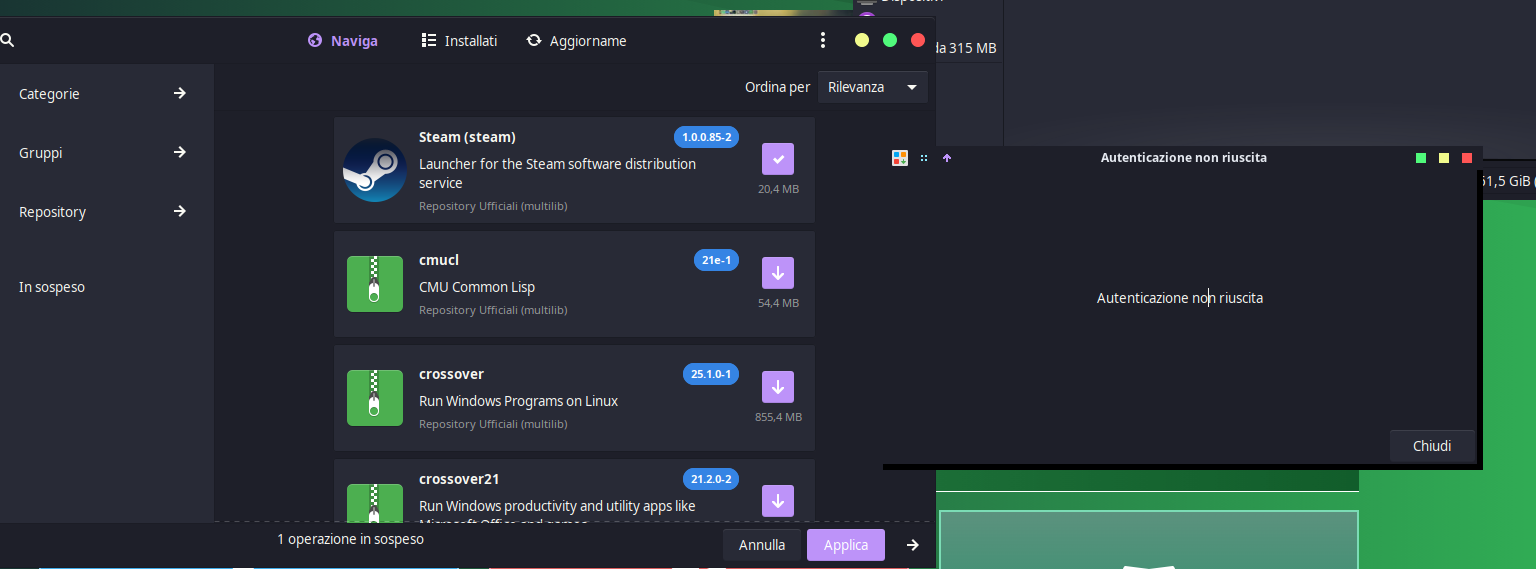
@Batmanx moved your topic here as it seems this is the same issue.
I can’t reproduce this issue on my installation anyway.
where do want me to move it
still having the same issue not able to download nothing any help please
Problem is mentioned on Manjaro forum… with several possible solutions…
see problems with polkit section.
where is the polkit section ? I noticed that anything that is related to mangaro even updating the kernel has the same issue authentication failure please can the maker of mabox look into these there are many bugs to resolve
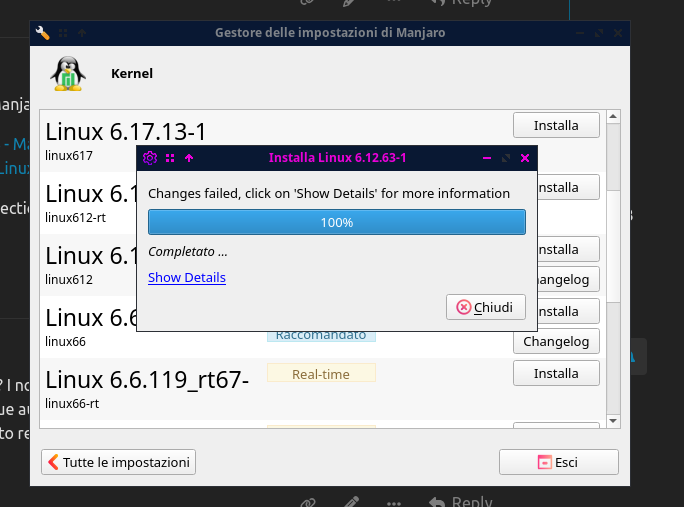
please see example
Just click on the link and read what you see on the screen ?
I can’t correct errors if they don’t occur on my computer.
You’ve been given help in the form of a link and several possible solutions. Having trouble reading?
Have you tried any of the proposed solutions?
If you’re having trouble finding the text, I’m pasting it here…
problems with polkit
After a change in polkit, some users report permission problems. Different solutions are suggested:
- rebooting
- reinstalling polkit (with
sudo pacman -S polkit, since pamac may not work in that case)- fixing the suid permissions manually with
sudo chmod 4755 /usr/lib/polkit-1/polkit-agent-helper-1
- fixing the file permissions manually
The proper permissions are:drwxr-xr-x (755) - root:root - Directory -rwxr-xr-x (755) - root:root - Executables -rw-r--r-- (644) - root:root - Rules filesso to fix you use
sudo chown -R root:root /usr/lib/polkit-1/
sudo chmod 755 /usr/lib/polkit-1/
sudo chmod 755 /usr/lib/polkit-1/polkitd /usr/lib/polkit-1/polkit-agent-helper-1
sudo chmod 644 /usr/lib/polkit-1/rules.d/*
Alternatively, running the full Manjaro packages update via
pacmanand rebooting before updating the AUR packages withpamacmight circumvent the problem from occurring in the first place.
In Linux world, the ability to read, search and some minimum troubleshooting knowledge is required.
You are the administrator of your system.
Can you give the kernel version you running now.
uname -a
I am pretty sure another kernel would solve the root gui issue (polkit)
Try again another kernel.
But…Is this a completed failed kernel installation you showing?
Tell us how you installed the new kernel and boot into it.
Are you running manjaro-settings-manager from cli?
sudo manjaro-settings-manager
EDIT: additional info. show bootmenu.
How to show bootmenu so one can choose kernel at boot.
- Open a terminal and edit the GRUB configuration file with a text editor as root:
sudo nano /etc/default/grub
-
Change the value to your preferred timeout in seconds. For example:
GRUB_TIMEOUT=10for 10 secondsGRUB_TIMEOUT=0to skip the menu entirelyGRUB_TIMEOUT=-1to wait indefinitely
-
Save the file (Ctrl+O, Enter, Ctrl+X in nano)
-
Update GRUB with your changes:
sudo grub-mkconfig -o /boot/grub/grub.cfg
Additional useful GRUB options:
GRUB_TIMEOUT_STYLE=menu- Shows the menu automaticallyGRUB_TIMEOUT_STYLE=countdown- Shows a countdown timerGRUB_TIMEOUT_STYLE=hidden- Hides the menu (press Esc to show it)
the kernel im using is 6.1.159.1
GRUB_DEFAULT=saved
GRUB_TIMEOUT=10
GRUB_TIMEOUT_STYLE=hidden
GRUB_DISTRIBUTOR=‘Mabox’
GRUB_CMDLINE_LINUX_DEFAULT=‘quiet udev.log_priority=3’
GRUB_CMDLINE_LINUX=“”
If you want to enable the save default function, uncomment the following
line, and set GRUB_DEFAULT to saved.
GRUB_SAVEDEFAULT=true
Preload both GPT and MBR modules so that they are not missed
GRUB_PRELOAD_MODULES=“part_gpt part_msdos”
Uncomment to enable Hidden Menu, and optionally hide the timeout count
#GRUB_HIDDEN_TIMEOUT=5
#GRUB_HIDDEN_TIMEOUT_QUIET=true
Uncomment to use basic console
GRUB_TERMINAL_INPUT=console
please can you tell in this menu what should I change to show as :
-
GRUB_TIMEOUT=10for 10 seconds -
GRUB_TIMEOUT=0to skip the menu entirely -
GRUB_TIMEOUT=-1to wait indefinitely