Hello,
how do I change the notification theme? Using xfce4-notifyd-config is not working. The orange background remains. Probably some other setting overrides it.
Do you have another notify app installed, like mate-notification-daemon.

Seems Xfce4 Notification Daemon is not started.
Enable it in Menu → Mabox Config → Autostart → Choose Apps/Services (GUI Editor)
Thank you. Thank you. The problem was caused by the update-notifier program, which requires a dependency on the dunst notification daemon.
I have uninstalled update-notifier and need some other one to notify me of available updates. Which one do you recommend? The one from xfce? Is there one?
For now, I would suggest running the default Conky - called Sysinfo. It has a built-in update check and displays a window with information if updates are available.
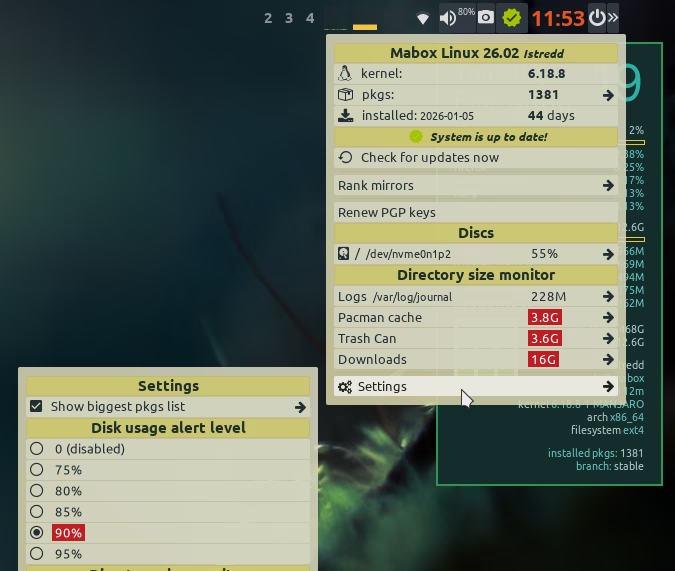
In a few days I will also publish an executor for tint2 - whose tasks will be to regularly check for updates, as well as monitor + inform about disks filling up.
Good catch on the dunst dependency! I’ve been using the Sysinfo Conky for updates for a while now and it’s actually really nice because it stays out of the way until you need it. Looking forward to that tint2 executor, though - that sounds like a great addition to the Mabox toolkit.
Update notifier/status icon is already available…
But… on older installations some manual steps are needed to get it.
yay -S mabox-checkupdates-systemd
sudo systemctl enable --now mabox-checkupdates.timer
mb-reset tint2
Above steps should do the trick, assuming you use default tint2 config: Istredd.
Take a look at Settings submenu, you can configure and enable some more features there.