Wrote a script to handle downloading from YouTube. You can choose to download the entire video or just the audio. Video options are anywhere from 420p to 2K. Can run CLI or GUI. Download completion merits a desktop notification.
Script below:
#!/bin/bash
# --- Configuration ---
DEFAULT_RES=1080
DEFAULT_FPS=30
DEFAULT_VIDEO_DIR="$HOME/Videos/My Video Downloader"
DEFAULT_AUDIO_DIR="$HOME/Music/My Audio Downloader"
RES_OPTIONS=("480" "720" "1080" "1440" "2160") # Expandable list
# --- Functions ---
function display_help {
    echo "Usage: $0 [OPTIONS] [URL]"
    echo "Downloads a video or audio using yt-dlp with optional GUI prompts."
    echo ""
    echo "Options:"
    echo " -d <directory> Specify download directory (default: $DEFAULT_VIDEO_DIR)"
    echo " -a Download audio only (skips video resolution prompt)"
    echo " -b Show about box"
    echo " -h Display this help message"
    echo ""
    echo "If URL is provided, skips URL prompt. Examples:"
    echo " $0 https://www.youtube.com/watch?v=dQw4w9WgXcQ"
    echo " $0 -a https://www.youtube.com/watch?v=dQw4w9WgXcQ"
    echo " $0 -d ~/Videos/MyChannel https://www.youtube.com/playlist?list=PL..."
    exit 0
}
function check_dependencies {
    command -v yt-dlp >/dev/null 2>&1 || { echo "Error: yt-dlp not installed." >&2; exit 1; }
}
function about_box {
    if command -v yad >/dev/null 2>&1; then
        yad --about --pname="YouTube Downloader Script" \
            --pversion="1.1" --copyright="Copyright (c) 2025 Sauron's Mouth" \
            --comments="Download YouTube videos/audio for local use" \
            --license="GPL3" --authors="Sauron's Mouth" \
            --website="https://x.com/SauronsMouth_DB" \
            --website-label="My Home on X" --image=gtk-about
    else
        echo "YouTube Downloader Script v1.1 by ripwardog"
        echo "For more info: https://x.com/SauronsMouth_DB"
    fi
}
function get_input {
    local prompt="$1"
    local default="$2"
    if command -v yad >/dev/null 2>&1; then
        yad --center --title="Input" --text="$prompt" --entry --entry-text="$default"
    else
        read -p "$prompt [$default]: " input
        echo "${input:-$default}"
    fi
}
function get_choice {
    local prompt="$1"
    local options="$2" # ! -separated for yad
    if command -v yad >/dev/null 2>&1; then
        choice=$(yad --center --title="Selection" --form --field="$prompt:CB" "$options")
        yad_exit=$?
        if [ $yad_exit -ne 0 ]; then
            return $yad_exit  # Propagate Cancel exit code
        fi
        echo "${choice%%|*}" # Trim trailing | if present (though ! separator shouldn't add it)
    else
        echo "$prompt Options: ${options//!/ }"
        read -p "Enter choice: " choice
        echo "$choice"
    fi
}
# --- Main Script Logic ---
check_dependencies
DOWNLOAD_DIR="$DEFAULT_VIDEO_DIR"
AUDIO_ONLY=false
SHOW_ABOUT=false
URL=""
while getopts ":d:abh" opt; do
    case $opt in
        d) DOWNLOAD_DIR="$OPTARG" ;;
        a) AUDIO_ONLY=true ;;
        b) SHOW_ABOUT=true ;;
        h) display_help ;;
        \?) echo "Invalid option: -$OPTARG" >&2; display_help ;;
    esac
done
shift $((OPTIND-1))
URL="${1:-}" # Take URL from args if provided
$SHOW_ABOUT && about_box
if [ -z "$URL" ]; then
    URL=$(get_input "Paste Video/Playlist Link here" "https://")
    [ $? -eq 1 ] && exit 1 # Canceled
    [ -z "$URL" ] && { echo "Error: No URL provided." >&2; display_help; }
fi
if ! $AUDIO_ONLY; then
    AV_CHOICE=$(get_choice "Complete Video or Audio Only?" "Video\!Audio")
    [ $? -eq 1 ] && exit 1
    [ "$AV_CHOICE" == "Audio" ] && AUDIO_ONLY=true
    DOWNLOAD_DIR="$DEFAULT_AUDIO_DIR"
fi
RES=$DEFAULT_RES
if ! $AUDIO_ONLY; then
    RES_OPTIONS_STR=$(IFS='!'; echo "${RES_OPTIONS[*]}")
    RES=$(get_choice "Select Video Resolution" "$RES_OPTIONS_STR")
    [ $? -eq 1 ] && exit 1
    DOWNLOAD_DIR="$DEFAULT_VIDEO_DIR"
fi
# Confirm inputs
if command -v yad >/dev/null 2>&1; then
    yad --center --title="Confirm" --text="URL: $URL\nDir: $DOWNLOAD_DIR\nMode: $( $AUDIO_ONLY && echo Audio || echo Video @$RES p)" --button="Cancel:1" --button="Confirm:0"
    [ $? -ne 0 ] && exit 1 # Canceled
fi
FORMAT="((bv*[fps>$DEFAULT_FPS]/bv*)[height<=$RES]/(wv*[fps>$DEFAULT_FPS]/wv*)) + ba / (b[fps>$DEFAULT_FPS]/b)[height<=$RES]/(w[fps>$DEFAULT_FPS]/w)"
mkdir -p "$DOWNLOAD_DIR" || { echo "Error: Cannot create directory $DOWNLOAD_DIR." >&2; exit 1; }
echo "Downloading '$URL' to '$DOWNLOAD_DIR'..."
if $AUDIO_ONLY; then
    yt-dlp -o "$DOWNLOAD_DIR/%(title)s.%(ext)s" -x --audio-format mp3 "$URL"
else
    yt-dlp -o "$DOWNLOAD_DIR/%(title)s.%(ext)s" -f "$FORMAT" "$URL"
fi
if [ $? -eq 0 ]; then
    echo "Download complete!"
    command -v notify-send >/dev/null 2>&1 && notify-send "Download Complete" "$URL saved to $DOWNLOAD_DIR"
else
    echo "Error during download. Check yt-dlp output above." >&2
    exit 1
fi
```
.desktop file:
[Desktop Entry]
Version=1.0
Type=Application
Name=MyYTDLr
Comment=A script that downloads a YouTube Video
Icon=$HOME/.local/share/icons/YTDLrICON.png
Exec=$HOME/bin/ytdler.sh
Path=$HOME/bin
Terminal=false
StartupNotify=false
Categories=AudioVideo;Audio;AudioVideoEditing;
When i download one url video with GUI, it keeps downloading other video’s.
I had to kill the process to stop downloading the whole of youtube in one go
Audio download seems fine both gui/cli.
I downloaded Madonna Nothing Realy Matters and got this list of video’s till i killed it.
‘A Touch Of Class - Around the World (La La La La La) (Official Video).webm’
I try to avoid watchin YT video’s directly from web-browser and wanted a quick way.
I got this under a hotkey. A wee bit different approach but both scripts could be a meld.
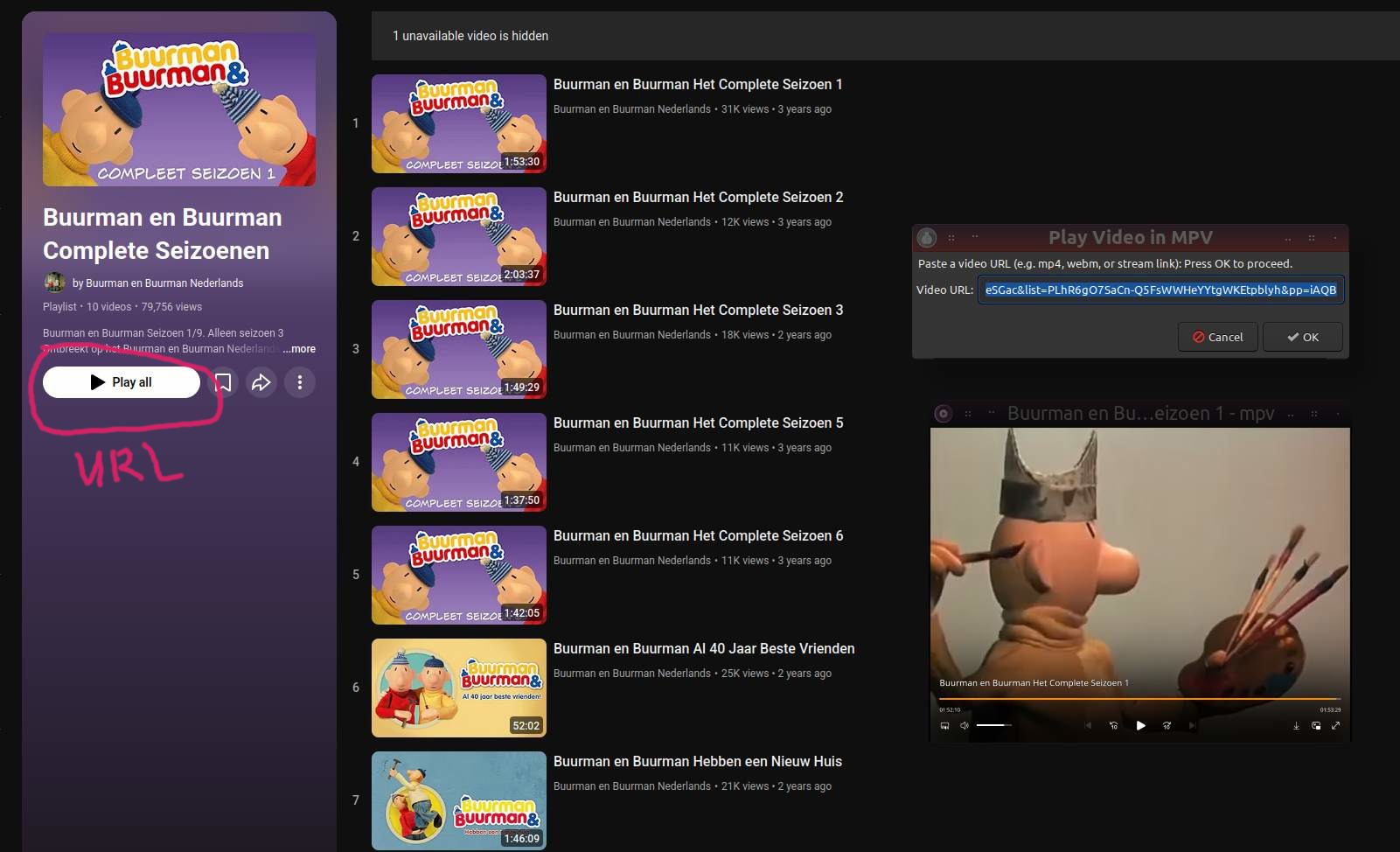
How it works.
Copy a video url (YT, Vimeo, Dailymotion, etc)
hotkey script.sh.
Paste url. Enter
Choose between direct watching with mpv or downloading
#!/bin/bash


WORKDIR="$HOME/Videos"

main() {
    case $LANG in
        pl*)
            NO_MPV="MPV nie jest zainstalowany."
            NO_DOWNLOADER="Brak yt-dlp lub youtube-dl.
Zainstaluj jedno, aby pobierać wideo."
            NO_CLIPBOARD="Brak xclip lub xsel.
Zainstaluj jedno, aby używać tego skryptu."
            INVALID_URL="Schowek nie zawiera prawidłowego URL.
Skopiuj link do wideo i spróbuj ponownie."
            FORM_TEXT="Wklej adres URL do wideo (np. mp4, webm, strumień):
Kliknij OK, aby kontynuować."
            CHOOSE_ACTION="Wybierz działanie"
            ACTION_PLAY="Odtwórz"
            ACTION_DOWNLOAD="Pobierz"
            DESC_PLAY="Odtwórz wideo w MPV"
            DESC_DOWNLOAD=""
            UNKNOWN_FORMAT="Ten URL nie wygląda na znany format wideo.
Kontynuować mimo to?"
            PLAY_FAIL="Nie udało się odtworzyć.
Sprawdź połączenie internetowe lub format URL."
            DL_START="📥 Pobieranie rozpoczęte i odtwarzaj wideo po zakończeniu pobierania"
            DL_WAIT="📥 Cierpliwości.
Pobieranie może potrwać chwilę"
            DL_DONE="✅ Pobieranie zakończone.
Zapisano w ~/Videos"
            DL_FAILED="❌ Niepowodzenie.
Nie udało się pobrać:"
            DL_DONE_YAD="Pobieranie zakończone.
Zapisano w <b>~/Videos</b>"
            OPEN_FOLDER="📁 Otwórz folder"
            ;;
        es*)
            NO_MPV="MPV no está instalado."
            NO_DOWNLOADER="No se encontró yt-dlp ni youtube-dl.
Instala uno para poder descargar."
            NO_CLIPBOARD="No se encontró xclip ni xsel.
Instala uno para usar este script."
            INVALID_URL="El portapapeles no contiene una URL válida.
Copia un enlace de video e inténtalo de nuevo."
            FORM_TEXT="Pega la URL del video (mp4, webm o enlace de streaming):
Pulsa OK para continuar."
            CHOOSE_ACTION="Elige una acción"
            ACTION_PLAY="Reproducir"
            ACTION_DOWNLOAD="Descargar"
            DESC_PLAY="Reproducir video en MPV"
            DESC_DOWNLOAD=""
            UNKNOWN_FORMAT="Esta URL no parece ser de un formato conocido.
¿Continuar igualmente?"
            PLAY_FAIL="No se pudo reproducir.
Verifica tu conexión o formato de URL."
            DL_START="📥 Descarga iniciada y reproducir el video al finalizar la descarga"
            DL_WAIT="📥 Espera.
La descarga puede tardar un poco"
            DL_DONE="✅ Descarga completada.
Guardado en ~/Videos"
            DL_FAILED="❌ Error de descarga.
No se pudo descargar:"
            DL_DONE_YAD="Descarga completada.
Guardado en <b>~/Videos</b>"
            OPEN_FOLDER="📁 Abrir carpeta"
            ;;
        *)
            NO_MPV="MPV is not installed."
            NO_DOWNLOADER="Neither yt-dlp nor youtube-dl is installed.
Install one to enable downloading."
            NO_CLIPBOARD="Neither xclip nor xsel found.
Please install one to use this script."
            INVALID_URL="The clipboard does not contain a valid URL.
Please copy a video link and try again."
            FORM_TEXT="Paste a video URL (e.g. mp4, webm, or stream link):
Press OK to proceed."
            CHOOSE_ACTION="Choose Action"
            ACTION_PLAY="Play"
            ACTION_DOWNLOAD="Download"
            DESC_PLAY="Play video in MPV"
            DESC_DOWNLOAD=""
            UNKNOWN_FORMAT="This URL doesn't appear to be a known video format.
Still proceed?"
            PLAY_FAIL="Failed to play video.
Check your internet or the URL format."
            DL_START="📥 Download Started and Play video when finished downloading"
            DL_WAIT="📥 Patient.
Downloading can take some time"
            DL_DONE="✅ Download Complete.
Video saved to ~/Videos"
            DL_FAILED="❌ Download Failed. Could not download:"
            DL_DONE_YAD="Download completed successfully.
Saved to <b>~/Videos</b>"
            OPEN_FOLDER="📁 Open Folder"
            ;;
    esac


    # Dependency checks
    command -v yad >/dev/null || { echo "yad is required."; exit 1; }
    command -v mpv >/dev/null || {
        yad --center --error --text="$NO_MPV"
        exit 1
    }

	# Multi video player support. (mpv, mplayer, kmplayer, ogle, xine, vlc)
	if command -v mpv >/dev/null; then
        PLAYER="mpv"
    elif command -v vlc >/dev/null; then
        PLAYER="vlc"
    elif command -v qtmpv >/dev/null; then
        PLAYER="qtmpv"
    elif command -v xine >/dev/null; then
		PLAYER="xine"
	elif command -v smplayer >/dev/null; then
		PLAYER="smplayer"
	elif command -v ogle >/dev/null; then
		PLAYER="ogle"
	elif command -v kmplayer >/dev/null; then
		PLAYER="kmplayer"
	elif command -v mplayer >/dev/null; then
		PLAYER="mplayer"
    else
        yad --width=500 --center --error --text="$NO_DOWNLOADER"
        exit 1
    fi


    if command -v yt-dlp >/dev/null; then
        DOWNLOADER="yt-dlp --no-playlist -o"
    elif command -v youtube-dl >/dev/null; then
        DOWNLOADER="youtube-dl --no-playlist -o"
    else
        yad --width=500 --center --error --text="$NO_DOWNLOADER"
        exit 1
    fi


    if command -v xclip >/dev/null; then
        CLIPBOARD=$(xclip -o -selection clipboard)
    elif command -v xsel >/dev/null; then
        CLIPBOARD=$(xsel --clipboard)
    else
        yad --width=500 --center --error --text="$NO_CLIPBOARD"
        exit 1
    fi

    if [[ -z "$CLIPBOARD" || ! "$CLIPBOARD" =~ ^https?:// ]]; then
        yad --width=500 --center --warning \
            --image="dialog-error" --text="$INVALID_URL"
        exit 1
    fi

    ENTRY=$(yad --center --form --title="Add Stream to MPV" \
        --width=500 --image="document-save" \
        --text="$FORM_TEXT" --field="Video URL:":TEXT "$CLIPBOARD" \
        2> >(grep -v "xapp-gtk3-module"))

    [ -z "$ENTRY" ] && exit 0
    URL=$(echo "$ENTRY" | cut -d '|' -f 1)

    ACTION=$(yad --center --list --title="Choose Action" \
    --width=400 --height=150 \
    --column="Action" \
    "Play" "Download" \
    --button-label="OK" \
    --default-item="Play" \
    2> >(grep -v "xapp-gtk3-module"))

# Check if the choice was made
if [ -n "$ACTION" ]; then
    # Get the selected action
    case $ACTION in
        "Play")
            echo "Selected: Play"
            ;;
        "Download")
            echo "Selected: Download"
            ;;
    esac
else
    echo "No action selected"
fi

    [ -z "$ACTION" ] && exit 0
    CHOICE=$(echo "$ACTION" | cut -d'|' -f1)

   if ! [[ "$URL" =~ ^https?://.*(youtube\.com|youtu\.be|yewtu\.be|vimeo\.com|dailymotion\.com|archive\.org|\.mp4$|\.webm$|\.mkv$|\.avi$|\.mov$|\.flv$|\.m3u8$) ]]; then
        yad --width=500 --center --question --text="$UNKNOWN_FORMAT" \
            --button=No:0 --button=Yes:1
        [ $? -ne 0 ] && exit 1
    fi

    if [ "$CHOICE" == "$ACTION_PLAY" ]; then
        "$PLAYER" "$URL" || yad --width=500 --center --error --text="$PLAY_FAIL"
    elif [ "$CHOICE" == "$ACTION_DOWNLOAD" ]; then
        mkdir -p "$WORKDIR"
        notify-send "$DL_START" "$URL"
        notify-send "$DL_WAIT"
        if $DOWNLOADER "$WORKDIR/%(title)s.%(ext)s" "$URL"; then
			# Play Video
            notify-send -t 500000 "$DL_DONE" "Mpv $URL"
            "$PLAYER" "$URL"
            #yad --width=400 --center --text="$DL_DONE_YAD" \
            #     --button="OK:1"
        else
            notify-send "$DL_FAILED"
            yad --width=500 --center --error --text="$DL_FAILED $URL"
        fi
    fi
}

main
Was that video a part of a playlist? I may need to make an adjustment for that in the script.
I should have read the entire thread. Never mind.
P.S. I generally only download movies for my Jellyfin Media server. I do also download music as MP3s and this is working fine for me at the moment. As time goes by I’ll further refine the script to more explicitly handle playlists. TY for the command line suggestion.