I created an aur git for beautysolar icon theme made by sajjad606.
yay beautysolar-icon-theme

Hi @muzqs
Thank you for this, it’s a really beautiful set of icons. 
The original theme (from the author) has a little defect for a couple of years now.
It installs fine but the OS is unable to generate the cache, which is needed for a proper functioning. You can see the errors during the installation:
gtk-update-icon-cache: The generated cache was invalid.
error: la orden no se ejecutó correctamente
This is caused because there are white spaces in several file names. You can see it with:
find /usr/share/icons/BeautySolar -name "* *"
Returning:
/usr/share/icons/BeautySolar/apps/scalable/ io.github.alainm23.planify.svg
/usr/share/icons/BeautySolar/apps/scalable/ org.flameshot.Flameshot.svg
/usr/share/icons/BeautySolar/apps/scalable/ com.mattjakeman.ExtensionManager.svg
/usr/share/icons/BeautySolar/apps/scalable/ com.github.vladimiry.ElectronMail.svg
/usr/share/icons/BeautySolar/apps/scalable/ org.libreoffice.LibreOffice.svg
/usr/share/icons/BeautySolar/devices/scalable/battery-level-100-symbolic.symbolic (copy 1).svg
In order to fix it, delete the last file (it’s a repeated copy) and remove the space from the rest:
sudo rm '/usr/share/icons/BeautySolar/devices/scalable/battery-level-100-symbolic.symbolic (copy 1).svg'
find /usr/share/icons/BeautySolar \( -type f -o -type l \) -name "* *" | while read file; do sudo mv "$file" ${file// /}; done
And finally, recreate the cache:
sudo gtk-update-icon-cache -f /usr/share/icons/BeautySolar
The icons will work properly now. 
Greetings.
Hi @M0nst3r ,
The issue is fixed and up on aur.
White spaces and double’s cleaned up.
beautysolar-icon-theme 20260717-1
yay -Syu beautysolar-icon-theme
The update just came in but I get this message:
-> base: local (3-4) is newer than maboxlinux (3-3)
-> 1 error occurred:
* request failed: Get "``https://aur.archlinux.org/rpc?arg[]=anydesk-bin&arg[]=arc-gtk-theme&arg[]=arc-solid-gtk-theme&arg[]=arronax&arg[]=beautysolar-icon-theme&arg[]=cheese&arg[]=clutter&arg[]=clutter-gst&arg[]=clutter-gtk&arg[]=cogl&arg[]=conky-no-nvidia&arg[]=detect-it-easy-bin&arg[]=electron35&arg[]=electron37&arg[]=electron38&arg[]=git-credential-manager-bin&arg[]=gkrellm&arg[]=gkrellmlaunch&arg[]=gtk-engine-murrine&arg[]=gtk2&arg[]=gtkmm&arg[]=haskell-data-array-byte&arg[]=libcheese&arg[]=libsoup&arg[]=libvisual&arg[]=linux-firmware-meta&arg[]=nitrogen&arg[]=obconf&arg[]=ocrmypdf&arg[]=ocs-url&arg[]=picom-conf-git&arg[]=python-fpdf2&arg[]=python-mock&arg[]=python-mouseinfo&arg[]=python-pyautogui&arg[]=python-pybrowsers&arg[]=python-pymsgbox&arg[]=python-pyscreeze&arg[]=python-pytweening&arg[]=python-schedule&arg[]=python-selenium&arg[]=python-webdriver-manager&arg[]=qt5-location&arg[]=qt5-webchannel&arg[]=reiserfsprogs&arg[]=remmina-plugin-rdesktop&arg[]=remmina-plugin-rustdesk&arg[]=samsung-unified-driver&arg[]=samsung-unified-driver-common&arg[]=samsung-unified-driver-printer&arg[]=samsung-unified-driver-scanner&arg[]=selenium-manager&arg[]=untrunc-anthwlock-bin&arg[]=vscodium-bin&arg[]=webkit2gtk&arg[]=xkblayout&arg[]=xkblayout-state-git&arg[]=xorgxrdp&arg[]=xrdp&arg[]=yp-tools&type=info&v=5``": unexpected EOF
Regards.
That’s not related to beautysolar-icon-theme — those are two separate, harmless issues on your end:
Just try yay -Syu again, should go through fine.
Yes, that was the case. Working now. 
An extra note for our fellow maboxers.
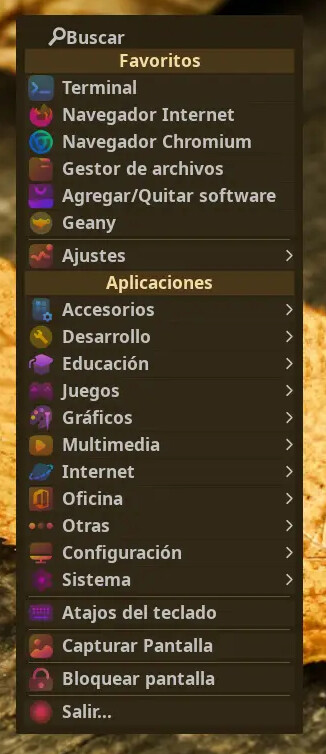
You can add this icon theme (or any other not present by default) to the main menu by including its name in ~/.config/mabox/mabox.conf file. Most likely the third line and change it like this:
jgmenu_icon_theme="BeautySolar"
A quick glance of how it looks afterwards:
Very nice icon theme 
I will add it to Mabox repo, and to selectable menu icons list… soon.