Attack wave on AUR packages!

--- [8] Loaded eBPF programs/links (bpftool) ---
  Loaded eBPF programs: 22
  WARNING: lsm eBPF programs loaded by unknown process (expected systemd / AppArmor / SELinux).
  Unknown loaders: python3(556)


Python3 is used to load my VPN daemon. According to HTOP.

Thanks for debugging, really helpful.

The python3(556) warning is almost certainly ProtonVPN β€” its Linux daemon is Python-based and legitimately loads lsm eBPF hooks for the network killswitch. False positive on archcanary’s end.

Fixed in the latest commit β€” it now checks if the loader’s binary is a pacman-owned package and downgrades to INFO if so, instead of warning.

  git pull
  ./install.sh --system
1 Like

Proton VPN is exactly what it is.

--- [8] Loaded eBPF programs/links (bpftool) ---
  Loaded eBPF programs: 26
  INFO: lsm eBPF programs loaded by non-systemd process (pacman-owned binary).
  Loaders: python3(556) (python)
  Perf attachments (kprobe/tracepoint): none.
  Net attachments (XDP/TC): none.

 Check summary
 ───────────────────────────────────────────────────────
 Package list (2016 pkgs)             βœ…  clean
 pacman.log history                   βœ…  clean
 Systemd persistence                  βœ…  clean
 eBPF rootkit traces                  βœ…  clean
 npm cache                            βœ…  clean
 bun cache                            βœ…  clean
 yarn cache                           βœ…  clean
 pnpm cache                           βœ…  clean
 PKGBUILD obfuscation scan            βœ…  clean
 eBPF programs (bpftool)              βœ…  clean
 ld.so.preload injection              βœ…  clean
 XDG autostart + shell RCs            βœ…  clean
 Kernel modules (DKMS)                βœ…  clean
 Lynis hardening                      βœ…  clean
 Package integrity                    βœ…  clean
 ───────────────────────────────────────────────────────
============================================================
 RESULT: CLEAN - No indicators found.
============================================================

1 Like

Coming back to this.


--- [10] XDG autostart + shell RC persistence check ---
WARNING: suspicious autostart entry: /home/donald/.config/autostart/zeitgeist-datahub.desktop
Exec=zeitgeist-datahub (outside standard system path)

The β€” [10] XDG AUTOSTART warning concerns me the most because I have deleted the .desktop file from /home/donald/.config/autostart folder several times and for some reason it returns after a while.

I don’t even have zeitgeist installed so I’m curious how this even got on my system. Deleted the .desktop file from both /etc/xdg/autostart and /home/donald/.config/autostart and rebooted. Let’s see what happens.

--- [11] Kernel module / DKMS audit ---
Clean: all loaded modules traceable to pacman packages or DKMS.
WARNING: DKMS module from untracked source: v4l2loopback/0.15.4, 6.12.95-1-MANJARO, x86_64: installed
WARNING: DKMS module from untracked source: v4l2loopback/0.15.4, 6.18.38-1-MANJARO, x86_64: installed

Nothing else has changed so I assume those warnings are false positives. (the DKMS warnings)


Check summary
───────────────────────────────────────────────────────
Package list (2016 pkgs)             βœ…  clean
pacman.log history                   βœ…  clean
Systemd persistence                  βœ…  clean
eBPF rootkit traces                  βœ…  clean
npm cache                            βœ…  clean
bun cache                            βœ…  clean
yarn cache                           βœ…  clean
pnpm cache                           βœ…  clean
PKGBUILD obfuscation scan            βœ…  clean
eBPF programs (bpftool)              βœ…  clean
ld.so.preload injection              βœ…  clean
XDG autostart + shell RCs            ❌  INFECTED
Kernel modules (DKMS)                ❌  INFECTED
Lynis hardening                      βœ…  clean
Package integrity                    βœ…  clean
───────────────────────────────────────────────────────
RESULT: INFECTED - Indicators found! Follow incident response.
Failed to show notification: Error spawning command line β€œdbus-launch --autolaunch=42972456f8b742cda6541ecf979c5787 --binary-syntax --close-stderr”: Child process exited with code 1

FYI: A notification did appear on screen.

1 Like

Thanks @SauronsMouth for the report β€” both warnings are now sorted out, and one of them turned out to be a real bug, so thank you for catching it.

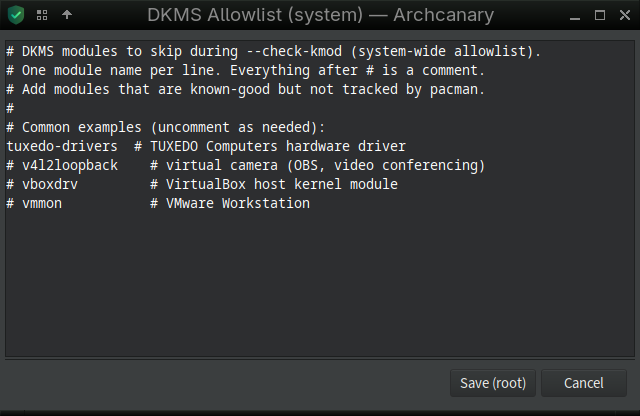
1. DKMS warning (v4l2loopback) β€” this one’s expected, not a bug.
DKMS-built kernel modules can’t be traced back to a pacman package, so archcanary has an allowlist for exactly this case.
In the β€œDKMS Allowlist (system)” editor, just uncomment the line:

v4l2loopback    # virtual camera (OBS, video conferencing)

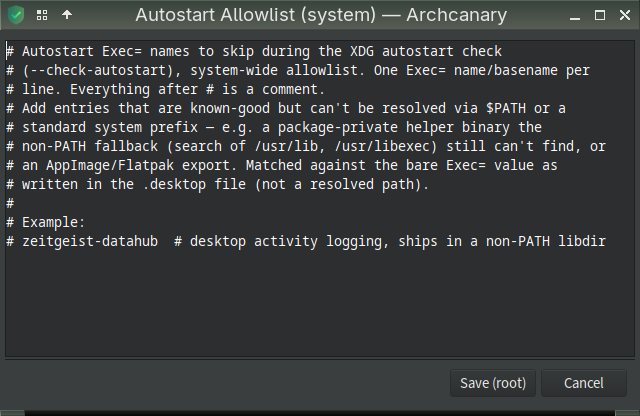
2. Autostart warning (zeitgeist-datahub) β€” archcanary’s check had a real gap (only resolved binaries on $PATH, missing legit package helpers installed elsewhere) and that’s fixed now.
Also added an Autostart allowlist (GUI β†’ Manage allowlists β†’ β€œAutostart”) as a fallback for any similar case going forward instead of waiting on a code fix.

3. Where zeitgeist actually came from?
Since that’s a mistery, it could be pulled with another package (GNOME- adjacent packages are the usual culprit).
You removed the .desktop’s and rebooted. This should be fine now, i guess.

:penguin:

This is expected behavior. Cosmetic failure.

Update:

v0.1.11 (2026-07-12)

  • New: autostart allowlist (/etc/archcanary/autostart_allowlist.conf).
  • Fix: glob-metacharacter injection in the new non-PATH fallback.
  • Fix: notify-send failing silently (sudo archcanary --full).
  • Fix: curl/wget pipe-to-shell autostart/RC pattern now matches across newlines.
  • Docs: fixed several stale/duplicated explanations found.
--- [10] XDG autostart + shell RC persistence check ---
  Clean: no suspicious autostart or shell RC entries found.

--- [11] Kernel module / DKMS audit ---
  Clean: all loaded modules traceable to pacman packages or DKMS.
  INFO: DKMS module allowlisted (not pacman-tracked): v4l2loopback/0.15.4, 6.12.95-1-MANJARO, x86_64: installed
  INFO: DKMS module allowlisted (not pacman-tracked): v4l2loopback/0.15.4, 6.18.38-1-MANJARO, x86_64: installed


 Check summary
 ───────────────────────────────────────────────────────
 Package list (2016 pkgs)             βœ…  clean
 pacman.log history                   βœ…  clean
 Systemd persistence                  βœ…  clean
 eBPF rootkit traces                  βœ…  clean
 npm cache                            βœ…  clean
 bun cache                            βœ…  clean
 yarn cache                           βœ…  clean
 pnpm cache                           βœ…  clean
 PKGBUILD obfuscation scan            βœ…  clean
 eBPF programs (bpftool)              βœ…  clean
 ld.so.preload injection              βœ…  clean
 XDG autostart + shell RCs            βœ…  clean
 Kernel modules (DKMS)                βœ…  clean
 Lynis hardening                      βœ…  clean
 Package integrity                    βœ…  clean
 ───────────────────────────────────────────────────────
============================================================
 RESULT: CLEAN - No indicators found.
============================================================


WOOT! TY sir.

1 Like

I’m trying it, it gives this to me:

 Check summary
 ───────────────────────────────────────────────────────
 Package list (2016 pkgs)             βœ…  clean
 pacman.log history                   βœ…  clean
 Systemd persistence                  βœ…  clean
 eBPF rootkit traces                  βœ…  clean
 npm cache                            βœ…  clean
 bun cache                            βœ…  clean
 yarn cache                           βœ…  clean
 pnpm cache                           βœ…  clean
 PKGBUILD obfuscation scan            βœ…  clean
 eBPF programs (bpftool)              ⚠   skipped (needs root)
 ld.so.preload injection              βœ…  clean
 XDG autostart + shell RCs            ❌  INFECTED
 Kernel modules (DKMS)                ⚠   skipped (needs root)
 Lynis hardening                      ⚠   skipped (needs root)
 Package integrity                    βœ…  clean

 ───────────────────────────────────────────────────────
============================================================
 RESULT: INFECTED - Indicators found! Follow incident response.
 INCOMPLETE: 3 root check(s) skipped (no root): bpftool kmod lynis
 Re-run with sudo for the full picture: sudo /usr/local/bin/archcanary --full

============================================================

--- [10] XDG autostart + shell RC persistence check ---
  WARNING: suspicious autostart entry: /home/dhbmb/.config/autostart/zeitgeist-datahub.desktop
    Exec=zeitgeist-datahub (outside standard system path)
  WARNING: suspicious autostart entry: /home/dhbmb/.config/autostart/xfce4-power-manager.desktop
    Exec=xfce4-power-manager (outside standard system path)
  WARNING: suspicious autostart entry: /home/dhbmb/.config/autostart/skippy-xd.desktop
    Exec=skippy-xd (outside standard system path)
  WARNING: suspicious autostart entry: /home/dhbmb/.config/autostart/pulseaudio.desktop
    Exec=start-pulseaudio-x11 (outside standard system path)
  WARNING: suspicious autostart entry: /home/dhbmb/.config/autostart/light-locker.desktop
    Exec=light-locker (outside standard system path)

Could you tell me what it means?

Very interesting project. :clap:

1 Like

Hi @danielhb,

Can you show

archcanary --version

I suspect you have an older version, the latest version is v0.1.11.

archcanary --version
============================================================
 Archcanary v0.1.11
 Scanned: 2026-07-13 03:04

 Lists loaded
   package_list.txt  infostealer + eBPF rootkit
   + CHAOS RAT         7 pkgs
   + Russian Spam     73 pkgs

 Packages checked: 2016
============================================================

--- [1] Currently installed foreign packages ---
  Clean: no infected packages currently installed.

--- [2] Historical pacman logs ---
  Clean: no historical log matches found.


 Check summary
 ───────────────────────────────────────────────────────
 Package list (2016 pkgs)             βœ…  clean
 pacman.log history                   βœ…  clean
 ───────────────────────────────────────────────────────
============================================================
 RESULT: CLEAN - No indicators found.
============================================================

Hi @danielhb,

Please try again. The release push was not right, was still v0.1.10.
Should be good now. v0.1.11

In your case…

git pull
./install

Thanks for debugging…

1 Like

Update: Bumb version v0.1.12

I faced a bug: Cache Log file owned by root

  • When running archcanary as root ~/.cache/archcanary/*.log chown was set to root. This is fixed in new release (v0.1.12).

If you have used archcanary as root the permission of some log files are likely root owned. For me this gave an issue using luckybackup wrong ownership.

Fix ownership to user with following command.

sudo chown $USER:$USER  ~/.cache/archcanary/*.log
1 Like

Update: latest commits. Fix ownership log files for npm.

If one has npm installed. The log files are also owned as root.

Fix ownership with

sudo chown $USER:$USER ~/.npm/_logs/*.log

Same release v0.1.12

1 Like

I reinstalled and refreshed, it gives the same results.

I consulted Google’s AI about the warnings, and it says it might be because the .desktop files don’t contain the full path to the executable.

Indeed, my .desktop files don’t contain the full path:

Exec=xfce4-power-manager        (disabled by me in mabox, hidden)
Hidden=true

Exec=zeitgeist-datahub          (??? service? donΒ΄t run/locate by  command line)
Hidden=true

Exec=skippy-xd --start-daemon   (disabled by me in mabox, hidden)
Hidden=true

Exec=start-pulseaudio-x11       (disabled by me in mabox, hidden)
Hidden=true

Exec=light-locker               (disabled by me in mabox, hidden)
Hidden=true

Maybe the hidden flag affects the result

2 Likes

Hi @danilehb,

Your hidden=true theory was spot on β€” that’s exactly what was going on, and it’s fixed now.

The check never looked at that flag, so a disabled entry got flagged just like a live one.

I didn’t create a new release for it. Latest v0.1.12.

For your interest: archcanary scans ~/.config/autostart/.desktop for entries whose Exec= command can’t be verified as coming from a trusted system location.
It exists because that folder is a well-known persistence trick β€” drop a file there and it silently runs on every graphical login, no root, no systemd unit needed.

Thanks again for debugging. :penguin:

1 Like