# Volumettf, unicode or icon, .... thats was the goal

**URL:** https://forum.maboxlinux.org/t/volumettf-unicode-or-icon-thats-was-the-goal/1545
**Category:** Scripts, Tutorials & Tips
**Created:** [November 21, 2023, 2:55pm UTC](https://forum.maboxlinux.org/t/volumettf-unicode-or-icon-thats-was-the-goal/1545 "2023-11-21T14:55:49Z")
**Posts on this page:** 6
**Page:** 1

<div class="post-metadata">

### Author: ![muzqs](https://forum.maboxlinux.org/user_avatar/forum.maboxlinux.org/muzqs/32/3702_2.png) [@muzqs](https://forum.maboxlinux.org/u/muzqs)
#### Post date: [November 21, 2023, 2:55pm UTC](https://forum.maboxlinux.org/t/volumettf-unicode-or-icon-thats-was-the-goal/1545/1 "2023-11-21T14:55:49Z")

</div>

## `volumettf_extended`: [2 parts]

### Script to display icon or text-icon view for tint2 panel. (+ change icon theme)

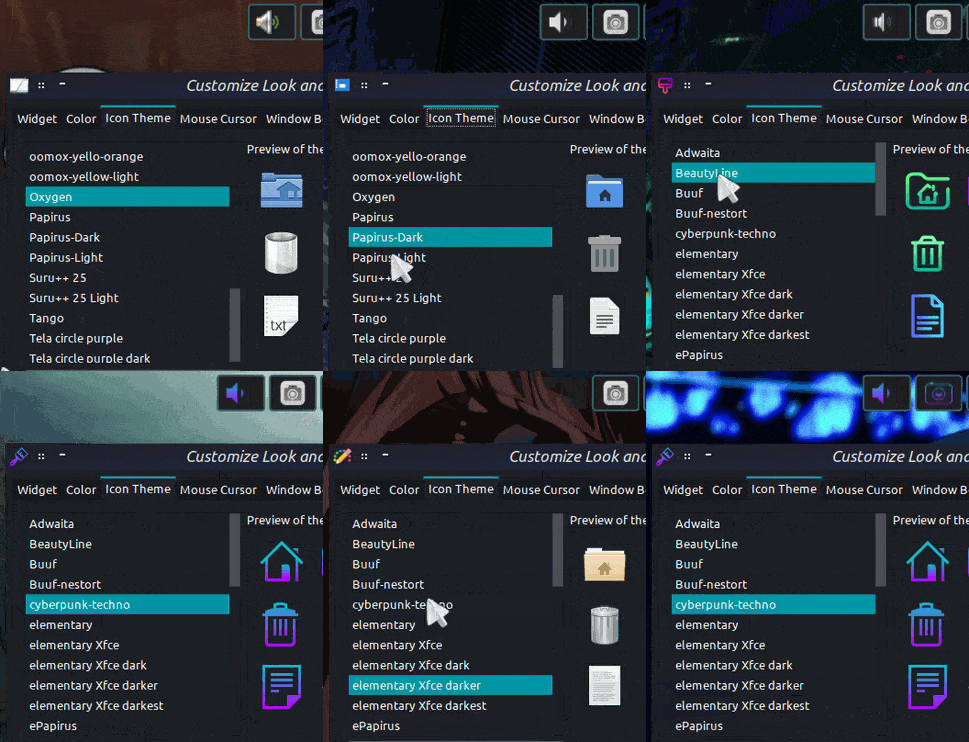
Since I am working to get most icons in Buuf style, I started investigating how to change the volumettf ‘Unicode icon’ to an ‘gtk icon theme’. (volup%/voldown%)  
And I wanted to be able to switch between different gtk icon themes. (Papirus,Adwaita,etc)

_Scripts + Config:_

- volumettf\_extended.sh **(replacement for `volumettf` icon notification).**

- volumettf\_toggle.sh ( **middle click action volumettf icon tint2** ) .  
_writes and changes the session-tint2rc from icon (1) to no icon (0), visa versa_.  
_and creates a /tmp/toggle\_icon\_state for checking icon status used by volumettf\_extended.sh_.

- .config/mabox/tint2\_vol\_theme.conf ( **edit icon theme name** ).

![tint207](https://forum.maboxlinux.org/uploads/default/original/2X/3/3086a544d9566c8e956f2231b113af5b58919b5c.gif)

* * *

### PART 1 (_no impact on the jgmenu. replacement for volumettf_)

* * *

> Tint2rc: **Volumettf Executer** - NEEDS TO HAVE THE NAME : **volumettf**
> 
> `execp_name = volumettf`

**Otherwise it won’t work …**

* * *

- Tint2 setup (lines of interest)

```auto
# Executor 5
execp = new
execp_name = volumettf
execp_command = volumettf_extended.sh     
execp_has_icon = 1
execp_lclick_command = mb-music-simple ipc
execp_rclick_command = mb-music ipc
execp_mclick_command = volumettf_toggle.sh

```

* * *

~/bin/volumettf\_extended.sh

```auto
#!/bin/bash
# Display volumettf with Icon(themes) or with Unicode.

# Config file for icon theme name
CONFIG_FILE="$HOME/.config/mabox/tint2_vol_theme.conf"

if [! -f "$CONFIG_FILE"]; then
cat <<EOF > "${CONFIG_FILE}"
# Edit volumettf icon theme: works with themes from share/icons or .icons.
ICON_THEME="Papirus-Dark"

##############################################################################################################################
### TINT2RC - volumettf-EXECUTER - NEEDS TO HAVE THE NAME : execp_name = volumettf ### Otherwise it won't work ###
##############################################################################################################################

# Icon themes that work : 
# Papirus, Papirus-Dark, Papirus-Light, oomox-themes, Buuf, buuf-nestort, Gruvbox-Material-Dark, 
# Adwaita, Tango (install tango-icon-theme-extras), elementary, elementary-xfce, HighContrast
EOF
fi

# Read the icon theme from the config file
source "$CONFIG_FILE"

# Function to find the icon file
find_icon() {
    local icon="$1"
    local paths=(
        "status/$icon.png"
        "status/$icon.svg"
        "status/symbolic/$icon-symbolic.svg"
        "symbolic/status/$icon-symbolic.svg"
        "24/status/$icon.svg"
        "24x24/status/$icon.png"
        "24x24/status/$icon.svg"
        "base/22x22/status/$icon.png"
    )

    for path in "${paths[@]}"; do
        local full_path="$icon_path/$path"
        if [-e "$full_path"]; then
            echo "$full_path"
            return
        fi
    done

    echo "Icon not found."
}

# Check path to the icon theme directory
if [-d "/usr/share/icons/$ICON_THEME"]; then
    icon_path="/usr/share/icons/$ICON_THEME"
elif [-d "$HOME/.icons/$ICON_THEME"]; then
    icon_path="$HOME/.icons/$ICON_THEME"
else
    echo "Icon Theme Path not found."
    exit 1
fi

# Check the current icon state
if [[-e "$HOME/.toggle_icon_state" && $(cat "$HOME/.toggle_icon_state") == "icon"]]; then
    # Display text view or theme-based icon
    muted=$(LANG=C pactl list sinks | awk '/Mute/ { print $2 }')
    vol=$(LANG=C pactl list sinks | awk '/Volume:/ {printf "%s ",$5}' | cut -f1 -d ' ' | cut -f1 -d '%')

    # Theme-based icon
    if [[$vol -ge 80]]; then
        icon="audio-volume-high"
    elif [[$vol -ge 70]]; then
        icon="audio-volume-high"
    elif [[$vol -ge 60]]; then
        icon="audio-volume-medium"
    elif [[$vol -ge 50]]; then
        icon="audio-volume-medium"
    elif [[$vol -ge 30]]; then
        icon="audio-volume-medium"
    elif [[$vol -ge 10]]; then
        icon="audio-volume-low"
    elif [[$vol -ge 0]]; then
        icon="audio-volume-low"
    else
        icon="error"
    fi
    
    # Display the chosen icon
    result=$(find_icon "$icon")
    echo "$result"
else
    # Display text view
    muted=$(LANG=C pactl list sinks | awk '/Mute/ { print $2 }')
    vol=$(LANG=C pactl list sinks | awk '/Volume:/ {printf "%s ",$5}' | cut -f1 -d ' ' | cut -f1 -d '%')

    if [[$muted == "no"]]; then
        if [[$vol -ge 80]]; then
            echo "墳<sup><span size='xx-small'> $vol%</span></sup>"
        elif [[$vol -ge 70]]; then
            echo "墳<sup><span size='xx-small'> $vol%</span></sup>"
        elif [[$vol -ge 60]]; then
            echo "奔<sup><span size='xx-small'> $vol%</span></sup>"
        elif [[$vol -ge 50]]; then
            echo "奔<sup><span size='xx-small'> $vol%</span></sup>"
        elif [[$vol -ge 30]]; then
            echo "奔<sup><span size='xx-small'> $vol%</span></sup>"
        elif [[$vol -ge 10]]; then
            echo "奄<sup><span size='xx-small'> $vol%</span></sup>"
        elif [[$vol -ge 0]]; then
            echo "奄<sup><span size='xx-small'> $vol%</span></sup>"
        fi
    fi
fi

```

~/bin/volumettf\_toggle.sh

```auto
#!/bin/bash
# Script to toggle between volume icon and text views for ( execp_name = volumettf ) in tint2.

##############################################################################################################################
#!!!!!!!!!!!!!!! TINT2RC `volumettf-EXECUTER' NEEDS TO HAVE THE NAME : execp_name = volumettf ### Otherwise it won't work ###
##############################################################################################################################

toggle_file="$HOME/.toggle_icon_state" # volumettf_extended.sh is checking the icon state
tint2_session_path="$(cat $HOME/.config/tint2/tint2-sessionfile)" 
tint2_config="$tint2_session_path"

 # Adjust the path to your Default.tint2rc
restart_tint2="mb-tint2restart"

# Check the current icon state and toggle
if [[-e $toggle_file && $(cat "$toggle_file") == "icon"]]; then
    # Modify tint2rc for text view
    sed -i '/^execp_name = volumettf/,/^execp_icon_h = 35/ s/^execp_has_icon = 1/execp_has_icon = 0/' "$tint2_config"
    echo "txt" > "$toggle_file"
    echo "Switched to text view"
else
    # Modify tint2rc for icon view![[Mabox_20231120-18-08-40.png]]![[Mabox_20231120-18-08-40.png]]
    sed -i '/^execp_name = volumettf/,/^execp_icon_h = 35/ s/^execp_has_icon = 0/execp_has_icon = 1/' "$tint2_config"
    echo "icon" > "$toggle_file"
    echo "Switched to icon view"
fi

# Restart tint2
$restart_tint2

```

.config/mabox/tint2\_vol\_theme.conf

```auto
# Edit volumettf icon theme: works with themes from share/icons or .icons.
ICON_THEME="Buuf"

# Themes that should work:
# Papirus, Papirus-Dark, Papirus-Light, oomox-themes, Buuf, buuf-nestort, Gruvbox-Material-Dark, Adwaita, Tango (tango-icon-theme-extras)

```

* * *

### PART 2: (impact on mb-music menu)

A minimal version of mb-music + icon theme editing.

 ![Mabox_20231120-18-08-40](https://forum.maboxlinux.org/uploads/default/original/2X/8/851fc19a1b766189a55d3a29e968f6fa5366ac0b.png) ![Mabox_20231121-01-17-12](https://forum.maboxlinux.org/uploads/default/original/2X/e/e0cf77993e26eacf06a552be4cefef09df8d0b48.png)

~/bin/mb-music-simple

```auto
#!/bin/bash

set -x

# mb-music - play Internet streams with mpv
wmctrl -R cavatransparent
mkdir -p "$HOME/.config/mabox/mb-music/"

# Specify the path to your CSV file
csv_file="$HOME/.config/mabox/mb-music/yt_music_list.csv"

CONFIG_DIR="$HOME/.config/mabox/tint2_vol_theme.conf"

IMAGE="$HOME/.icons/mabox-jgmenu-images/mb-music-play-ON.png"
# read IMAGE<<< $(grep file "$HOME/.config/nitrogen/bg-saved.cfg" | cut -d'=' -f2) # full path to wallpaper file
# IMAGE = For this option: remove '#' from each line, at section " cat <<EOF > ${MENU_ITEMS} ... etc " to get cava look and feel.

PLAYLIST="$HOME/.config/pyradio/stations.csv"
PLAYLISTYT="$HOME/.config/mabox/mb-music/yt_music_list.csv"
if [! -f $PLAYLISTYT]; then
cat <<EOF > ${PLAYLISTYT}
Legendary Albums,-
Portishead - Dummy 1994,https://www.youtube.com/watch?v=qNq9TJ4QCas
The Cure - Faith 1981,https://www.youtube.com/watch?v=fShNf-NdJx4
Joy Division - Unknown Pleasures 1979,https://www.youtube.com/watch?v=oo7lt0lLOvg
END,-
EOF
fi

NOWPLAYYT="$HOME/.config/mabox/mb-music/.yt-mpv"

menu() {
case $LANG in
    pl*)
		SNM="Dźwięk i Muzyka"
        VOL="Sterowanie głośnością"
        RADIO="Radio Internetowe"
        PYRADIO="Uruchom <b>PyRadio</b>"
        LISTEN="Słuchaj radia..."
        EDITSTATIONS="Edytuj listę stacji radiowych"
        RADIOBROWSER="Szukaj stacji online"
        MPV="Odtwarzaj (za pomocą mpv - bez gui)"
        CAVA="Wizualizacja (cava)"
        STOP="Wyłącz"
        YTMUSIC="Odtwarzacz MPV"
        PLAYYT="Odtwarzaj..."
        EDITPLAYLIST="Edytuj listę"
        SETTINGS="Ustawienia"
        ;;
    *)
		SNM="Sound and Music"
        VOL="Volume Control"
        RADIO="Internet Radio"
        PYRADIO="Launch <b>PyRadio</b>"
        LISTEN="Listen to the radio..."
        EDITSTATIONS="Edit radio stations list"
        RADIOBROWSER="Search Radio Stations online"
        MPV="Play (with mpv - no gui)"
        CAVA="Visualiser (cava)"
        STOP="Stop"
        YTMUSIC="MPV Player"
        PLAYYT="Play..."
        EDITPLAYLIST="Edit MPV playlist"
        SETTINGS="Settings"
        VOL_ICON="Volume icon theme"
        EDIT_ICON_THEME="Edit Icon theme (if not listed)"
        CHANGE_THEME="List of icon themes"
        CHANGE_ICONS="Theme <small>(install theme first)</small>"
        LOCATION_ICONS="<small>share/icons or .icons location, both fine.</small>"
        ;;
esac

CHOOSE_ICON_THEME="Adwaita Buuf buuf-nestort cyberpunk-techno elementary elementary-xfce Gruvbox-Material-Dark HighContrast Numix oxygen Papirus Papirus-Dark Papirus-Light"

#out+=("^sep()")
NOWPL="0"

out+=("^sep($YTMUSIC)")
pgrep -f yt-mpv > /dev/null && NOW="$(<"$NOWPLAYYT")" NOWPL="1" out0+=("<small>   </small>,mpvc -p") # echo cycle pause | socat - '/tmp/mpvsocket' ") 
pgrep -f yt-mpv > /dev/null && NOW="$(<"$NOWPLAYYT")" PL="1" out0+=("<small>  </small>,mpvc -k ; echo '' > /home/vogel/.config/mabox/mb-music/.yt-mpv ") # ;pkill -f yt-mpv;pkill -f radio-mpv")

#out+=("^sep()")
out+=(" $SETTINGS,^checkout(settings)")
out2+=("^tag(settings)")
out2+=("^sep($RADIO)")
out2+=(" $EDITSTATIONS,xdg-open $PLAYLIST")
out2+=(" $RADIOBROWSER,xdg-open https://www.radio-browser.info")
out2+=("^sep($YTMUSIC)")
out2+=(" $EDITPLAYLIST,xdg-open $PLAYLISTYT")
out2+=("^sep($VOL_ICON)")
out2+=(" $EDIT_ICON_THEME,xdg-open $CONFIG_DIR")
out2+=(" $CHANGE_THEME,^checkout(icon)")
out2+=("^tag(icon)")
out2+=("^sep($CHANGE_ICONS)")
for i in $CHOOSE_ICON_THEME; do out2+=("$(printf "<tt> %4s</tt>,%s" "$i" "mb-setvar ICON_THEME=${i} $CONFIG_DIR;$me")");done

### List yt playlist
if (( $n <= 24 ));then #flat view in rootmenu
	while IFS=$'\r\n' read -r line
	do
		url=${line#*,}
		name=${line%,*}
		if [${url} == "-"];then
		out+=("^sep(<small>$name</small>)")
		else
		[[$name != ""]] && out+=("<small>󰐊 ${name}</small>,mb-music playyt "\""${url}"\"" "\""${name}"\""")
		fi
	done <<< $(grep -v '^\s*$\|^#\|^\s*#' $PLAYLISTYT)
elif (( $n <= 26 ));then # flat view in submenu
	out+=("$PLAYYT ,^checkout(ytmusic)")
	out2+=("^tag(ytmusic)")
	out2+=("^sep($YTMUSIC)")
	grp=0
	while IFS=$'\r\n' read -r line
	do
		url=${line#*,}
		name=${line%,*}
		if [${url} == "-"];then
		out2+=("^sep(<small>$name</small>)")
		else
		[[$name != ""]] && out2+=("<small>󰐊 ${name}</small>,mb-music playyt "\""${url}"\"" "\""${name}"\""")
		fi
	done <<< $(grep -v '^\s*$\|^#\|^\s*#' $PLAYLISTYT)
	out2+=("^sep()")
	out2+=("$EDITPLAYLIST,xdg-open $PLAYLISTYT")
else # n > 30
	out+=("$PLAYYT ,^checkout(ytmusic)")
	out2+=("^tag(ytmusic)")
	out2+=("^sep($YTMUSIC)")
    out2+=(" <b>SHUFFLE ALL TRACKS</b>,mb-music-simple playyt_shuffle")
	grp=0
	while IFS=$'\r\n' read -r line
	do
		url=${line#*,}
		name=${line%,*}
		if [${url} == "-"];then
		((grp++))
		out2+=("${name},^checkout(yt${grp})")
		out3+=("^tag(yt$grp)")
		out3+=("^sep($name)")
		else
			if [${grp} != "0"];then
				out3+=("󰐊 ${name},mb-music playyt "\""${url}"\"" "\""${name}"\""")
			else
				out2+=("󰐊 ${name},mb-music playyt "\""${url}"\"" "\""${name}"\""")
			fi
		fi
	done <<< $(grep -v '^\s*$\|^#\|^\s*#' $PLAYLISTYT)
	
fi

### RUN
if [["$1" == "-s" || "$1" == "ipc"]]; then
. /usr/share/mb-jgtools/pipemenu-standalone.cfg
. $HOME/.config/mabox/mabox.conf
if [[$panels_heightpos == "top"]]; then
MENU_VALIGN="top"
MENU_MARGIN_Y=${panels_topmargin:-1}
elif [[$panels_heightpos == "bottom"]]; then
MENU_VALIGN="bottom"
MENU_MARGIN_Y=${panels_topmargin:-0}
else 
    MENU_VALIGN="top"
fi

MENU_PADDING_TOP=$((jgtools_padding+170))
MENU_HALIGN="right"
JGWIDTH=$((300+2*jgtools_padding))

if [["$1" == "ipc"]]; then 
POSITION_MODE="ipc"
else
POSITION_MODE="fixed"
fi
jgmenu_icon_size=0
TABS=200

[$(pidof picom)] && MENU_RADIUS=$jgtools_radius
[-z $jgmenu_use_borders] && menu_border=0

mkconfigfile

if [["$NOWPL" == "1"]];then
clr="#22FF22"
IMAGE="$HOME/.icons/mabox-jgmenu-images/mb-music-play-OFF.png"
read -r -d '' NOWPLAYLINES <<EOF
@rect,,${jgtools_padding},$((jgtools_padding+140)),300,24,0,left,top,,# 90,
@rect,,$((jgtools_padding+16)),$((jgtools_padding+140)),$((JGWIDTH-2*jgtools_padding-32)),25,4,left,top,,#222222 92,
@text,,$((jgtools_padding+12)),$((jgtools_padding+143)),$((JGWIDTH-2*jgtools_padding-25)),20,0,left,top,#ebdbb2 98,,""" <small>${media_title}</small>"""
EOF
else
clr="#444444"
fi

cat <<EOF > ${MENU_ITEMS}
@rect,,${jgtools_padding},${jgtools_padding},300,5,0,left,top,,f4a300 80,
@icon,,$((jgtools_padding + 4)),$((jgtools_padding + 4)),292,150,4,left,top,,,${IMAGE}
#@rect,,${jgtools_padding},$((jgtools_padding+130)),8,36,0,left,top,,${clr} 65,
#@rect,,$((jgtools_padding+10)),$((jgtools_padding+136)),8,30,0,left,top,,${clr} 65,
#@rect,,$((jgtools_padding+20)),$((jgtools_padding+110)),8,56,0,left,top,,${clr} 65,
#@rect,,$((jgtools_padding+30)),$((jgtools_padding+122)),8,44,0,left,top,,${clr} 65,
#@rect,,$((jgtools_padding+40)),$((jgtools_padding+130)),8,36,0,left,top,,${clr} 65,
#@rect,,$((jgtools_padding+50)),$((jgtools_padding+120)),8,46,0,left,top,,${clr} 65,
#@rect,,$((jgtools_padding+60)),$((jgtools_padding+80)),8,86,0,left,top,,${clr} 65,
#@rect,,$((jgtools_padding+70)),$((jgtools_padding+95)),8,71,0,left,top,,${clr} 65,
#@rect,,$((jgtools_padding+80)),$((jgtools_padding+130)),8,36,0,left,top,,${clr} 65,
#@rect,,$((jgtools_padding+90)),$((jgtools_padding+140)),8,26,0,left,top,,${clr} 65,
#@rect,,$((jgtools_padding+100)),$((jgtools_padding+120)),8,46,0,left,top,,${clr} 65,
#@rect,,$((jgtools_padding+110)),$((jgtools_padding+90)),8,76,0,left,top,,${clr} 65,
#@rect,,$((jgtools_padding+120)),$((jgtools_padding+100)),8,66,0,left,top,,${clr} 65,
#@rect,,$((jgtools_padding+130)),$((jgtools_padding+110)),8,56,0,left,top,,${clr} 65,
#@rect,,$((jgtools_padding+140)),$((jgtools_padding+120)),8,46,0,left,top,,${clr} 65,
#@rect,,$((jgtools_padding+150)),$((jgtools_padding+140)),8,26,0,left,top,,${clr} 65,
#@rect,,$((jgtools_padding+160)),$((jgtools_padding+150)),8,16,0,left,top,,${clr} 65,
#@rect,,$((jgtools_padding+170)),$((jgtools_padding+155)),8,11,0,left,top,,${clr} 65,
#@rect,,$((jgtools_padding+180)),$((jgtools_padding+160)),8,6,0,left,top,,${clr} 65,
#@rect,,$((jgtools_padding+190)),$((jgtools_padding+161)),8,5,0,left,top,,${clr} 65,
#@rect,,$((jgtools_padding+200)),$((jgtools_padding+161)),8,5,0,left,top,,${clr} 65,
#@rect,,$((jgtools_padding+210)),$((jgtools_padding+161)),8,5,0,left,top,,${clr} 65,
#@rect,,$((jgtools_padding+220)),$((jgtools_padding+162)),8,4,0,left,top,,${clr} 65,
#@rect,,$((jgtools_padding+230)),$((jgtools_padding+156)),8,10,0,left,top,,${clr} 65,
#@rect,,$((jgtools_padding+240)),$((jgtools_padding+147)),8,19,0,left,top,,${clr} 65,
#@rect,,$((jgtools_padding+250)),$((jgtools_padding+152)),8,14,0,left,top,,${clr} 65,
#@rect,,$((jgtools_padding+260)),$((jgtools_padding+156)),8,10,0,left,top,,${clr} 65,
#@rect,,$((jgtools_padding+270)),$((jgtools_padding+144)),8,22,0,left,top,,${clr} 65,
#@rect,,$((jgtools_padding+280)),$((jgtools_padding+130)),8,36,0,left,top,,${clr} 65,
#@rect,,$((jgtools_padding+290)),$((jgtools_padding+124)),8,42,0,left,top,,${clr} 65,

${NOWPLAYLINES}

$(printf '%s\n' "${out0[@]}")
$(printf '%s\n' "${out[@]}")
$(printf '%s\n' "${out2[@]}")
$(printf '%s\n' "${out3[@]}")
EOF
jgmenu --config-file=${CONFIG_FILE} --csv-file=${MENU_ITEMS} 2>/dev/null
exit 0
fi

printf '%s\n' "${out[@]}"
printf '%s\n' "${out2[@]}"
printf '%s\n' "${out3[@]}"
}

playyt_shuffle() {
    
    pkill -f yt-mpv
    pkill -f radio-mpv    
    # Create a temporary file to store the shuffled playlist
    temp_playlist=$(mktemp)
    
    if [-f "$csv_file"]; then
        awk -F, '{if(NF>=2) print $NF}' "$csv_file" | sed 's/ //g' | shuf > "$temp_playlist"
    fi
    notify-send -t 50000 -i audio-card "$media_title" "shuffle = on"
    
    # Use mpv to play the shuffled playlist
    mpv --no-video --no-config --title=yt-mpv --input-ipc-server=/tmp/mpvsocket --playlist="$temp_playlist"
    # Clean up the temporary file
   
    rm -f "$temp_playlist"
}

# get the media title from mpv (yt-mpv)
command='{ "command": ["get_property", "media-title"] }'
# mpv socket and read the response
response=$(echo "$command" | socat - /tmp/mpvsocket)
# Extract the "media-title" from the JSON response using jq
media_title=$(echo "$response" | jq -r '.data')

playyt() {
    pkill -f yt-mpv
    pkill -f radio-mpv
    notify-send.sh "Playing now: " "$3" -i audio-card &
    echo "$3" > "$NOWPLAYYT"
    if [["$2" == *"playlist"*]];then
    mpv --no-video --no-config --script-opts=ytdl_hook-ytdl_path=yt-dlp --msg-level=all=no,ytdl_hook=trace --ytdl-raw-options="yes-playlist=" "$2" --title=yt-mpv --save-position-on-quit=yes --write-filename-in-watch-later-config=yes --input-ipc-server=/tmp/mpvsocket 
    else
    mpv "$2" --no-config --script-opts=ytdl_hook-ytdl_path=yt-dlp --msg-level=all=no,ytdl_hook=trace --title=yt-mpv --no-video --save-position-on-quit=yes --write-filename-in-watch-later-config=yes --input-ipc-server=/tmp/mpvsocket 
    fi
}

case "$1" in
    play) play "$1" "$2" "$3";;
    playyt) playyt "$1" "$2" "$3";;
    playyt_shuffle) playyt_shuffle "$1" "$2" "$3";;
    stop) stop;;
    stopyt) stopyt;;
    cavastart) cavastart "$2" "$3";;
    cavakill) cavakill;;
    ipc|*) menu "$1";;
esac

```

* * *

mb-music background image cava. Place in :

`~/.icons/mabox-jgmenu-images`

```auto
.icons/mabox-jgmenu-images/mb-music-play-ON.png

```

 ![mb-music-play-ON.png](https://forum.maboxlinux.org/uploads/default/original/2X/0/042c3e8b0623225dbe7263137780d80b0c8a728c.png)

```auto
.icons/mabox-jgmenu-images/mb-music-play-OFF.png

```

 ![mb-music-play-OFF.png](https://forum.maboxlinux.org/uploads/default/original/2X/9/95f70d79b5fd2a4150090fc59a07a974dd0c560a.png)

lines of interest for IMAGE.

```auto
IMAGE="$HOME/.icons/mabox-jgmenu-images/mb-music-play-ON.png"
# read IMAGE<<< $(grep file "$HOME/.config/nitrogen/bg-saved.cfg" | cut -d'=' -f2) # full path to wallpaper file
# IMAGE = For this option: remove '#' from each line, at section " cat <<EOF > ${MENU_ITEMS} ... etc " to get cava look and feel.

```

and part

```auto
if [["$NOWPL" == "1"]];then
clr="#22FF22"
IMAGE="$HOME/.icons/mabox-jgmenu-images/mb-music-play-OFF.png"

```

* * *

EXTRA: Show title in tint2panel:

#### Tint2 executer for showing yt-mpv + pyradio in the panel.

~/bin/mpv\_show\_title.sh

```auto
#!/bin/bash

# Use pgrep with the exact process name to count the number of yt-mpv processes
YTMPV=$(pgrep yt-mpv | wc -l)

# Check the status of pyradio
pyradio_status="$(curl http://127.0.0.1:9998/html/info | grep 'Status' | grep -c playback)"

# pyradio title
if [$pyradio_status -gt 0]; then
    TITLE=$(tail -n 1 $HOME/.config/pyradio/pyradio-titles.log | cut -d'|' -f2)
    TITLE=${TITLE##*( )} # remove leading spaces
    echo "pyradio: ${TITLE/&/&amp;}" # replace
fi

# Check if the mpv socket file exists
if [-e /tmp/mpvsocket]; then
    # Get the media title (yt-mpv)
    command='{ "command": ["get_property", "media-title"] }'
    # mpv socket and read the response
    response=$(echo "$command" | socat - /tmp/mpvsocket)
    # Extract the "media-title" from the JSON response using jq
    media_title=$(echo "$response" | jq -r '.data')    
    echo "$media_title"
fi

```

🐦

EDIT:Update 23-11

---

<div class="post-metadata">

### Author: ![muzqs](https://forum.maboxlinux.org/user_avatar/forum.maboxlinux.org/muzqs/32/3702_2.png) [@muzqs](https://forum.maboxlinux.org/u/muzqs)
#### Post date: [November 21, 2023, 11:54pm UTC](https://forum.maboxlinux.org/t/volumettf-unicode-or-icon-thats-was-the-goal/1545/2 "2023-11-21T23:54:59Z")

</div>

### Updated :

`volume_extended.sh` and `volumettf_toggle.sh`

- changed location tmp file to home dir. (for reboot)
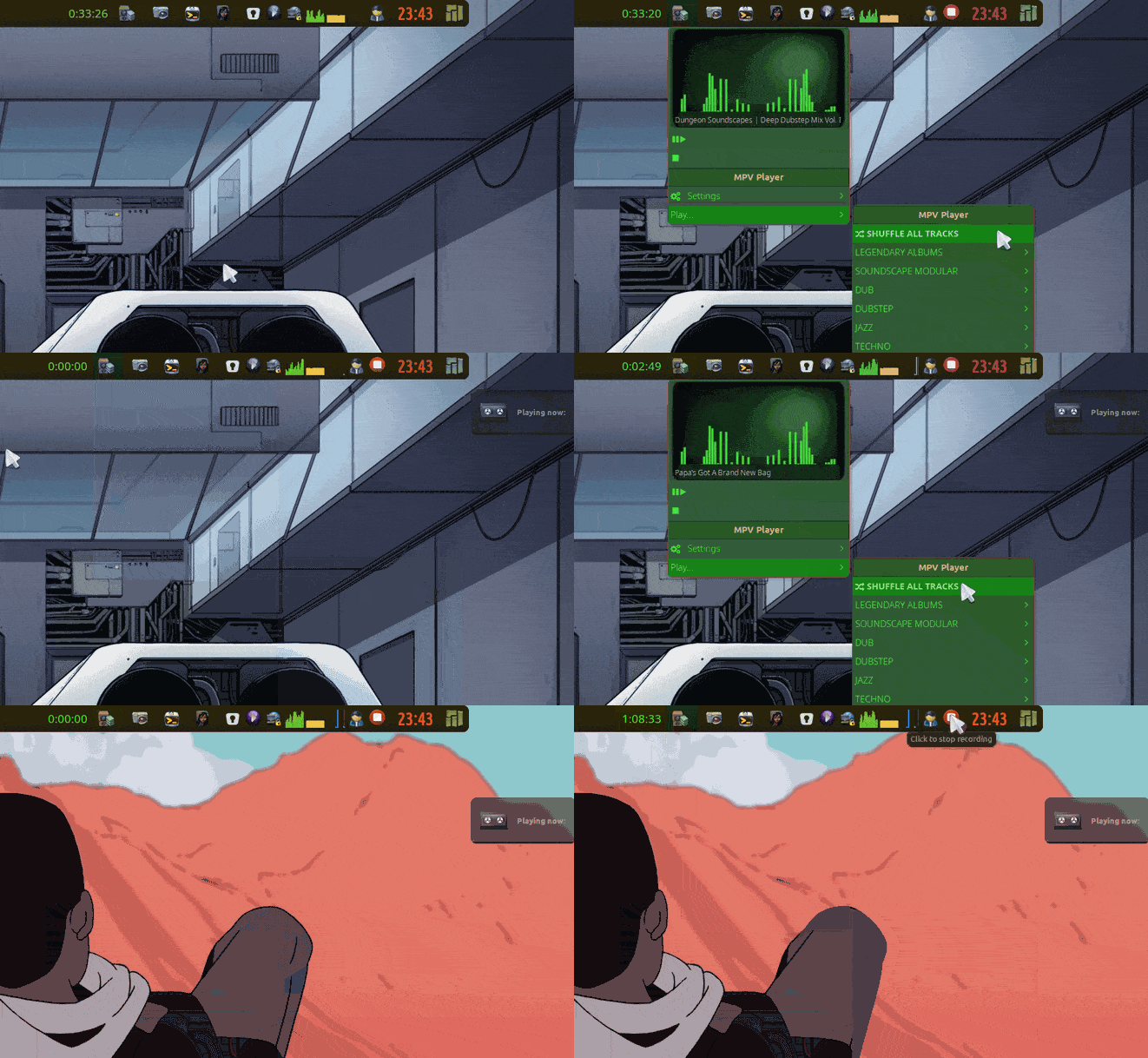
- added a shuffle all streams function.
![mb-music_shuff](https://forum.maboxlinux.org/uploads/default/original/2X/4/42e10d8a7f3d25b8dd0ef6f5d771eaf6bbe6e46c.gif)

The anim is a bit speedy. ⏩ ⏩  
I want to keep it below 512kb. But you get the idea of changing songs randomly.

_When playing with shuffle, the next track will play automaticly._  
🐦

---

<div class="post-metadata">

### Author: ![muzqs](https://forum.maboxlinux.org/user_avatar/forum.maboxlinux.org/muzqs/32/3702_2.png) [@muzqs](https://forum.maboxlinux.org/u/muzqs)
#### Post date: [November 22, 2023, 4:19pm UTC](https://forum.maboxlinux.org/t/volumettf-unicode-or-icon-thats-was-the-goal/1545/3 "2023-11-22T16:19:51Z")

</div>

(EDIT) update `mb-music-simple`: 22-11

- removed fixed icon path for icon name.
- fixed… yt-mpv shuffle - shows title with ~/bin/mpv\_show\_title.sh in tint2 panel.
- fixed xdg-open icon CONFIG\_DIR.

Added : `mpv_show_title.sh`

🐦

---

<div class="post-metadata">

### Author: ![muzqs](https://forum.maboxlinux.org/user_avatar/forum.maboxlinux.org/muzqs/32/3702_2.png) [@muzqs](https://forum.maboxlinux.org/u/muzqs)
#### Post date: [November 22, 2023, 6:54pm UTC](https://forum.maboxlinux.org/t/volumettf-unicode-or-icon-thats-was-the-goal/1545/4 "2023-11-22T18:54:45Z")

</div>

(EDIT) update `mb-music-simple`: 22-11

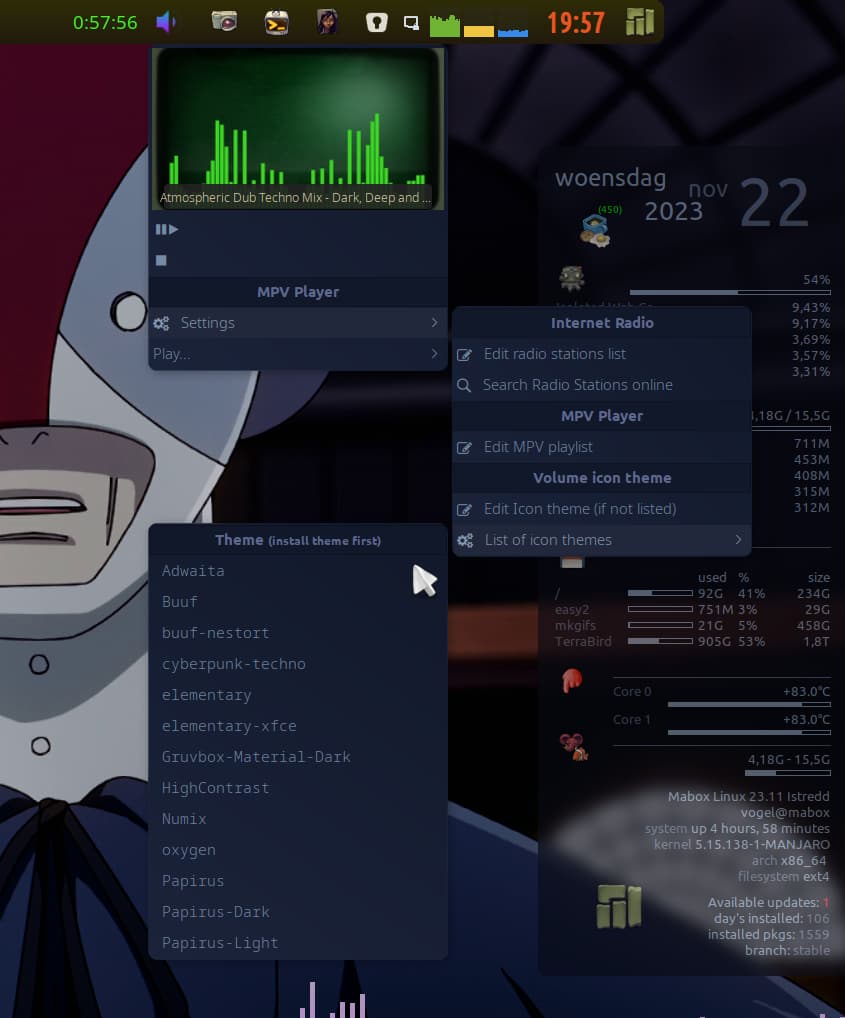
- tested and added cyberpunk-techno to theme list menu.  
_foldername and index.theme changed to cyberpunk-techno._

used cyberpunk icon pack:

> **[cyberpunk technotronic icon theme](https://www.gnome-look.org/p/1999292)**
>
> A blue-purple (oomox) gradient full-icon theme for all of us that love cyberpunk, neon, outrun, synthwave and retrofuture aesthetics. This theme has outline...
 ![Mabox_20231122-19-57-29](https://forum.maboxlinux.org/uploads/default/original/2X/e/e54dc1dbdc2162043ce3b79b57aed1c053132037.jpeg)

🐦

---

<div class="post-metadata">

### Author: ![muzqs](https://forum.maboxlinux.org/user_avatar/forum.maboxlinux.org/muzqs/32/3702_2.png) [@muzqs](https://forum.maboxlinux.org/u/muzqs)
#### Post date: [November 23, 2023, 10:44am UTC](https://forum.maboxlinux.org/t/volumettf-unicode-or-icon-thats-was-the-goal/1545/5 "2023-11-23T10:44:24Z")

</div>

update: `mpv_show_title.sh` (fix)

- Mpv title was showing randomly when not playing.

🐦

---

<div class="post-metadata">

### Author: ![muzqs](https://forum.maboxlinux.org/user_avatar/forum.maboxlinux.org/muzqs/32/3702_2.png) [@muzqs](https://forum.maboxlinux.org/u/muzqs)
#### Post date: [December 2, 2023, 4:42pm UTC](https://forum.maboxlinux.org/t/volumettf-unicode-or-icon-thats-was-the-goal/1545/6 "2023-12-02T16:42:35Z")

</div>

### Updated script:

`volumettf_extended.sh`

No need to manualy change gtk-icon-theme.  
It looks for the system icon theme. (gtk-3.0/settings.ini)

```auto
#!/bin/bash
# Display volumettf with Icon(themes) or with Unicode.
# It search icons in /usr/share/icons and ~/.icons.

# When icon is not available, look for /path/icon_theme_name/to/audio-volume- ($volume), for desired theme and add to the list below.
# Function to find the icons. 
find_icon() {
    local icon="$1"
    local paths=(
        "status/$icon.png"
        "status/$icon.svg"
        "status/symbolic/$icon-symbolic.svg"
        "actions/scalable/$icon.svg"
        "actions/scalable/$icon.png"
        "symbolic/status/$icon-symbolic.svg"
        "24/status/$icon.svg"
        "24x24/status/$icon.png"
        "24x24/status/$icon.svg"
        "base/22x22/status/$icon.png"
    )

    for path in "${paths[@]}"; do
        local full_path="$icon_path/$path"
        if [-e "$full_path"]; then
            echo "$full_path"
            return
        fi
    done

    echo "Icon not found."
}

# Find GTK icon theme from settings.ini
gtk_settings_file="$HOME/.config/gtk-3.0/settings.ini"
gtk_icon_theme_line=$(grep "gtk-icon-theme-name" "$gtk_settings_file")

if [[! -z "$gtk_icon_theme_line"]]; then
    # Extract icon theme name
    ICON_THEME=$(echo "$gtk_icon_theme_line" | cut -d= -f2 | tr -d '[:space:]')
else
    echo "Unable to find GTK icon theme in $gtk_settings_file."
    exit 1
fi

# Check path to the icon theme directory
if [-d "/usr/share/icons/$ICON_THEME"]; then
    icon_path="/usr/share/icons/$ICON_THEME"
elif [-d "$HOME/.icons/$ICON_THEME"]; then
    icon_path="$HOME/.icons/$ICON_THEME"
else
    echo "Icon Theme Path not found."
    exit 1
fi

# Check the current icon state
if [[-e "$HOME/.temp/toggle_icon_state" && $(cat "$HOME/.temp/toggle_icon_state") == "icon"]]; then
    # Display text view or theme-based icon
    muted=$(LANG=C pactl list sinks | awk '/Mute/ { print $2 }')
    vol=$(LANG=C pactl list sinks | awk '/Volume:/ {printf "%s ",$5}' | cut -f1 -d ' ' | cut -f1 -d '%')

    # Theme-based icon
    if [[$vol -ge 80]]; then
        icon="audio-volume-high"
    elif [[$vol -ge 70]]; then
        icon="audio-volume-high"
    elif [[$vol -ge 60]]; then
        icon="audio-volume-medium"
    elif [[$vol -ge 50]]; then
        icon="audio-volume-medium"
    elif [[$vol -ge 30]]; then
        icon="audio-volume-medium"
    elif [[$vol -ge 10]]; then
        icon="audio-volume-low"
    elif [[$vol -ge 0]]; then
        icon="audio-volume-low"
    else
        icon="error"
    fi
    
    # Display the chosen icon
    result=$(find_icon "$icon")
    echo "$result"
else
    # Display text view
    muted=$(LANG=C pactl list sinks | awk '/Mute/ { print $2 }')
    vol=$(LANG=C pactl list sinks | awk '/Volume:/ {printf "%s ",$5}' | cut -f1 -d ' ' | cut -f1 -d '%')

    if [[$muted == "no"]]; then
        if [[$vol -ge 80]]; then
            echo "墳<sup><span size='xx-small'> $vol%</span></sup>"
        elif [[$vol -ge 70]]; then
            echo "墳<sup><span size='xx-small'> $vol%</span></sup>"
        elif [[$vol -ge 60]]; then
            echo "奔<sup><span size='xx-small'> $vol%</span></sup>"
        elif [[$vol -ge 50]]; then
            echo "奔<sup><span size='xx-small'> $vol%</span></sup>"
        elif [[$vol -ge 30]]; then
            echo "奔<sup><span size='xx-small'> $vol%</span></sup>"
        elif [[$vol -ge 10]]; then
            echo "奄<sup><span size='xx-small'> $vol%</span></sup>"
        elif [[$vol -ge 0]]; then
            echo "奄<sup><span size='xx-small'> $vol%</span></sup>"
        fi
    fi
fi

```

![vol-tint-gtk](https://forum.maboxlinux.org/uploads/default/original/2X/e/ead4d65e18e54496902554fad7be8226d1fa85f3.gif)

🐦