# Tint2 panel and launcher\_apps\_dir
**URL:** https://forum.maboxlinux.org/t/tint2-panel-and-launcher-apps-dir/356
**Category:** Tint2 Panels
**Created:** [January 29, 2021, 12:11pm UTC](https://forum.maboxlinux.org/t/tint2-panel-and-launcher-apps-dir/356 "2021-01-29T12:11:15Z")
**Posts on this page:** 2
**Page:** 1
### Author:  [@napcok](https://forum.maboxlinux.org/u/napcok)
#### Post date: [January 29, 2021, 12:11pm UTC](https://forum.maboxlinux.org/t/tint2-panel-and-launcher-apps-dir/356/1 "2021-01-29T12:11:15Z")
Recently I discovered an interesting option in the tint2 configuration files.
_I can’t believe I did not spotted it earlier - using tint2 so many years 😉_
`launcher_apps_dir = path_to_directory` : Specifies a path to a directory from which the launcher is loading all .desktop files (all subdirectories are explored recursively). Can be used multiple times. The path may begin with ~, which is expanded to the path of the user’s home directory.
Thiss will allow us to have own favorites applications launchers the same - no matter which tint2 config we use.
So I updated all tint2 config shipped with Mabox.
You can copy new default tint2 configs into your `~/.config/tint2/` by command:
```auto
mb-reset tint2
```
Create directory for desktop files:
```auto
mkdir ~/.config/tint2/launcherapps
```
And add your favorite launchers by simply copy desktop files into `~/.config/tint2/launcherapps/`
For example:
```auto
cp /usr/share/applications/{gimp,geany,blender}.desktop ~/.config/tint2/launcherapps/
```
Tell tint to reload its config:
```auto
killall -SIGUSR1 tint2
```
Now when you select other tint2 config file - your favorite apps launchers should be in place 🙂
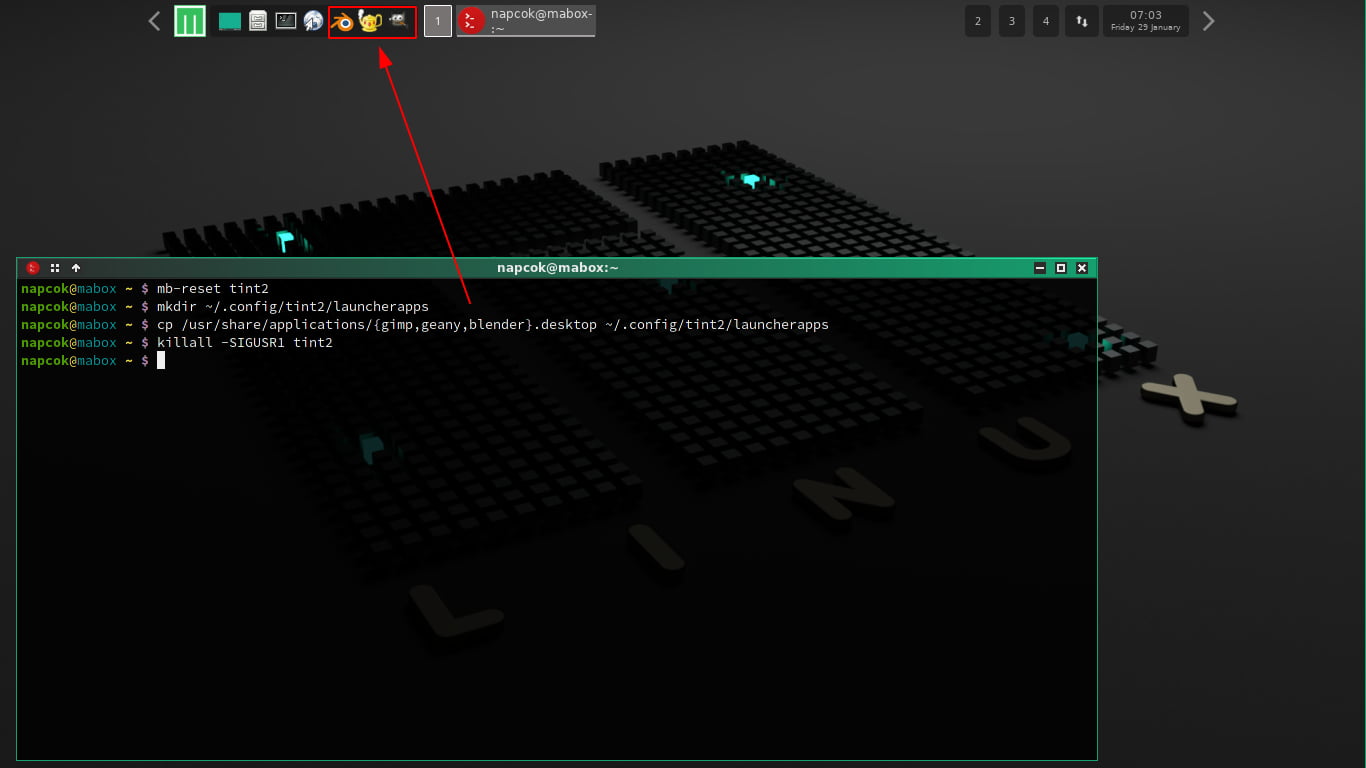
If you want to change the order of the icons in the panel - you can just rename the desktop files - they are sorted alphabetically.
---
### Author:  [@OlivierWierda](https://forum.maboxlinux.org/u/OlivierWierda)
#### Post date: [January 29, 2021, 2:51pm UTC](https://forum.maboxlinux.org/t/tint2-panel-and-launcher-apps-dir/356/2 "2021-01-29T14:51:32Z")
Amazing! That’s fantastic, as this was something I was struggling with then sharing my tint2 config. 🥳