# Tint2 - mini HW monitor in systray
**URL:** https://forum.maboxlinux.org/t/tint2-mini-hw-monitor-in-systray/375
**Category:** Tint2 Panels
**Created:** [February 15, 2021, 11:51am UTC](https://forum.maboxlinux.org/t/tint2-mini-hw-monitor-in-systray/375 "2021-02-15T11:51:04Z")
**Posts on this page:** 12
**Page:** 1
### Author:  [@napcok](https://forum.maboxlinux.org/u/napcok)
#### Post date: [February 15, 2021, 11:51am UTC](https://forum.maboxlinux.org/t/tint2-mini-hw-monitor-in-systray/375/1 "2021-02-15T11:51:05Z")
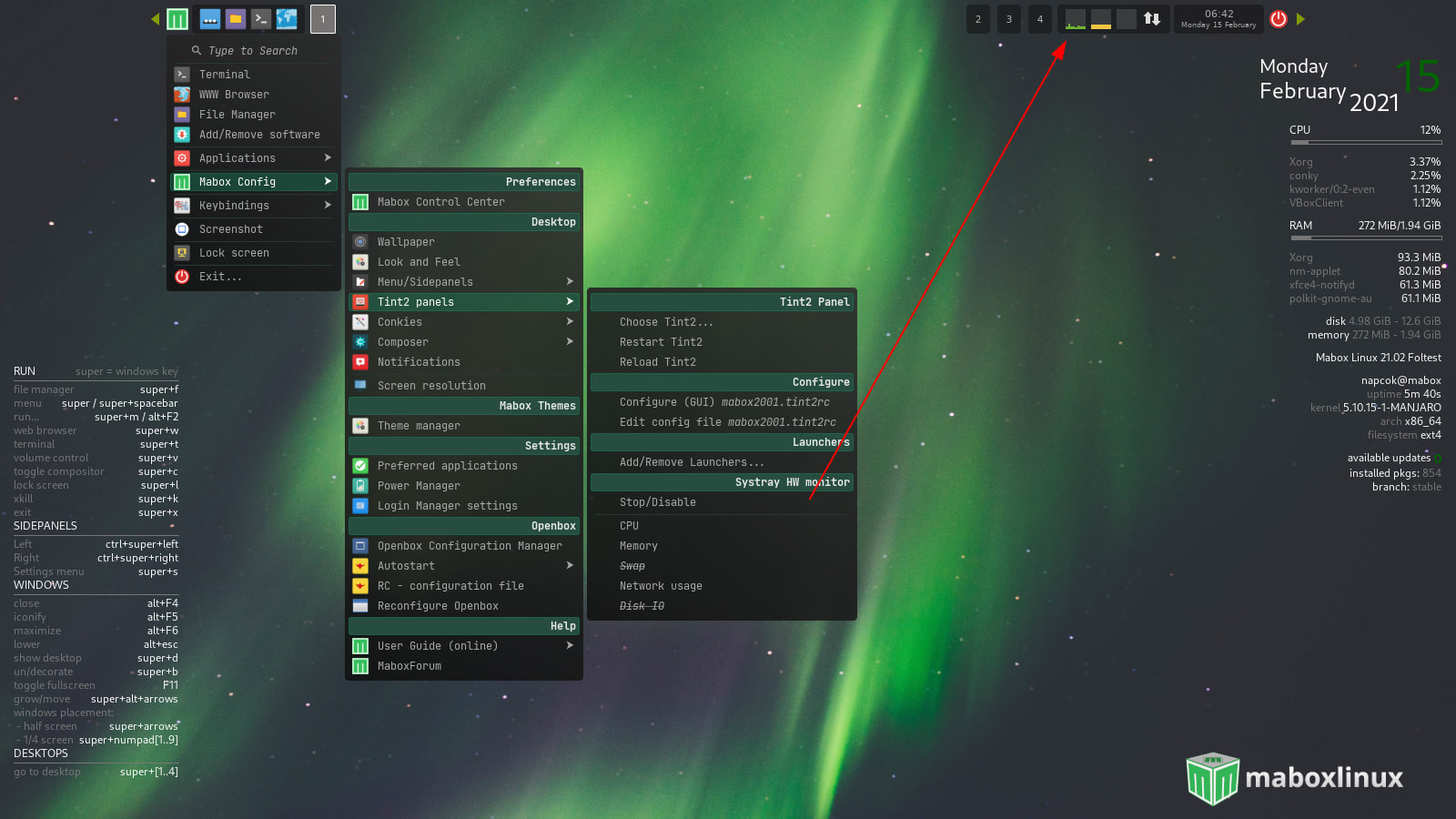
New addition to tint2 panel is mini HW monitor in systray. Disabled by default. You can enable it from **Settings Menu** win+s → **Tint2 panels** …
There are 5 monitors: CPU, Ram, Swap, Network and Disk IO - all can be enabled/disabled from menu.
Left click action on monitor will run Lxtask.
---
### Author:  [@kruno](https://forum.maboxlinux.org/u/kruno)
#### Post date: [February 15, 2021, 9:42pm UTC](https://forum.maboxlinux.org/t/tint2-mini-hw-monitor-in-systray/375/2 "2021-02-15T21:42:59Z")
This is great! Very useful! Thank you for the this new feature!
---
### Author:  [@ninja](https://forum.maboxlinux.org/u/ninja)
#### Post date: [April 18, 2022, 1:00pm UTC](https://forum.maboxlinux.org/t/tint2-mini-hw-monitor-in-systray/375/3 "2022-04-18T13:00:50Z")
Could someone kindly show me where does Mabox persist the config change for HW monitor?
I used this nice GUI to configure all tint2 to the way I like. Now I am building Ansible to automate these changes for other computers.
I found all the config changes for tint2 gets persisted into the ~/.config/tint2/xyz.tint2rc except mini HW monitor change.
thank you in advance.
Cheers!
---
### Author:  [@Tomek](https://forum.maboxlinux.org/u/Tomek)
#### Post date: [April 18, 2022, 1:38pm UTC](https://forum.maboxlinux.org/t/tint2-mini-hw-monitor-in-systray/375/4 "2022-04-18T13:38:39Z")
This is script called `phwmon.py`. It’s part of `mabox-tools`.
---
### Author:  [@napcok](https://forum.maboxlinux.org/u/napcok)
#### Post date: [April 18, 2022, 2:34pm UTC](https://forum.maboxlinux.org/t/tint2-mini-hw-monitor-in-systray/375/5 "2022-04-18T14:34:52Z")
Phwmon.py is just single file script and does not store its settings anywhere. In Mabox it is “encapsulated” with bash scripts.
The state of every single “monitor” is written to ~/.config/mabox/mabox.conf
---
### Author:  [@ninja](https://forum.maboxlinux.org/u/ninja)
#### Post date: [April 18, 2022, 3:46pm UTC](https://forum.maboxlinux.org/t/tint2-mini-hw-monitor-in-systray/375/6 "2022-04-18T15:46:58Z")
napcok,
Thank you very much for quick response. `phwmon_monitor` is the property holds the boolean value.
---
### Author:  [@napcok](https://forum.maboxlinux.org/u/napcok)
#### Post date: [April 18, 2022, 3:55pm UTC](https://forum.maboxlinux.org/t/tint2-mini-hw-monitor-in-systray/375/7 "2022-04-18T15:55:01Z")
```auto
napcok@mabox ~ $ grep phwmon ~/.config/mabox/mabox.conf
phwmon_monitor=true
phwmon_cpu=true
phwmon_mem=true
phwmon_swap=false
phwmon_net=true
phwmon_io=false
```
😉
---
### Author:  [@taito](https://forum.maboxlinux.org/u/taito)
#### Post date: [April 19, 2022, 3:27am UTC](https://forum.maboxlinux.org/t/tint2-mini-hw-monitor-in-systray/375/8 "2022-04-19T03:27:23Z")
thank you so much for this, it’s a very useful feature ✨
is there any way to customize it with different colors?
---
### Author:  [@napcok](https://forum.maboxlinux.org/u/napcok)
#### Post date: [April 19, 2022, 6:02am UTC](https://forum.maboxlinux.org/t/tint2-mini-hw-monitor-in-systray/375/9 "2022-04-19T06:02:06Z")
Hi @taito,
Very good idea 🙂 At the moment it is not so easy - probably best way could be by copying script to `~/bin/’ and by editing it there.
```auto
cp /usr/bin/phwmon.py ~/bin/
```
But I will try to add easy way to select colors for monitors to “tint2 dynamic menu” in comming days.
---
### Author:  [@napcok](https://forum.maboxlinux.org/u/napcok)
#### Post date: [April 26, 2022, 7:48pm UTC](https://forum.maboxlinux.org/t/tint2-mini-hw-monitor-in-systray/375/10 "2022-04-26T19:48:42Z")
@taito
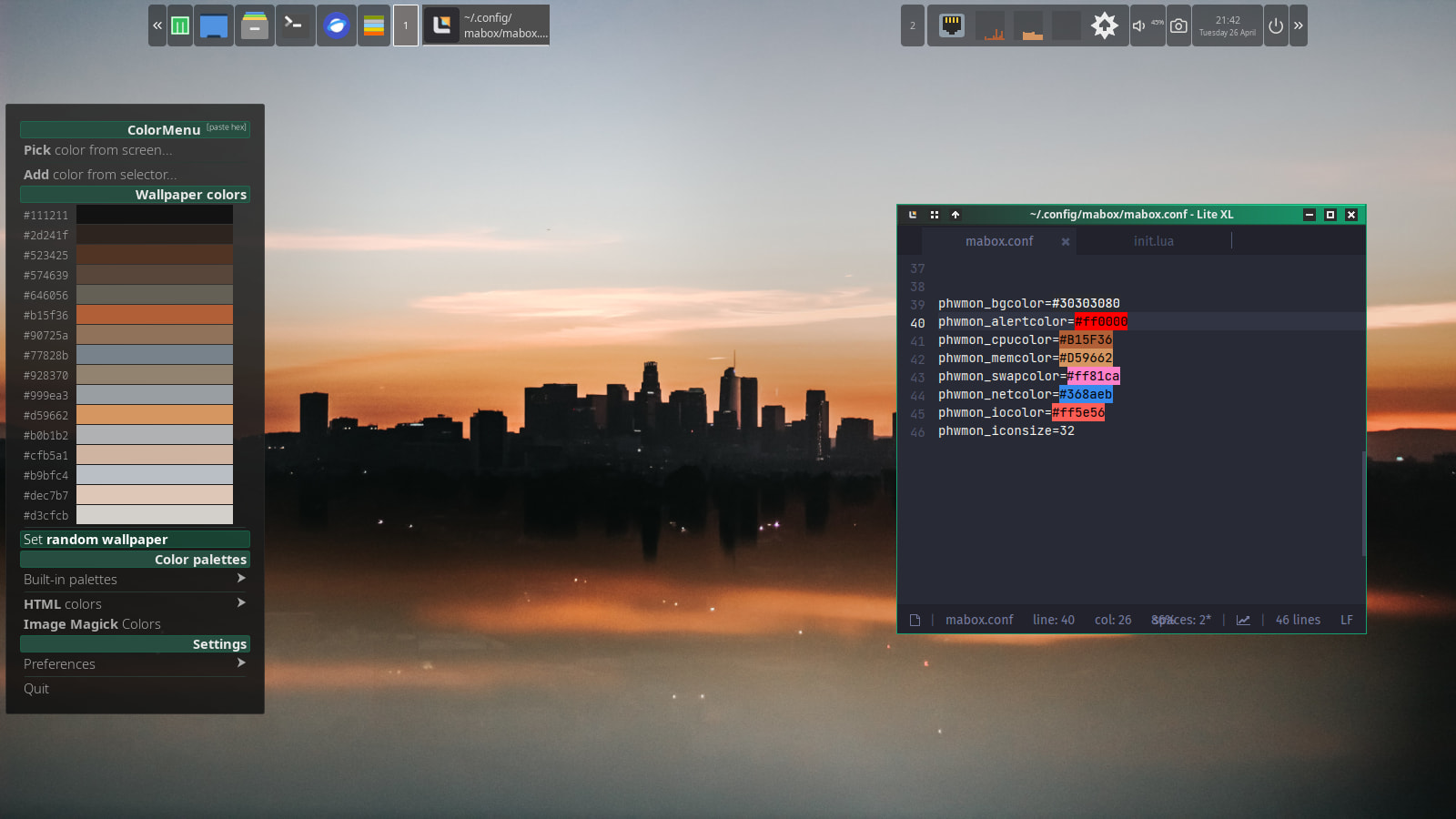
You can now (after today small update and logout) change colors in ~/.config/mabox/mabox.conf
I use ColorMenu for that 😉
I’m working to make this configurable from tint2 dynamic menu but not ready yet.
---
### Author:  [@rdtsc](https://forum.maboxlinux.org/u/rdtsc)
#### Post date: [January 26, 2023, 1:45pm UTC](https://forum.maboxlinux.org/t/tint2-mini-hw-monitor-in-systray/375/11 "2023-01-26T13:45:42Z")
Nice! 😄
Question, I see an `--io_scale` parameter in phwmon.py defaulting to 100MB/s; how can we pass a custom value at run-time? My disk I/O has only ever peaked at about 20% of the panel size (old SATA platter drive = hardware throughput of ~20MB/s.) Users with 500MB/s SSD’s may also want to tweak this.
---
### Author:  [@napcok](https://forum.maboxlinux.org/u/napcok)
#### Post date: [January 26, 2023, 2:06pm UTC](https://forum.maboxlinux.org/t/tint2-mini-hw-monitor-in-systray/375/12 "2023-01-26T14:06:53Z")
Phwmon is managed by mabox-obstart script, so best way to customize it would be to copy it to `~/bin`
```auto
cp /usr/bin/mabox-obstart ~/bin/
```
and edit there to your needs… (phwmon.py is in line 77)
Something like adding:
```auto
--io_scale=40
```
should do the trick.