[RESOLVED] Tint2 rare crash - systray (patched)

Yeah, I tried that variable as well - I always read the messages and try to follow the suggestions :wink:

If I find the time, I’ll try to build tint2 over the weekend the normal way - using a PKGBUILD.
The situation with tint2 isn’t great… there are lots of patches floating around online - both for the original version and for the forks - some of them works, some are not working “AI hallucinations” and sorting all of that out will definitely be time‑consuming.

1 Like

Update:

A rebuilded AppImage. Hopefully this fixes the launch crash.

Unfortunately still doesn’t start. core dumped.
I will try to apply those patches from reddit to original tint2 ( o9000 / tint2 · GitLab ).

Seems first patch from reddit post works fine…
So far no crashes with: Steam, Lutris and Localsend…

Patched tint2 pkg can be downloaded here → index - powered by h5ai v0.30.0 (https://larsjung.de/h5ai/)

If everything is fine for a day or two, then I’ll upload it to the official Mabox repo.

Patch adapted for original tint2 ( o9000 / tint2 · GitLab)

1 Like

Informative:
FYI
Not needed as you already patched :wink: the first.

I have forked tint2 and applied the 3 reddit patches.
I saw it needed a fix in CMakeList. Should build now.

git clone https://gitlab.com/muzlabz-musqz/tint2.git
cd tint2
git checkout systray-crashes
mkdir build
cd build
cmake ..
make -j4

I forked this fork
nick87720z
A fork of
o9000 / tint2 · GitLab

I only use [nick87720z], because the person on Reddit with the patches uses it.

The Appimage was an extra, I wont look further into it.

1 Like

Update:

Installed the gitea tint2 for testing. So far so good…

1 Like

Patched tint2 is already available in Mabox repo.

Patch for tint2 17.0.2
systray-iterator-uaf.patch

From: zackattackz
Subject: [PATCH] systray: fix iterator UAF in on_change_systray

Patch adapted for original tint2 (o9000/tint2) by danieln@maboxlinux.org

on_change_systray() iterates systray.list_icons and calls reparent_icon()
for each icon not yet reparented. If the XEMBED handshake fails,
reparent_icon() calls remove_icon(), which g_slist_remove()s and g_free()s
the current node. The loop then advances via l = l->next on the freed node,
and the next iteration dereferences l->data on garbage memory (SIGSEGV).

Trigger: any tray client that requests dock then destroys its window before
the embed completes — e.g. Steam's transient 200x200 loader icon, Electron
apps (Vesktop/Discord) that tear down their GdkWindow mid-embed.

Fix: capture l->next at the top of the loop body, before any call that
might free the current node. remove_icon() only frees the current node, so
the pre-captured next pointer stays valid.

This is the same iterator-invalidation pattern fixed in uevent_handler() by
the glib2.76 patch (issue #4). That fix addressed one occurrence; this is
the missed sibling in systraybar.c.

Tested with a reproducer that queues N_SYSTEM_TRAY_REQUEST_DOCK events then
destroys the windows before on_change_systray can reparent them:
unpatched → SIGSEGV within a few rounds; patched → all rounds survive.
---
 src/systray/systraybar.c | 5 +++--
 1 file changed, 3 insertions(+), 2 deletions(-)

diff --git a/src/systray/systraybar.c b/src/systray/systraybar.c
index 2a9fafe..5eb5c6f 100644
--- a/src/systray/systraybar.c
+++ b/src/systray/systraybar.c
@@ -292,9 +292,10 @@ void on_change_systray(void *obj)
     }
 
     TrayWindow *traywin;
-    GSList *l;
+    GSList *l, *next;
     int i;
-    for (i = 1, l = systray.list_icons; l; i++, l = l->next) {
+    for (i = 1, l = systray.list_icons; l; i++, l = next) {
+        next = l->next;
         traywin = (TrayWindow *)l->data;
 
         traywin->y = posy;
4 Likes

Hello!

My tint2 systray is not working (as you know). I updated the package to 17.0.2-9 (mabox upgrade script :+1:).
So far so good. But today, when I started my system:

  • /usr/lib/polkit-gnome/polkit-gnome-authentication-agent-1 takes all CPU
  • nm-applet, xfce4-notifyd, clipit, blueman, xfce4-power-manager also takes 90% CPU. (before all this begins, they were in systray). even pcmanfm -d do that.

Obviously, the system is slow. S-t (terminator) does not start.

In the same session, open TTY. check the issue with top. even exo-open (the terminal window from GUI) at >90% CPU.

  • pkill those culprits.
  • commented polkit and pcmanfm daemon in openbox’s autostart
  • disable those programmes in XDG editor.

Restart. tint2 is working (no systray). No hot CPU (reached >90º before). It looks/behave normal.
Enable programmes In XDG editor and restart: the issue reappears as described. Reboot and repeat those steps.

start nm-applet from terminal: icon appears in systray, normal cpu usage, working normally.
also clipit, blueman-applet, xfce4-power-manager appear in systray, normal CPU.
pcmanfm daemon still disabled.

Don’t know how to start xfce4-notifyd…

This is my situation right now. Fell free to show me what to do. Thanks!

Hi @Rhuks ,

Can you show the following:

journalctl -b -1 --no-pager | grep -E 'tint2|nm-applet|blueman|clipit|polkit|xfce4|pcmanfm' > ~/boot-bad.log
cat ~/boot-bad.log

Sometimes the timing of when apps starts from startup script can have influence.
Changing order in the autostart can help.

Can you give the autostart.

cat ~/.config/openbox/autostart

Show XDG autostart

ls ~/.config/autostart/
grep -l "Hidden=false\|^[^H]" ~/.config/autostart/*.desktop 2>/dev/null | xargs grep -H "Exec="

Show tint2 systray: Use your tint2rc.

grep -A 10 "systray" ~/.config/tint2/tint2rc

Another way to narrow down = to disable all systray apps and only start nm-applet.
One app could trigger the issue.

The strange thing is the polkit.
Polkit has nothing to do with the systray, so if it’s also spiking, the root cause may be elsewhere than tint2 itself.

1 Like

the output:

:$ journalctl -b -1 --no-pager | grep -E 'tint2|nm-applet|blueman|clipit|polkit|xfce4|pcmanfm' > ~/boot-bad.log
cat ~/boot-bad.log
may 09 22:59:23 rhuks-k53sv polkitd[536]: Started polkitd version 127
may 09 22:59:23 rhuks-k53sv polkitd[536]: Error compiling script /etc/polkit-1/rules.d/51-blueman.rules: SyntaxError: invalid regexp flags (line 1)
may 09 22:59:25 rhuks-k53sv dbus-broker-launch[597]: Service file '/usr/share/dbus-1/services/org.xfce.xfce4-notifyd.Notifications.service' is not named after the D-Bus name 'org.freedesktop.Notifications'.
may 09 22:59:25 rhuks-k53sv dbus-broker-launch[597]: Service file '/usr/share/dbus-1/services/org.xfce.xfce4-notifyd.Notifyd.service' is not named after the D-Bus name 'org.xfce.Notifyd'.
may 09 23:07:27 rhuks-k53sv dbus-broker-launch[769]: Service file '/usr/share/dbus-1/services/org.xfce.xfce4-notifyd.Notifications.service' is not named after the D-Bus name 'org.freedesktop.Notifications'.
may 09 23:07:27 rhuks-k53sv dbus-broker-launch[769]: Service file '/usr/share/dbus-1/services/org.xfce.xfce4-notifyd.Notifyd.service' is not named after the D-Bus name 'org.xfce.Notifyd'.
may 09 23:07:32 rhuks-k53sv xfce4-notifyd[1107]: Your sqlite library does not support OFFSET/LIMIT with DELETE; falling back to less-efficient deletion method
may 09 23:41:45 rhuks-k53sv NetworkManager[414]: <info>  [1778380905.9994] agent-manager: agent[e7e31905bcbcd63e,:1.1079/org.freedesktop.nm-applet/1000]: agent registered
may 10 01:04:33 rhuks-k53sv systemd[514]: xfce4-notifyd.service: Main process exited, code=exited, status=1/FAILURE
may 10 01:04:33 rhuks-k53sv systemd[514]: xfce4-notifyd.service: Failed with result 'exit-code'.
may 10 01:04:33 rhuks-k53sv systemd[1]: polkit.service: Deactivated successfully.
may 10 01:04:33 rhuks-k53sv systemd[1]: polkit.service: Consumed 2.377s CPU time over 2h 5min 10.281s wall clock time, 7M memory peak.
may 10 01:04:34 rhuks-k53sv systemd[1]: polkit-agent-helper.socket: Deactivated successfully.

Not tidy, but it works:

:$ cat ~/.config/openbox/autostart
## Mabox Autostart File
##
##
##
## Note that global autostart .desktop files will also be in
## /etc/xdg/openbox/autostart. These will include applications
## such as the Network Manager and Parcellite
##
## Turn on/off system beep.
xset b off

## Resolution
 ## Set up LVDS1 (laptop) as PRIMARY with its own X screen
#xrandr --setmonitor "LVDS1-only" 1366/340x768/190+0+0 LVDS1
 ## Set up HDMI1 (external monitor) as a separate X screen
#xrandr --setmonitor "HDMI1-only" 1920/530x1080/300+1366+0 none
# Fallback config #
#xrandr --output VGA-1 --primary --mode 1600x900 --pos 0x0 --rotate normal
#xrandr --output VGA-1 --primary --mode 1920x1080 --pos 0x0 --rotate normal
#xrandr --output LVDS1 --mode 1366x768 --rate 59.97
 
# Ajustando la resolución para dos monitores (Working!)
# (Laptop Rd/ HDMI1 Lu)
 #xrandr --output LVDS1 --primary --mode 1366x768 --pos 1920x312 --rotate normal
 #xrandr --output HDMI1 --mode 1920x1080 --pos 0x0 --rotate normal 
 # # # Laptop Left/down HDMI1 Right/Up
 xrandr --output LVDS1 --primary --mode 1366x768 --pos 0x0 --rotate normal
 xrandr --output HDMI1 --mode 1920x1080 --pos 1366x0 --rotate normal 
 #
# xrandr --output LVDS1 --mode 1366x768 --pos 0x0 --output HDMI1 --mode 1920x1080 --pos 1366x-312

 ## Disable unused outputs (optional)
xrandr --output DP1 --off --output VGA1 --off --output VIRTUAL1 --off
##### EOConfig###
#
## Copy Language files for Mabox - only for first run
#/usr/bin/mabox-langfiles &

## Set keyboard settings - 250 ms delay and 25 cps (characters per second) repeat rate.
## Adjust the values according to your preferances.
#xset r rate 250 25

# Alias Super key to Super+Space for single-key menu.
# See 'man xcape' for other possibilities.
#xcape -e 'Super_L=Super_L|space'


#/usr/lib/polkit-gnome/polkit-gnome-authentication-agent-1 &


## Panel
(sleep 1s && mb-tint2-session) &

## Background
(sleep 2s && nitrogen --restore) &

## Optionally enable file manager in daemon mode for automounting
#(sleep 1s && pcmanfm -d) &

## Optionally disable touchpad
#/usr/bin/synclient TouchpadOff=1 &

## Funtional touchpad command
#(sleep 3s && /home/rhuks/bin/touchpad_switch.sh) &
(sleep 3s && /home/rhuks/bin/DS-touchpad-toggle.sh) &

## Mabox scripts - DO NOT DISABLE 
(sleep 1s && mabox-obstart startopenbox) &

## XSETTINGS
(sleep 2 && xsettingsd) &

#export XDG_CONFIG_DIRS="/etc/xdg"

## Stalonetray
#(sleep 5 && stalonetray --dockapp-mode simple --grow-gravity E -bg "#333333") &

:$ ls ~/.config/autostart/
grep -l "Hidden=false\|^[^H]" ~/.config/autostart/*.desktop 2>/dev/null | xargs grep -H "Exec="
at-spi-dbus-bus.desktop        nm-applet.desktop
blueman.desktop                org.fcitx.Fcitx5.desktop
clipit-startup.desktop         pamac-tray-budgie.desktop
conky-session.desktop          pamac-tray.desktop
cornora.desktop                picom.desktop
dropbox.desktop                pygrid.desktop
emacs-server.desktop           skippy-xd.desktop
geoclue-demo-agent.desktop     user-dirs-update-gtk.desktop
gnome-keyring-pkcs11.desktop   volumeicon.desktop
gnome-keyring-secrets.desktop  xapp-sn-watcher.desktop
gnome-keyring-ssh.desktop      xdg-user-dirs.desktop
log_startup.desktop            xfce4-notifyd.desktop
LXinput-setup.desktop          xfce4-power-manager.desktop
lxrandr-autostart.desktop      xfce4-volumed-pulse.desktop
mpd.desktop
/home/rhuks/.config/autostart/at-spi-dbus-bus.desktop:Exec=/usr/lib/at-spi-bus-launcher --launch-immediately
/home/rhuks/.config/autostart/blueman.desktop:Exec=nice -n 5 blueman-applet
/home/rhuks/.config/autostart/clipit-startup.desktop:Exec=clipit
/home/rhuks/.config/autostart/conky-session.desktop:#Exec=mb-conky-session --autostart
/home/rhuks/.config/autostart/conky-session.desktop:Exec=nice -n 10 mb-conky-session --autostart
/home/rhuks/.config/autostart/cornora.desktop:Exec=cornora -tl "mb-jgtools places" -tr "mb-jgtools right" -iof
/home/rhuks/.config/autostart/dropbox.desktop:Exec=dropbox
/home/rhuks/.config/autostart/emacs-server.desktop:Exec=/usr/bin/emacs --bg-daemon
/home/rhuks/.config/autostart/geoclue-demo-agent.desktop:Exec=/usr/lib/geoclue-2.0/demos/agent
/home/rhuks/.config/autostart/gnome-keyring-pkcs11.desktop:Exec=/usr/bin/gnome-keyring-daemon --start --components=pkcs11
/home/rhuks/.config/autostart/gnome-keyring-secrets.desktop:Exec=/usr/bin/gnome-keyring-daemon --start --components=secrets
/home/rhuks/.config/autostart/gnome-keyring-ssh.desktop:Exec=/usr/bin/gnome-keyring-daemon --start --components=ssh
/home/rhuks/.config/autostart/log_startup.desktop:Exec=/home/rhuks/bin/log_startup.sh
/home/rhuks/.config/autostart/LXinput-setup.desktop:Exec=sh -c 'xset m 50/10 50 r rate 276 49 b on'
/home/rhuks/.config/autostart/lxrandr-autostart.desktop:Exec=sh -c 'xrandr --output HDMI1 --mode 1920x1080 --right-of LVDS1 --output LVDS1 --mode 1366x768_60.00'
/home/rhuks/.config/autostart/mpd.desktop:Exec=nice -n 10 ionice -c 2 -n 7 mpd ~/.config/mpd/mpd.conf
/home/rhuks/.config/autostart/nm-applet.desktop:Exec=nm-applet
/home/rhuks/.config/autostart/org.fcitx.Fcitx5.desktop:Exec=/usr/bin/fcitx5
/home/rhuks/.config/autostart/pamac-tray-budgie.desktop:Exec=sh -c "GDK_BACKEND=x11 pamac-tray"
/home/rhuks/.config/autostart/pamac-tray.desktop:Exec=sh -c "GDK_BACKEND=x11 pamac-tray"
/home/rhuks/.config/autostart/picom.desktop:#TryExec=picom
/home/rhuks/.config/autostart/picom.desktop:Exec=mabox-compositor --start
/home/rhuks/.config/autostart/pygrid.desktop:Exec=pygrid
/home/rhuks/.config/autostart/skippy-xd.desktop:Exec=skippy-xd --start-daemon --config /home/rhuks/.config/skippy-xd/skippy-xd.rc
/home/rhuks/.config/autostart/user-dirs-update-gtk.desktop:Exec=xdg-user-dirs-gtk-update
/home/rhuks/.config/autostart/volumeicon.desktop:Exec=volumeicon
/home/rhuks/.config/autostart/xapp-sn-watcher.desktop:Exec=/usr/lib/xapps/xapp-sn-watcher
/home/rhuks/.config/autostart/xdg-user-dirs.desktop:TryExec=xdg-user-dirs-update
/home/rhuks/.config/autostart/xdg-user-dirs.desktop:Exec=xdg-user-dirs-update
/home/rhuks/.config/autostart/xfce4-notifyd.desktop:Exec=/usr/lib/xfce4/notifyd/xfce4-notifyd
/home/rhuks/.config/autostart/xfce4-power-manager.desktop:Exec=xfce4-power-manager
/home/rhuks/.config/autostart/xfce4-volumed-pulse.desktop:Exec=xfce4-volumed-pulse

:$ grep -A 10 "systray" ~/.config/tint2/tint2rc
systray_padding = 2 4 4
systray_background_id = 7
systray_sort = ascending
systray_icon_size = 24
systray_icon_asb = 100 0 0
systray_monitor = 1
systray_name_filter = 

#-------------------------------------
# Launcher
launcher_padding = 2 4 2
launcher_background_id = 0
launcher_icon_background_id = 0
launcher_icon_size = 24
launcher_icon_asb = 100 0 0
launcher_icon_theme_override = 0
startup_notifications = 1

Hi @Rhuks

Sorry for the delay. After going through your logs and autostart here’s what I found.

The main culprit — broken blueman polkit rule

polkitd: Error compiling script /etc/polkit-1/rules.d/51-blueman.rules: SyntaxError: invalid regexp flags

polkitd fails on every auth request because of this broken rule. Fix it by removing and reinstalling blueman:

sudo rm /etc/polkit-1/rules.d/51-blueman.rules
sudo pacman -S blueman

Disable xapp-sn-watcher

This is a StatusNotifierItem watcher from the Cinnamon/Budgie ecosystem — it doesn’t belong in an Openbox/tint2 setup and directly competes with tint2’s systray. Disable xapp-sn-watcher.desktop in your XDG autostart.

A few more things to clean up:

  • Disable pamac-tray-budgie.desktop — it’s a duplicate, pamac-tray is already running
  • Disable lxrandr-autostart.desktop — conflicts with the xrandr commands in your openbox autostart
  • Your XDG autostart fires ~20 apps all at once before tint2 is ready — adding small delays to the heavier systray apps would help

Small autostart fix:

The last line in your openbox autostart should not have &:

(sleep 2 && xsettingsd)

Start with the blueman fix — that alone might solve most of it.

1 Like

Hi @muzqs
Thanks for your time to solve this (my) issue.

I’ve followed your instructions.
Before reboot, uncommented the polkit line in openbox’ autostart (just to test that).
After login, I hear the fan throttling, slow system. Check top in TTY, again the polkit process at 96% CPU.

pkill it.

Run again the log checker you provided in your previous response.
the compiling error for the blueman rule ¿is still there?

:$ journalctl -b -1 --no-pager | grep -E 'tint2|nm-applet|blueman|clipit|polkit|xfce4|pcmanfm' > ~/boot-bad.log
cat ~/boot-bad.log
may 11 11:31:01 rhuks-k53sv polkitd[545]: Started polkitd version 127
may 11 11:31:01 rhuks-k53sv polkitd[545]: Error compiling script /etc/polkit-1/rules.d/51-blueman.rules: SyntaxError: invalid regexp flags (line 1)
may 11 11:31:02 rhuks-k53sv dbus-broker-launch[607]: Service file '/usr/share/dbus-1/services/org.xfce.xfce4-notifyd.Notifications.service' is not named after the D-Bus name 'org.freedesktop.Notifications'.
may 11 11:31:02 rhuks-k53sv dbus-broker-launch[607]: Service file '/usr/share/dbus-1/services/org.xfce.xfce4-notifyd.Notifyd.service' is not named after the D-Bus name 'org.xfce.Notifyd'.
may 11 13:00:12 rhuks-k53sv dbus-broker-launch[861]: Service file '/usr/share/dbus-1/services/org.xfce.xfce4-notifyd.Notifications.service' is not named after the D-Bus name 'org.freedesktop.Notifications'.
may 11 13:00:12 rhuks-k53sv dbus-broker-launch[861]: Service file '/usr/share/dbus-1/services/org.xfce.xfce4-notifyd.Notifyd.service' is not named after the D-Bus name 'org.xfce.Notifyd'.
may 11 13:00:17 rhuks-k53sv xfce4-notifyd[1211]: Your sqlite library does not support OFFSET/LIMIT with DELETE; falling back to less-efficient deletion method
may 11 13:09:26 rhuks-k53sv sudo[9710]:    rhuks : TTY=pts/0 ; PWD=/home/rhuks ; USER=root ; COMMAND=/usr/bin/rm /etc/polkit-1/rules.d/51-blueman.rules
may 11 13:09:36 rhuks-k53sv sudo[9847]:    rhuks : TTY=pts/0 ; PWD=/home/rhuks ; USER=root ; COMMAND=/usr/bin/pacman -S blueman
may 11 13:09:40 rhuks-k53sv dbus-broker-launch[861]: Service file '/usr/share/dbus-1/services/org.xfce.xfce4-notifyd.Notifications.service' is not named after the D-Bus name 'org.freedesktop.Notifications'.
may 11 13:09:40 rhuks-k53sv dbus-broker-launch[861]: Service file '/usr/share/dbus-1/services/org.xfce.xfce4-notifyd.Notifyd.service' is not named after the D-Bus name 'org.xfce.Notifyd'.
may 11 13:09:40 rhuks-k53sv dbus-broker-launch[861]: Service file '/usr/share/dbus-1/services/org.xfce.xfce4-notifyd.Notifications.service' is not named after the D-Bus name 'org.freedesktop.Notifications'.
may 11 13:09:40 rhuks-k53sv dbus-broker-launch[861]: Service file '/usr/share/dbus-1/services/org.xfce.xfce4-notifyd.Notifyd.service' is not named after the D-Bus name 'org.xfce.Notifyd'.
may 11 13:11:27 rhuks-k53sv systemd[524]: xfce4-notifyd.service: Main process exited, code=exited, status=1/FAILURE
may 11 13:11:27 rhuks-k53sv systemd[524]: xfce4-notifyd.service: Failed with result 'exit-code'.
may 11 13:11:27 rhuks-k53sv systemd[1]: polkit.service: Deactivated successfully.
may 11 13:11:28 rhuks-k53sv systemd[1]: polkit-agent-helper.socket: Deactivated successfully.

List the directory /etc/polkit-1/rules.d : permission denied.
sudo ls: empty directory.

I’m still curious; run blueman-applet from terminal: icon working in tint2 systray.

In other time, I would do a fresh install and forget all this, but now, I prefer to guide my patience looking for a solution, if possible.

tinkering update:

Disabled from XDG editor:

  • xfce4-power-manager
  • clipit
  • blueman-applet
  • nm-applet
  • conky-session

Added to ~/.config/openbox/autostart (trying to keep the original Mabox structure (at least, in my mind))

## Panel
 52 (sleep 1s && mb-tint2-session) &
 53 ### temporal solving systray (11052026)
 54 (sleep 2s && nm-applet) &
 55 (sleep 2s && clipit) &
 56 (sleep 2s && xfce4-power-manager) &
 57 (sleep 2s && blueman-applet) &

and:

 72 ## Mabox scripts - DO NOT DISABLE 
 73 (sleep 1s && mabox-obstart startopenbox) &
 74 ### temporal solving conky session start (11052026)
 75 (sleep 2s && nice -n 10 mb-conky-session --autostart) &

Results:

  • normal login; lower RAM usage! (this was not an issue/concern, but cool)
  • tint2 systray with icons working.
  • system working as always…
  • but programmes depending of polkit (remember, I disable it from openbox autostart), i.e: pamac, can not work properly for authentication. (not a big deal, pacman do the job)

picom is still enabled from XDG, but doesn’t start at login. S-p keybind and it start/stop at will (could added it to openbox autostart; I missed that) But I think that’s a symptom of something.

@Rhuks

So if I understand tint2 is fine now. But issue with polkit.

  • The authentication (polkit) sounds like a new topic (issue).

Background fyi:
For me, maybe some years ago I found that .desktop autostart did’t work always for me. So I moved most of the applications to the autostart file.
But in theory the .desktop autostarts should work fine.

When editing the autostart file I looked at when which application starts.

Just to show my autostart as example

1 Like

@muzqs
Yes, you’re right: the tint2 systray issue is solved. Thank you!

2 more things:

  1. do you recommend to open a new topic regarding polkit?
  2. You autostart is beautiful! I hope you don’t mind if I take it to my openbox… :blush:

Thank you for your time and patience.

@Rhuks

If you have polkit issues and need to look at, a new topic helps others with the same issue in the future. Easier to find.

Yes please use as inspiration.
I am still moving stuff around when i see the boot is not yet right. Or think this could be better. I use this setup for a month or 2 now.

I prefer managing autostart via the Openbox autostart file rather than the autostart GUI. For apps like Surfshark and Vorta that have their own built-in launch at startup or start in systray option, I disable that — and handle it from the autostart file instead. Also worth a double check for duplicate .desktop entries, since conflicts can cause logout/login issues.

That said, this is personal preference — using the autostart GUI with .desktop entries works just as well, as long as there are no duplicates between the two.

:penguin:

Hello, @muzqs
This is not to bring to life a solved post, but I think this post could “explain?” what happened to my system regarding tint2 and the polkit issue:

Yes, the tint2 issue was solved, but I think there were a lot of things happenning at the same time, and I felt my system was not working as I intended , why to comment polkit in OB autostart? There were other programmes affected for that, and, in my mind, it broke the robustness of Mabox in my machine.

So I decided to apply a fresh OS re-install. It works out the box (Thanks for this project, @napcok).
After the mandatory upgrades, I try to replicate my old desktop (not heavily custom, but I used it from almost for 2 years, so a lot of habits). The system was working well until I set my old tint2 config (copied the config file into the tint2 directory, set it with mabox tools).

Reboot… CPU 99% each: polkit, nm-applet, clipit, blueman-applet, xfce4-notify and xfce-power-manager.

Second re-install (because I didn’t want to tinkering). And here we are: all is working as good as always, with my customizations but not with that old tint2 config file. I don’t want to test it again, but I think something is wrong with my old tint2 file, not with polkit or anything else.

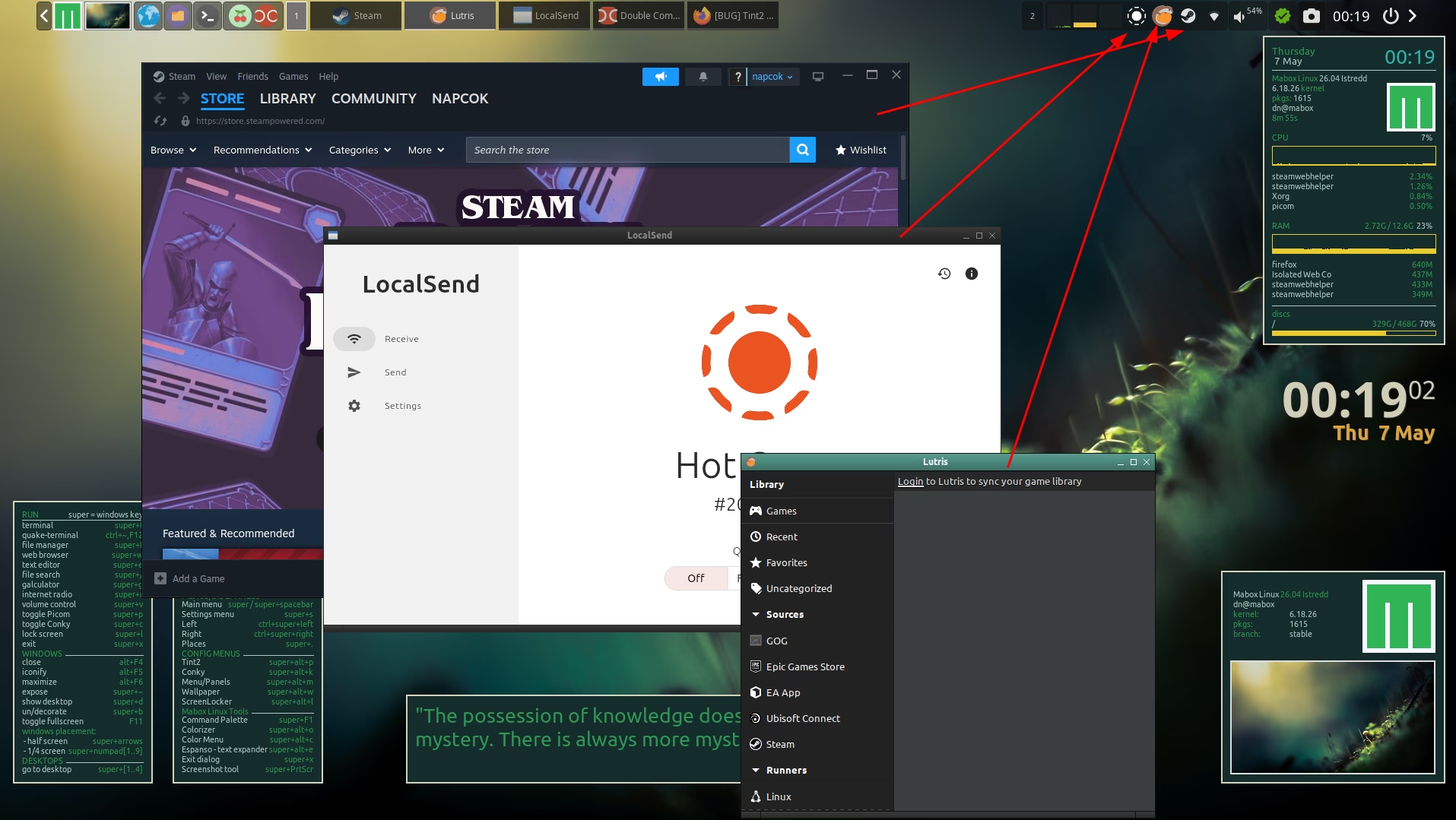
And that’s it. Thank you, @muzqs for your posts.

1 Like

@Rhuks , could you share your problematic tint2 config?
Maybe we could investigate and determine the source of the issue…

Of course, @napcok ! here it is:

#---- Generated by tint2conf 467a ----
# See https://gitlab.com/o9000/tint2/wikis/Configure for 
# full documentation of the configuration options.
#-------------------------------------
# Gradients
#-------------------------------------
# Backgrounds
# Background 1: Batería, Panel
rounded = 0
border_width = 0
border_sides = TBLR
border_content_tint_weight = 0
background_content_tint_weight = 0
background_color = #2f343f 61
border_color = #2f343f 100
background_color_hover = #2f343f 100
border_color_hover = #484848 100
background_color_pressed = #2f343f 100
border_color_pressed = #484848 100

# Background 2: Nombre del escritorio activo
rounded = 0
border_width = 0
border_sides = TBLR
border_content_tint_weight = 0
background_content_tint_weight = 0
background_color = #5294e2 100
border_color = #000000 100
background_color_hover = #5294e2 100
border_color_hover = #000000 100
background_color_pressed = #5294e2 100
border_color_pressed = #000000 100

# Background 3: 
rounded = 0
border_width = 2
border_sides = B
border_content_tint_weight = 0
background_content_tint_weight = 0
background_color = #2f343f 0
border_color = #1ed1b1 100
background_color_hover = #2f343f 100
border_color_hover = #484848 100
background_color_pressed = #2f343f 100
border_color_pressed = #484848 100

# Background 4: Bandeja del sistema
rounded = 0
border_width = 2
border_sides = B
border_content_tint_weight = 0
background_content_tint_weight = 0
background_color = #2f343f 0
border_color = #faf3f3 56
background_color_hover = #2f343f 100
border_color_hover = #484848 100
background_color_pressed = #2f343f 100
border_color_pressed = #484848 100

# Background 5: Ejecutor
rounded = 0
border_width = 2
border_sides = B
border_content_tint_weight = 0
background_content_tint_weight = 0
background_color = #2f343f 0
border_color = #ebcb8b 100
background_color_hover = #2f343f 100
border_color_hover = #484848 100
background_color_pressed = #2f343f 100
border_color_pressed = #484848 100

# Background 6: Tarea predeterminada
rounded = 6
border_width = 2
border_sides = B
border_content_tint_weight = 0
background_content_tint_weight = 0
background_color = #2f343f 0
border_color = #8fbcbb 100
background_color_hover = #5294e2 10
border_color_hover = #85bd55 80
background_color_pressed = #2f343f 100
border_color_pressed = #484848 100

# Background 7: 
rounded = 0
border_width = 2
border_sides = B
border_content_tint_weight = 0
background_content_tint_weight = 0
background_color = #2f343f 0
border_color = #ff6ac1 100
background_color_hover = #2f343f 100
border_color_hover = #484848 100
background_color_pressed = #2f343f 100
border_color_pressed = #484848 100

# Background 8: 
rounded = 0
border_width = 2
border_sides = B
border_content_tint_weight = 0
background_content_tint_weight = 0
background_color = #2f343f 0
border_color = #bf616a 100
background_color_hover = #2f343f 100
border_color_hover = #484848 100
background_color_pressed = #2f343f 100
border_color_pressed = #484848 100

# Background 9: Tarea activa
rounded = 6
border_width = 2
border_sides = B
border_content_tint_weight = 0
background_content_tint_weight = 0
background_color = #2f343f 0
border_color = #85bd55 100
background_color_hover = #5585bd 30
border_color_hover = #bd5585 50
background_color_pressed = #2f343f 100
border_color_pressed = #484848 100

# Background 10: Mensaje emergente
rounded = 3
border_width = 6
border_sides = T
border_content_tint_weight = 0
background_content_tint_weight = 0
background_color = #2f343f 59
border_color = #444a57 0
background_color_hover = #2f343f 100
border_color_hover = #484848 0
background_color_pressed = #2f343f 100
border_color_pressed = #484848 0

# Background 11: Barra de tareas activa
rounded = 0
border_width = 0
border_sides = 
border_content_tint_weight = 0
background_content_tint_weight = 0
background_color = #bf3f3f 0
border_color = #bf3f3f 0
background_color_hover = #2f343f 100
border_color_hover = #484848 100
background_color_pressed = #2f343f 100
border_color_pressed = #484848 100

# Background 12: 
rounded = 0
border_width = 2
border_sides = B
border_content_tint_weight = 0
background_content_tint_weight = 0
background_color = #2f343f 0
border_color = #bf616a 100
background_color_hover = #2f343f 100
border_color_hover = #484848 100
background_color_pressed = #2f343f 100
border_color_pressed = #484848 100

# Background 13: Reloj
rounded = 0
border_width = 2
border_sides = B
border_content_tint_weight = 0
background_content_tint_weight = 0
background_color = #2f343f 0
border_color = #8fbcbb 100
background_color_hover = #2f343f 100
border_color_hover = #484848 100
background_color_pressed = #2f343f 100
border_color_pressed = #484848 100

# Background 14: 
rounded = 0
border_width = 2
border_sides = B
border_content_tint_weight = 0
background_content_tint_weight = 0
background_color = #2f343f 0
border_color = #bc4b4f 100
background_color_hover = #2f343f 100
border_color_hover = #484848 100
background_color_pressed = #2f343f 100
border_color_pressed = #484848 100

#-------------------------------------
# Panel
panel_items = P:EETE:S:E:C:EP
panel_size = 100% 3%
panel_margin = 0 0
panel_padding = 0 1 0
panel_background_id = 1
wm_menu = 1
panel_dock = 0
panel_pivot_struts = 0
panel_position = top center horizontal
panel_layer = top
panel_monitor = all
panel_shrink = 0
autohide = 0
autohide_show_timeout = 0.2
autohide_hide_timeout = 1
autohide_height = 1
strut_policy = follow_size
panel_window_name = polynordish
disable_transparency = 0
mouse_effects = 1
font_shadow = 0
mouse_hover_icon_asb = 99 -2 10
mouse_pressed_icon_asb = 99 1 0
scale_relative_to_dpi = 10
scale_relative_to_screen_height = 10

#-------------------------------------
# Taskbar
taskbar_mode = single_desktop
taskbar_hide_if_empty = 0
taskbar_padding = 4 0 8
taskbar_background_id = 0
taskbar_active_background_id = 11
taskbar_name = 0
taskbar_hide_inactive_tasks = 0
taskbar_hide_different_monitor = 1
taskbar_hide_different_desktop = 1
taskbar_always_show_all_desktop_tasks = 1
taskbar_name_padding = 3 3
taskbar_name_background_id = 0
taskbar_name_active_background_id = 2
taskbar_name_font_color = #000000 100
taskbar_name_active_font_color = #2f343f 100
taskbar_distribute_size = 0
taskbar_sort_order = application
task_align = left

#-------------------------------------
# Task
task_text = 1
task_icon = 0
task_centered = 1
urgent_nb_of_blink = 20
task_maximum_size = 0 0
task_padding = 0 0 0
task_font = Fira Sans Condensed, Bold Condensed 9.55
task_tooltip = 0
task_thumbnail = 0
task_thumbnail_size = 210
task_font_color = #8fbcbb 100
task_active_font_color = #85bd55 80
task_urgent_font_color = #ff5c57 100
task_iconified_font_color = #8fbcbb 100
task_icon_asb = 94 0 0
task_active_icon_asb = 100 0 0
task_urgent_icon_asb = 100 0 0
task_iconified_icon_asb = 100 0 0
task_background_id = 6
task_active_background_id = 9
task_urgent_background_id = 0
task_iconified_background_id = 0
mouse_left = toggle_iconify
mouse_middle = close
mouse_right = iconify
mouse_scroll_up = toggle_iconify
mouse_scroll_down = shade

#-------------------------------------
# System tray (notification area)
systray_padding = 5 0 2
systray_background_id = 4
systray_sort = left2right
systray_icon_size = 22
systray_icon_asb = 90 0 0
systray_monitor = primary
systray_name_filter = 

#-------------------------------------
# Launcher
launcher_padding = 0 0 0
launcher_background_id = 0
launcher_icon_background_id = 0
launcher_icon_size = 16
launcher_icon_asb = 100 0 0
launcher_icon_theme_override = 0
startup_notifications = 0
launcher_tooltip = 0
launcher_item_app = /usr/local/share/applications/termite.desktop
launcher_item_app = /usr/share/applications/Thunar.desktop

#-------------------------------------
# Clock
time1_format =  %H:%M |  %b %d
time2_format = 
time1_font = Armata 8
time1_timezone = 
time2_timezone = 
clock_font_color = #8fbcbb 100
clock_padding = 5 4
clock_background_id = 13
clock_tooltip = 
clock_tooltip_timezone = 
clock_lclick_command = gsimplecal
clock_rclick_command = 
clock_mclick_command = 
clock_uwheel_command = 
clock_dwheel_command = 

#-------------------------------------
# Battery
 # battery_tooltip = 1
 # battery_low_status = 20
 # battery_low_cmd = notify-send "battery low"
 # battery_full_cmd = 
 # bat1_font = ShureTechMono Nerd Font 10
 # bat2_font = ShureTechMono Nerd Font 6
 # battery_font_color = #b5b5b5 100
 # bat1_format = 
 # bat2_format = 
 # battery_padding = 5 5
 # battery_background_id = 1
 # battery_hide = 99
 # battery_lclick_command = 
 # battery_rclick_command = 
 # battery_mclick_command = 
 # battery_uwheel_command = 
 # battery_dwheel_command = 
 # ac_connected_cmd = 
 # ac_disconnected_cmd = 

#-------------------------------------
# Separator 1
separator = new
separator_background_id = 0
separator_color = #777777 0
separator_style = empty
separator_size = 8
separator_padding = 0 0

#-------------------------------------
# Separator 2
separator = new
separator_background_id = 0
separator_color = #777777 0
separator_style = empty
separator_size = 10
separator_padding = 0 0

#-------------------------------------
# Separator 3
separator = new
separator_background_id = 0
separator_color = #777777 0
separator_style = empty
separator_size = 4
separator_padding = 0 0

#-------------------------------------
# Separator 4
separator = new
separator_background_id = 0
separator_color = #777777 80
separator_style = empty
separator_size = 4
separator_padding = 0 0

#-------------------------------------
# Separator 5
separator = new
separator_background_id = 0
separator_color = #777777 0
separator_style = empty
separator_size = 5
separator_padding = 0 0

#-------------------------------------
# Executor 1
execp = new
execp_name = 
execp_command = ~/.config/tint2/scripts/desktop info
execp_interval = 1
execp_has_icon = 0
execp_cache_icon = 1
execp_continuous = 0
execp_markup = 1
execp_monitor = all
execp_tooltip = 
execp_lclick_command = 
execp_rclick_command = 
execp_mclick_command = 
execp_uwheel_command = 
execp_dwheel_command = 
execp_font = URW Gothic Semi-Bold 11.5
execp_font_color = #ebcb8b 100
execp_padding = 3 0
execp_background_id = 5
execp_centered = 1
execp_icon_w = 0
execp_icon_h = 0

#-------------------------------------
# Executor 2
execp = new
execp_name = 
execp_command = ~/.config/tint2/scripts/mpd-module
execp_interval = 1
execp_has_icon = 0
execp_cache_icon = 1
execp_continuous = 0
execp_markup = 1
execp_monitor = all
execp_tooltip = Now Playing...
execp_lclick_command = mpc -p 6601 toggle
execp_rclick_command = ncmpcpp2
execp_mclick_command = 
execp_uwheel_command = 
execp_dwheel_command = 
execp_font = Iosevka Nerd Font 8
execp_font_color = #ff5c57 100
execp_padding = 0 0
execp_background_id = 11
execp_centered = 0
execp_icon_w = 0
execp_icon_h = 0

#-------------------------------------
# Executor 3
execp = new
execp_name = 
execp_command = ~/.config/tint2/scripts/weather
execp_interval = 10
execp_has_icon = 0
execp_cache_icon = 1
execp_continuous = 0
execp_markup = 1
execp_monitor = all
execp_tooltip = 
execp_lclick_command = 
execp_rclick_command = 
execp_mclick_command = 
execp_uwheel_command = 
execp_dwheel_command = 
execp_font = Iosevka Nerd Font 8
execp_font_color = #ff6ac1 100
execp_padding = 5 0
execp_background_id = 7
execp_centered = 0
execp_icon_w = 0
execp_icon_h = 0

#-------------------------------------
# Executor 4
execp = new
execp_name = 
execp_command = volumettf
execp_interval = 0
execp_has_icon = 0
execp_cache_icon = 0
execp_continuous = 0
execp_markup = 1
execp_monitor = all
execp_tooltip = 
execp_lclick_command = pactl set-sink-mute 0 toggle
execp_rclick_command = mb-music ipc
execp_mclick_command = 
execp_uwheel_command = amixer -q set Master 2% + unmute
execp_dwheel_command = amixer -q set Master 5% - unmute
execp_font = Voltaire 12.5
execp_font_color = #ebcb8b 100
execp_padding = 10 5
execp_background_id = 5
execp_centered = 0
execp_icon_w = 0
execp_icon_h = 0

#-------------------------------------
# Executor 5
 # execp = new
 # execp_name = 
 # execp_command = ~/.config/tint2/scripts/battery-i3-blocks
 # execp_interval = 5
 # execp_has_icon = 0
 # execp_cache_icon = 1
 # execp_continuous = 0
 # execp_markup = 1
 # execp_monitor = all
 # execp_tooltip = 
 # execp_lclick_command = 
 # execp_rclick_command = 
 # execp_mclick_command = 
 # execp_uwheel_command = 
 # execp_dwheel_command = 
 # execp_font = Iosevka Nerd Font 8
 # execp_font_color = #f3f99d 100
 # execp_padding = 5 0
 # execp_background_id = 5
 # execp_centered = 0
 # execp_icon_w = 0
 # execp_icon_h = 0

#-------------------------------------
# Button 1
button = new
button_text = 󰦸
button_tooltip = Left Sidepanel
button_lclick_command = mb-jgtools places
button_rclick_command = 
button_mclick_command = 
button_uwheel_command = 
button_dwheel_command = 
button_font = Symbols Nerd Font Bold 11.5
button_font_color = #85bd55 100
button_padding = 0 0
button_background_id = 0
button_centered = 1
button_max_icon_size = 0

#-------------------------------------
# Button 2
button = new
button_text = 󰦺
button_tooltip = Right Sidepanel
button_lclick_command = mb-jgtools right
button_rclick_command = 
button_mclick_command = 
button_uwheel_command = 
button_dwheel_command = 
button_font = Symbols Nerd Font Bold 11.5
button_font_color = #85bd55 100
button_padding = 0 0
button_background_id = 0
button_centered = 0
button_max_icon_size = 0

#-------------------------------------
# Tooltip
tooltip_show_timeout = 0.8
tooltip_hide_timeout = 0.3
tooltip_padding = 5 4
tooltip_background_id = 10
tooltip_font_color = #89bd55 100


1 Like

Thanks, I checked it quickly… it seems to work normally and without any issues on my side.
But I don’t have three executors scripts:

  • desktop
  • mpd-module
  • weather

Maybe the problem is hiding somewhere in these scripts?