# Notification theme
**URL:** https://forum.maboxlinux.org/t/notification-theme/1779
**Category:** Technical Issues
**Created:** [October 8, 2024, 8:52am UTC](https://forum.maboxlinux.org/t/notification-theme/1779 "2024-10-08T08:52:46Z")
**Posts on this page:** 7
**Page:** 1
### Author:  [@domogled](https://forum.maboxlinux.org/u/domogled)
#### Post date: [October 8, 2024, 8:52am UTC](https://forum.maboxlinux.org/t/notification-theme/1779/1 "2024-10-08T08:52:46Z")
Hello,
how do I change the notification theme? Using xfce4-notifyd-config is not working. The orange background remains. Probably some other setting overrides it.

---
### Author:  [@muzqs](https://forum.maboxlinux.org/u/muzqs)
#### Post date: [October 8, 2024, 9:13am UTC](https://forum.maboxlinux.org/t/notification-theme/1779/2 "2024-10-08T09:13:05Z")
Do you have another notify app installed, like `mate-notification-daemon`.
🐦
---
### Author:  [@napcok](https://forum.maboxlinux.org/u/napcok)
#### Post date: [October 8, 2024, 9:15am UTC](https://forum.maboxlinux.org/t/notification-theme/1779/3 "2024-10-08T09:15:14Z")
Seems Xfce4 Notification Daemon is not started.
Enable it in **Menu** → **Mabox Config** → **Autostart** → **Choose Apps/Services (GUI Editor)**
---
### Author:  [@domogled](https://forum.maboxlinux.org/u/domogled)
#### Post date: [October 8, 2024, 12:32pm UTC](https://forum.maboxlinux.org/t/notification-theme/1779/4 "2024-10-08T12:32:23Z")
Thank you. Thank you. The problem was caused by the _update-notifier_ program, which requires a dependency on the _dunst_ notification daemon.
I have uninstalled update-notifier and need some other one to notify me of available updates. Which one do you recommend? The one from _xfce_? Is there one?
---
### Author:  [@napcok](https://forum.maboxlinux.org/u/napcok)
#### Post date: [October 8, 2024, 12:52pm UTC](https://forum.maboxlinux.org/t/notification-theme/1779/5 "2024-10-08T12:52:38Z")
For now, I would suggest running the default Conky - called Sysinfo. It has a built-in update check and displays a window with information if updates are available.

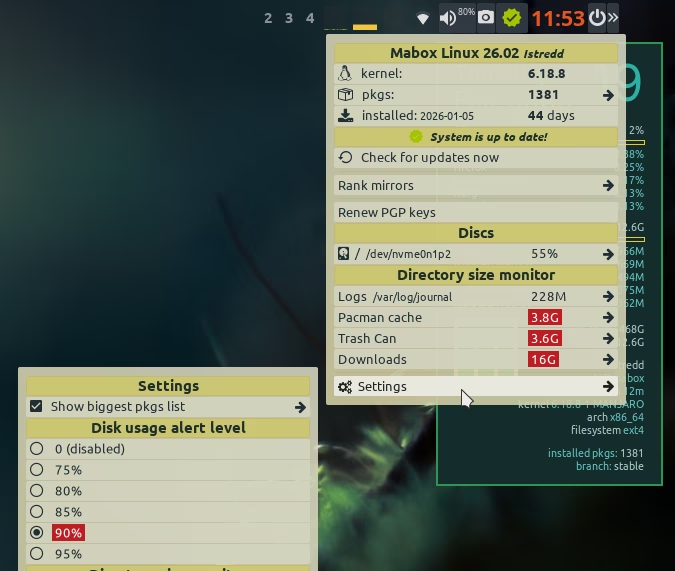
In a few days I will also publish an executor for tint2 - whose tasks will be to regularly check for updates, as well as monitor + inform about disks filling up.
---
### Author:  [@Ursi\_Janecks](https://forum.maboxlinux.org/u/Ursi_Janecks)
#### Post date: [February 19, 2026, 9:54am UTC](https://forum.maboxlinux.org/t/notification-theme/1779/6 "2026-02-19T09:54:02Z")
Good catch on the dunst dependency! I’ve been using the Sysinfo Conky for updates for a while now and it’s actually really nice because it stays out of the way until you need it. Looking forward to that tint2 executor, though - that sounds like a great addition to the Mabox toolkit.
---
### Author:  [@napcok](https://forum.maboxlinux.org/u/napcok)
#### Post date: [February 19, 2026, 10:32am UTC](https://forum.maboxlinux.org/t/notification-theme/1779/7 "2026-02-19T10:32:01Z")
Update notifier/status icon is already available…
But… on older installations some manual steps are needed to get it.
1. Install and enable systemd timer (dependency)
```auto
yay -S mabox-checkupdates-systemd
sudo systemctl enable --now mabox-checkupdates.timer
```
1. Update tint2 configs shipped by Mabox
_(Warning: this will overwrite the tint2 configuration files in your home directory.)_
```auto
mb-reset tint2
```
Above steps should do the trick, assuming you use default tint2 config: Istredd.
Take a look at _Settings_ submenu, you can configure and enable some more features there.