# Neofetch
**URL:** https://forum.maboxlinux.org/t/neofetch/1370
**Category:** Userland
**Created:** [June 4, 2023, 11:18pm UTC](https://forum.maboxlinux.org/t/neofetch/1370 "2023-06-04T23:18:05Z")
**Posts on this page:** 18
**Page:** 1
### Author:  [@Claudio](https://forum.maboxlinux.org/u/Claudio)
#### Post date: [June 4, 2023, 11:18pm UTC](https://forum.maboxlinux.org/t/neofetch/1370/1 "2023-06-04T23:18:05Z")
Hi All, I am trying to modify my neofetch.
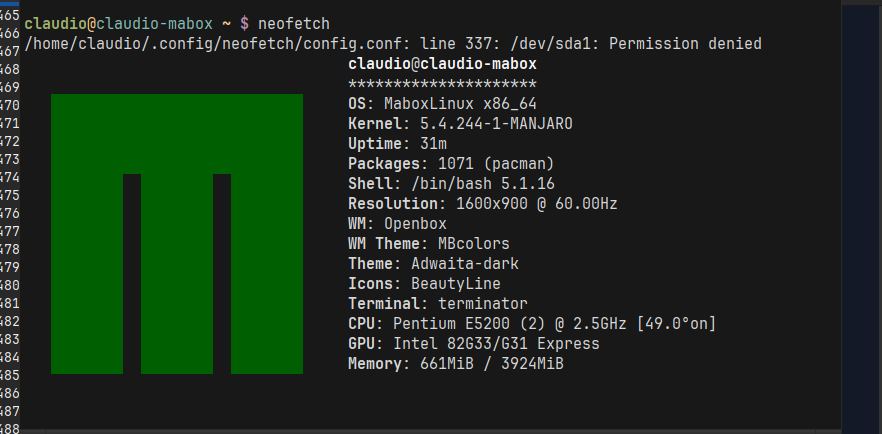
I want it to display information about my hard disk. I have tried different syntaxes and the most I have been able to do is to get this message when I run neofetch:
_(claudio@claudio-mabox ~ $ neofetch_
_/home/claudio/.config/neofetch/config.conf: line 337: /dev/sda1: Permission denied)_
Another thing I am trying to do is to show me an image instead of the ugly logo that appears on the screen, I have changed the options but I can’t get it to show me an image. It could be that Terminator doesn’t show images, that I’m writing the code wrong, or I don’t know what.
Can anyone share the code of a neofetch that shows an image?
Thanks to all of you.
---
### Author:  [@zolw](https://forum.maboxlinux.org/u/zolw)
#### Post date: [June 5, 2023, 1:41pm UTC](https://forum.maboxlinux.org/t/neofetch/1370/2 "2023-06-05T13:41:15Z")
Hi @Claudio,
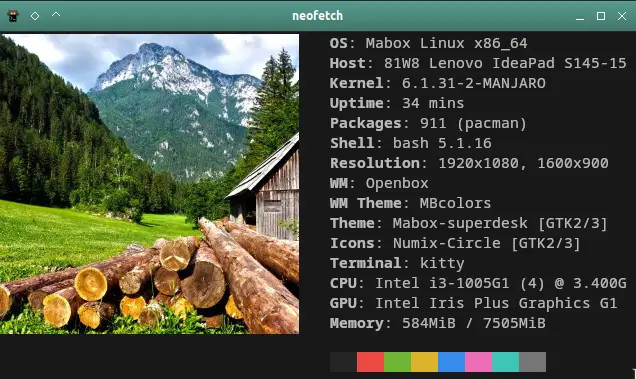
I haven’t solved. You may carry on. I modified neofetch config.conf
659c
`image_loop="on"`
.
608c
#image\_source=“$HOME/.config/neofetch/mabox.ascii”
```auto
image_source="$HOME/Pictures/pexels.jpeg"
```
.
595c
`image_backend="w3m"`
numbers are line numbers, made by diff -e
As you see kitty was used. (terminology may be used as well)
The problem is if image\_loop=off then the image disappears. So CTRL+c is the exit.
[This may help.](https://github.com/dylanaraps/neofetch/wiki/Images-in-the-terminal)
Diviértete jugando.
Edit:
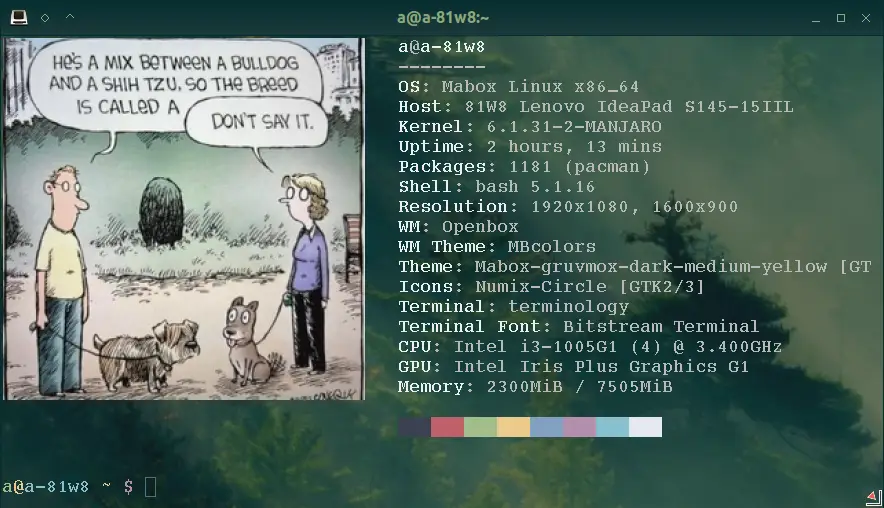
image\_loop=“off” with terminology – It works.
N.B. Mabox has a graphical neofetch hasn’t it?
---
### Author:  [@Claudio](https://forum.maboxlinux.org/u/Claudio)
#### Post date: [June 5, 2023, 11:00pm UTC](https://forum.maboxlinux.org/t/neofetch/1370/3 "2023-06-05T23:00:05Z")
Thanks, unfortunately I broke my system, I have to reinstall everything from scratch. I will come back on the subject as soon as Nabox is up and running again. 👍
---
### Author:  [@Claudio](https://forum.maboxlinux.org/u/Claudio)
#### Post date: [June 10, 2023, 3:02pm UTC](https://forum.maboxlinux.org/t/neofetch/1370/4 "2023-06-10T15:02:40Z")
Hi @zolw it looks great, good job 👍
---
### Author:  [@zolw](https://forum.maboxlinux.org/u/zolw)
#### Post date: [June 10, 2023, 6:56pm UTC](https://forum.maboxlinux.org/t/neofetch/1370/5 "2023-06-10T18:56:14Z")
If does not work check dependencies under link ‘This may help’ above.
---
### Author:  [@everardo17](https://forum.maboxlinux.org/u/everardo17)
#### Post date: [June 12, 2023, 6:10am UTC](https://forum.maboxlinux.org/t/neofetch/1370/6 "2023-06-12T06:10:20Z")
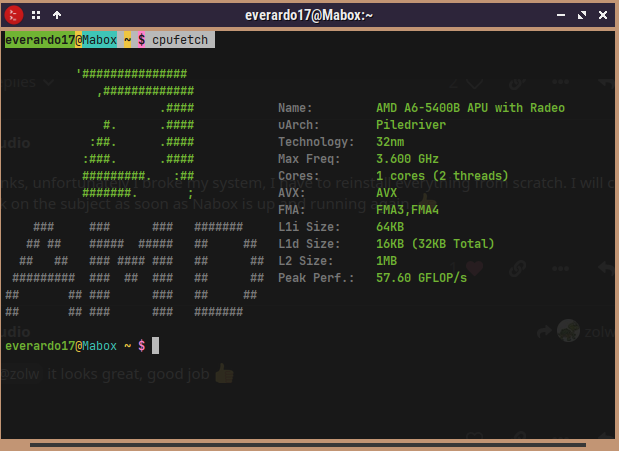
cpufetch
---
### Author:  [@Claudio](https://forum.maboxlinux.org/u/Claudio)
#### Post date: [June 13, 2023, 11:45am UTC](https://forum.maboxlinux.org/t/neofetch/1370/7 "2023-06-13T11:45:23Z")
I did not know CPUFETCH 👍.
---
### Author:  [@everardo17](https://forum.maboxlinux.org/u/everardo17)
#### Post date: [June 13, 2023, 11:16pm UTC](https://forum.maboxlinux.org/t/neofetch/1370/8 "2023-06-13T23:16:44Z")
It is similar to neofetch but it gives you the information of your processor it installs with yay
---
### Author:  [@Claudio](https://forum.maboxlinux.org/u/Claudio)
#### Post date: [June 27, 2023, 2:20pm UTC](https://forum.maboxlinux.org/t/neofetch/1370/9 "2023-06-27T14:20:57Z")
H i @zolw
I keep modifying my neofetch and it still does not show me an image.
I tried from the terminal to launch w3m /home/claudio/.config/neofetch/mabox\_3d.png and it works, it opens the image in a window outside the terminal but it opens it.
In the neofecth code I modified the image source in the following ways:
image\_source=“$HOME/claudio/.config/neofetch/mabox\_3d.png”
image\_source=“$/HOME/claudio/.config/neofetch/mabox\_3d.png”
image\_source=“$~/HOME/claudio/.config/neofetch/mabox\_3d.png”
image\_source=“$home/claudio/.config/neofetch/mabox\_3d.png”
image\_source=“$/home/claudio/.config/neofetch/mabox\_3d.png”
image\_source=“$~/home/claudio/.config/neofetch/mabox\_3d.png”
image\_loop=“on”
image\_loop=“off”
I have enabled and disabled the ascii options and nothing has worked.
Could it be due to the “themes”, some syntax error, another option?
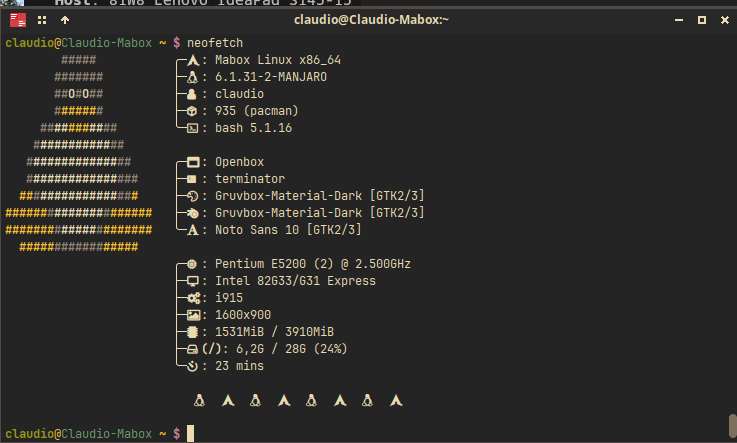
I was able to modify the text area as shown in the image. I can’t make any progress with this, it’s already a personal challenge.
I will add my code for review and if you notice what might be going wrong please let me know.
,
# See this wiki page for more info: # https://github.com/dylanaraps/neofetch/wiki/Customizing-Info print\_info() {
```
info "${cl2} ╭─ " distro
info "${cl2} ├─ " kernel
info "${cl2} ├─ " users
info "${cl2} ├─ " packages
info "${cl2} ╰─ " shell
echo
info "${cl6} ╭─ " wm
info "${cl6} ├─ " term
info "${cl6} ├─ " term_font
info "${cl6} ├─ " theme
info "${cl6} ├─ " icons
info "${cl6} ╰─ " font
echo
# info "${cl4} ╭─ " model
info "${cl4} ╭─ " cpu
info "${cl4} ├─ " gpu
info "${cl4} ├─ " gpu_driver
info "${cl4} ├─ " resolution
info "${cl4} ├─ " memory
info "${cl4} ├─ ${cl0} " disk
info "${cl4} ├─ ${cl0} " battery
info "${cl4} ╰─ " uptime
prin ""
prin " \n \n \n ${cl3} \n \n ${cl5} \n \n ${cl2} \n \n ${cl6} \n \n ${cl4} \n \n ${cl1} \n \n ${cl7} \n \n ${cl0} \n \n "
# info title
# info underline
# info "OS" distro
# info "Host" model
# info "Kernel" kernel
# info "Uptime" uptime
# info "Packages" packages
# info "Shell" shell
# info "Resolution" resolution
# info "DE" de
# info "WM" wm
# info "WM Theme" wm_theme
# info "Theme" theme
# info "Icons" icons
# info "Terminal" term
# info "Terminal Font" term_font
# info "CPU" cpu
# info "GPU" gpu
# info "Memory" memory
# info "GPU Driver" gpu_driver # Linux/macOS only
# info "CPU Usage" cpu_usage
# info "Disk" disk
# info "Battery" battery
# info "Font" font
# info "Song" song
# [["$player"]] && prin "Music Player" "$player"
# info "Local IP" local_ip
# info "Public IP" public_ip
# info "Users" users
# info "Locale" locale # This only works on glibc systems.
# info cols
```
}
# Title
# Hide/Show Fully qualified domain name.
#
# Default: ‘off’
# Values: ‘on’, ‘off’
# Flag: --title\_fqdn
title\_fqdn=“off”
# Kernel
# Shorten the output of the kernel function.
#
# Default: ‘on’
# Values: ‘on’, ‘off’
# Flag: --kernel\_shorthand
# Supports: Everything except \*BSDs (except PacBSD and PC-BSD)
#
# Example:
# on: ‘4.8.9-1-ARCH’
# off: ‘Linux 4.8.9-1-ARCH’
kernel\_shorthand=“on”
# Distro
# Shorten the output of the distro function
#
# Default: ‘off’
# Values: ‘on’, ‘tiny’, ‘off’
# Flag: --distro\_shorthand
# Supports: Everything except Windows and Haiku
distro\_shorthand=“off”
# Show/Hide OS Architecture.
# Show ‘x86\_64’, ‘x86’ and etc in ‘Distro:’ output.
#
# Default: ‘on’
# Values: ‘on’, ‘off’
# Flag: --os\_arch
#
# Example:
# on: ‘Arch Linux x86\_64’
# off: ‘Arch Linux’
os\_arch=“on”
# Uptime
# Shorten the output of the uptime function
#
# Default: ‘on’
# Values: ‘on’, ‘tiny’, ‘off’
# Flag: --uptime\_shorthand
#
# Example:
# on: ‘2 days, 10 hours, 3 mins’
# tiny: ‘2d 10h 3m’
# off: ‘2 days, 10 hours, 3 minutes’
uptime\_shorthand=“on”
# Memory
# Show memory pecentage in output.
#
# Default: ‘off’
# Values: ‘on’, ‘off’
# Flag: --memory\_percent
#
# Example:
# on: ‘1801MiB / 7881MiB (22%)’
# off: ‘1801MiB / 7881MiB’
memory\_percent=“off”
# Change memory output unit.
#
# Default: ‘mib’
# Values: ‘kib’, ‘mib’, ‘gib’
# Flag: --memory\_unit
#
# Example:
# kib ‘1020928KiB / 7117824KiB’
# mib ‘1042MiB / 6951MiB’
# gib: ’ 0.98GiB / 6.79GiB’
memory\_unit=“mib”
# Packages
# Show/Hide Package Manager names.
#
# Default: ‘tiny’
# Values: ‘on’, ‘tiny’ ‘off’
# Flag: --package\_managers
#
# Example:
# on: ‘998 (pacman), 8 (flatpak), 4 (snap)’
# tiny: ‘908 (pacman, flatpak, snap)’
# off: ‘908’
package\_managers=“on”
# Shell
# Show the path to $SHELL
#
# Default: ‘off’
# Values: ‘on’, ‘off’
# Flag: --shell\_path
#
# Example:
# on: ‘/bin/bash’
# off: ‘bash’
shell\_path=“off”
# Show $SHELL version
#
# Default: ‘on’
# Values: ‘on’, ‘off’
# Flag: --shell\_version
#
# Example:
# on: ‘bash 4.4.5’
# off: ‘bash’
shell\_version=“on”
# CPU
# CPU speed type
#
# Default: ‘bios\_limit’
# Values: ‘scaling\_cur\_freq’, ‘scaling\_min\_freq’, ‘scaling\_max\_freq’, ‘bios\_limit’.
# Flag: --speed\_type
# Supports: Linux with ‘cpufreq’
# NOTE: Any file in ‘/sys/devices/system/cpu/cpu0/cpufreq’ can be used as a value.
speed\_type=“bios\_limit”
# CPU speed shorthand
#
# Default: ‘off’
# Values: ‘on’, ‘off’.
# Flag: --speed\_shorthand
# NOTE: This flag is not supported in systems with CPU speed less than 1 GHz
#
# Example:
# on: ‘i7-6500U (4) @ 3.1GHz’
# off: ‘i7-6500U (4) @ 3.100GHz’
speed\_shorthand=“off”
# Enable/Disable CPU brand in output.
#
# Default: ‘on’
# Values: ‘on’, ‘off’
# Flag: --cpu\_brand
#
# Example:
# on: ‘Intel i7-6500U’
# off: ‘i7-6500U (4)’
cpu\_brand=“on”
# CPU Speed
# Hide/Show CPU speed.
#
# Default: ‘on’
# Values: ‘on’, ‘off’
# Flag: --cpu\_speed
#
# Example:
# on: ‘Intel i7-6500U (4) @ 3.1GHz’
# off: ‘Intel i7-6500U (4)’
cpu\_speed=“on”
# CPU Cores
# Display CPU cores in output
#
# Default: ‘logical’
# Values: ‘logical’, ‘physical’, ‘off’
# Flag: --cpu\_cores
# Support: ‘physical’ doesn’t work on BSD.
#
# Example:
# logical: ‘Intel i7-6500U (4) @ 3.1GHz’ (All virtual cores)
# physical: ‘Intel i7-6500U (2) @ 3.1GHz’ (All physical cores)
# off: ‘Intel i7-6500U @ 3.1GHz’
cpu\_cores=“logical”
# CPU Temperature
# Hide/Show CPU temperature.
# Note the temperature is added to the regular CPU function.
#
# Default: ‘off’
# Values: ‘C’, ‘F’, ‘off’
# Flag: --cpu\_temp
# Supports: Linux, BSD
# NOTE: For FreeBSD and NetBSD-based systems, you’ll need to enable
# coretemp kernel module. This only supports newer Intel processors.
#
# Example:
# C: ‘Intel i7-6500U (4) @ 3.1GHz [27.2°C]’
# F: ‘Intel i7-6500U (4) @ 3.1GHz [82.0°F]’
# off: ‘Intel i7-6500U (4) @ 3.1GHz’
cpu\_temp=“off”
# GPU
# Enable/Disable GPU Brand
#
# Default: ‘on’
# Values: ‘on’, ‘off’
# Flag: --gpu\_brand
#
# Example:
# on: ‘AMD HD 7950’
# off: ‘HD 7950’
gpu\_brand=“on”
# Which GPU to display
#
# Default: ‘all’
# Values: ‘all’, ‘dedicated’, ‘integrated’
# Flag: --gpu\_type
# Supports: Linux
#
# Example:
# all:
# GPU1: AMD HD 7950
# GPU2: Intel Integrated Graphics
#
# dedicated:
# GPU1: AMD HD 7950
#
# integrated:
# GPU1: Intel Integrated Graphics
gpu\_type=“all”
# Resolution
# Display refresh rate next to each monitor
# Default: ‘off’
# Values: ‘on’, ‘off’
# Flag: --refresh\_rate
# Supports: Doesn’t work on Windows.
#
# Example:
# on: ‘1920x1080 @ 60Hz’
# off: ‘1920x1080’
refresh\_rate=“off”
# Gtk Theme / Icons / Font
# Shorten output of GTK Theme / Icons / Font
#
# Default: ‘off’
# Values: ‘on’, ‘off’
# Flag: --gtk\_shorthand
#
# Example:
# on: ‘Numix, Adwaita’
# off: ‘Numix [GTK2], Adwaita [GTK3]’
gtk\_shorthand=“off”
# Enable/Disable gtk2 Theme / Icons / Font
#
# Default: ‘on’
# Values: ‘on’, ‘off’
# Flag: --gtk2
#
# Example:
# on: ‘Numix [GTK2], Adwaita [GTK3]’
# off: ‘Adwaita [GTK3]’
gtk2=“on”
# Enable/Disable gtk3 Theme / Icons / Font
#
# Default: ‘on’
# Values: ‘on’, ‘off’
# Flag: --gtk3
#
# Example:
# on: ‘Numix [GTK2], Adwaita [GTK3]’
# off: ‘Numix [GTK2]’
gtk3=“on”
# IP Address
# Website to ping for the public IP
#
# Default: ‘[http://ident.me](http://ident.me)’
# Values: ‘url’
# Flag: --ip\_host
public\_ip\_host=“[http://ident.me](http://ident.me)”
# Public IP timeout.
#
# Default: ‘2’
# Values: ‘int’
# Flag: --ip\_timeout
public\_ip\_timeout=2
# Desktop Environment
# Show Desktop Environment version
#
# Default: ‘on’
# Values: ‘on’, ‘off’
# Flag: --de\_version
de\_version=“on”
# Disk
# Which disks to display.
# The values can be any /dev/sdXX, mount point or directory.
# NOTE: By default we only show the disk info for ‘/’.
#
# Default: ‘/’
# Values: ‘/’, ‘/dev/sdXX’, ‘/path/to/drive’.
# Flag: --disk\_show
#
# Example:
# disk\_show=(‘/’ ‘/dev/sdb1’):
# ‘Disk (/): 74G / 118G (66%)’
# ‘Disk (/mnt/Videos): 823G / 893G (93%)’
#
# disk\_show=(‘/’):
# ‘Disk (/): 74G / 118G (66%)’
#
disk\_show=(‘/’)
# Disk subtitle.
# What to append to the Disk subtitle.
#
# Default: ‘mount’
# Values: ‘mount’, ‘name’, ‘dir’, ‘none’
# Flag: --disk\_subtitle
#
# Example:
# name: ‘Disk (/dev/sda1): 74G / 118G (66%)’
# ‘Disk (/dev/sdb2): 74G / 118G (66%)’
#
# mount: ‘Disk (/): 74G / 118G (66%)’
# ‘Disk (/mnt/Local Disk): 74G / 118G (66%)’
# ‘Disk (/mnt/Videos): 74G / 118G (66%)’
#
# dir: ‘Disk (/): 74G / 118G (66%)’
# ‘Disk (Local Disk): 74G / 118G (66%)’
# ‘Disk (Videos): 74G / 118G (66%)’
#
# none: ‘Disk: 74G / 118G (66%)’
# ‘Disk: 74G / 118G (66%)’
# ‘Disk: 74G / 118G (66%)’
disk\_subtitle=“mount”
# Disk percent.
# Show/Hide disk percent.
#
# Default: ‘on’
# Values: ‘on’, ‘off’
# Flag: --disk\_percent
#
# Example:
# on: ‘Disk (/): 74G / 118G (66%)’
# off: ‘Disk (/): 74G / 118G’
disk\_percent=“on”
# Song
# Manually specify a music player.
#
# Default: ‘auto’
# Values: ‘auto’, ‘player-name’
# Flag: --music\_player
#
# Available values for ‘player-name’:
#
# amarok
# audacious
# banshee
# bluemindo
# clementine
# cmus
# deadbeef
# deepin-music
# dragon
# elisa
# exaile
# gnome-music
# gmusicbrowser
# gogglesmm
# guayadeque
# io.elementary.music
# iTunes
# juk
# lollypop
# mocp
# mopidy
# mpd
# muine
# netease-cloud-music
# olivia
# playerctl
# pogo
# pragha
# qmmp
# quodlibet
# rhythmbox
# sayonara
# smplayer
# spotify
# strawberry
# tauonmb
# tomahawk
# vlc
# xmms2d
# xnoise
# yarock
music\_player=“auto”
# Format to display song information.
#
# Default: ‘%artist% - %album% - %title%’
# Values: ‘%artist%’, ‘%album%’, ‘%title%’
# Flag: --song\_format
#
# Example:
# default: ‘Song: Jet - Get Born - Sgt Major’
song\_format=“%artist% - %album% - %title%”
# Print the Artist, Album and Title on separate lines
#
# Default: ‘off’
# Values: ‘on’, ‘off’
# Flag: --song\_shorthand
#
# Example:
# on: ‘Artist: The Fratellis’
# ‘Album: Costello Music’
# ‘Song: Chelsea Dagger’
#
# off: ‘Song: The Fratellis - Costello Music - Chelsea Dagger’
song\_shorthand=“off”
# ‘mpc’ arguments (specify a host, password etc).
#
# Default: ‘’
# Example: mpc\_args=(-h HOST -P PASSWORD)
mpc\_args=()
# Text Colors
# Text Colors
#
# Default: ‘distro’
# Values: ‘distro’, ‘num’ ‘num’ ‘num’ ‘num’ ‘num’ ‘num’
# Flag: --colors
#
# Each number represents a different part of the text in
# this order: ‘title’, ‘@’, ‘underline’, ‘subtitle’, ‘colon’, ‘info’
#
# Example:
# colors=(distro) - Text is colored based on Distro colors.
# colors=(4 6 1 8 8 6) - Text is colored in the order above.
colors=(distro)
# Text Options
# Toggle bold text
#
# Default: ‘on’
# Values: ‘on’, ‘off’
# Flag: --bold
bold=“on”
# Enable/Disable Underline
#
# Default: ‘on’
# Values: ‘on’, ‘off’
# Flag: --underline
underline\_enabled=“on”
# Underline character
#
# Default: ‘-’
# Values: ‘string’
# Flag: --underline\_char
underline\_char=“-”
# Info Separator
# Replace the default separator with the specified string.
#
# Default: ‘:’
# Flag: --separator
#
# Example:
# separator=“-\>”: ‘Shell-\> bash’
# separator=" =": ‘WM = dwm’
separator=“:”
# Color Blocks
# Color block range
# The range of colors to print.
#
# Default: ‘0’, ‘15’
# Values: ‘num’
# Flag: --block\_range
#
# Example:
#
# Display colors 0-7 in the blocks. (8 colors)
# neofetch --block\_range 0 7
#
# Display colors 0-15 in the blocks. (16 colors)
# neofetch --block\_range 0 15
block\_range=(0 15)
# Toggle color blocks
#
# Default: ‘on’
# Values: ‘on’, ‘off’
# Flag: --color\_blocks
color\_blocks=“on”
# Color block width in spaces
#
# Default: ‘3’
# Values: ‘num’
# Flag: --block\_width
block\_width=3
# Color block height in lines
#
# Default: ‘1’
# Values: ‘num’
# Flag: --block\_height
block\_height=1
# Color Alignment
#
# Default: ‘auto’
# Values: ‘auto’, ‘num’
# Flag: --col\_offset
#
# Number specifies how far from the left side of the terminal (in spaces) to
# begin printing the columns, in case you want to e.g. center them under your
# text.
# Example:
# col\_offset=“auto” - Default behavior of neofetch
# col\_offset=7 - Leave 7 spaces then print the colors
col\_offset=“auto”
# Progress Bars
# Bar characters
#
# Default: ‘-’, ‘=’
# Values: ‘string’, ‘string’
# Flag: --bar\_char
#
# Example:
# neofetch --bar\_char ‘elapsed’ ‘total’
# neofetch --bar\_char ‘-’ ‘=’
bar\_char\_elapsed=“-”
bar\_char\_total=“=”
# Toggle Bar border
#
# Default: ‘on’
# Values: ‘on’, ‘off’
# Flag: --bar\_border
bar\_border=“on”
# Progress bar length in spaces
# Number of chars long to make the progress bars.
#
# Default: ‘15’
# Values: ‘num’
# Flag: --bar\_length
bar\_length=15
# Progress bar colors
# When set to distro, uses your distro’s logo colors.
#
# Default: ‘distro’, ‘distro’
# Values: ‘distro’, ‘num’
# Flag: --bar\_colors
#
# Example:
# neofetch --bar\_colors 3 4
# neofetch --bar\_colors distro 5
bar\_color\_elapsed=“distro”
bar\_color\_total=“distro”
# Info display
# Display a bar with the info.
#
# Default: ‘off’
# Values: ‘bar’, ‘infobar’, ‘barinfo’, ‘off’
# Flags: --cpu\_display
# –memory\_display
# –battery\_display
# –disk\_display
#
# Example:
# bar: ‘[—=======]’
# infobar: ‘info [—=======]’
# barinfo: ‘[—=======] info’
# off: ‘info’
cpu\_display=“off”
memory\_display=“off”
battery\_display=“off”
disk\_display=“off”
# Backend Settings
# Image backend.
#
# Default: ‘ascii’
# Values: ‘ascii’, ‘caca’, ‘chafa’, ‘jp2a’, ‘iterm2’, ‘off’,
# ‘pot’, ‘termpix’, ‘pixterm’, ‘tycat’, ‘w3m’, ‘kitty’
# Flag: --backend
image\_backend=“w3m”
# Image Source
#
# Which image or ascii file to display.
#
# Default: ‘auto’
# Values: ‘auto’, ‘ascii’, ‘wallpaper’, ‘/path/to/img’, ‘/path/to/ascii’, ‘/path/to/dir/’
# ‘command output (neofetch --ascii “$(fortune | cowsay -W 30)”)’
# Flag: --source
#
# NOTE: ‘auto’ will pick the best image source for whatever image backend is used.
# In ascii mode, distro ascii art will be used and in an image mode, your
# wallpaper will be used.
image\_source=“$~/home/claudio/.config/neofetch/mabox\_3d.png”
# Ascii Options
# Ascii distro
# Which distro’s ascii art to display.
#
# Default: ‘auto’
# Values: ‘auto’, ‘distro\_name’
# Flag: --ascii\_distro
# NOTE: AIX, Alpine, Anarchy, Android, Antergos, antiX, “AOSC OS”,
# “AOSC OS/Retro”, Apricity, ArcoLinux, ArchBox, ARCHlabs,
# ArchStrike, XFerience, ArchMerge, Arch, Artix, Arya, Bedrock,
# Bitrig, BlackArch, BLAG, BlankOn, BlueLight, bonsai, BSD,
# BunsenLabs, Calculate, Carbs, CentOS, Chakra, ChaletOS,
# Chapeau, Chrom\*, Cleanjaro, ClearOS, Clear\_Linux, Clover,
# Condres, Container\_Linux, CRUX, Cucumber, Debian, Deepin,
# DesaOS, Devuan, DracOS, DarkOs, DragonFly, Drauger, Elementary,
# EndeavourOS, Endless, EuroLinux, Exherbo, Fedora, Feren, FreeBSD,
# FreeMiNT, Frugalware, Funtoo, GalliumOS, Garuda, Gentoo, Pentoo,
# gNewSense, GNOME, GNU, GoboLinux, Grombyang, Guix, Haiku, Huayra,
# Hyperbola, janus, Kali, KaOS, KDE\_neon, Kibojoe, Kogaion,
# Korora, KSLinux, Kubuntu, LEDE, LFS, Linux\_Lite,
# LMDE, Lubuntu, Lunar, macos, Mageia, MagpieOS, Mandriva,
# Manjaro, Maui, Mer, Minix, LinuxMint, MX\_Linux, Namib,
# Neptune, NetBSD, Netrunner, Nitrux, NixOS, Nurunner,
# NuTyX, OBRevenge, OpenBSD, openEuler, OpenIndiana, openmamba,
# OpenMandriva, OpenStage, OpenWrt, osmc, Oracle, OS Elbrus, PacBSD,
# Parabola, Pardus, Parrot, Parsix, TrueOS, PCLinuxOS, Peppermint,
# popos, Porteus, PostMarketOS, Proxmox, Puppy, PureOS, Qubes, Radix,
# Raspbian, Reborn\_OS, Redstar, Redcore, Redhat, Refracted\_Devuan,
# Regata, Rosa, sabotage, Sabayon, Sailfish, SalentOS, Scientific,
# Septor, SereneLinux, SharkLinux, Siduction, Slackware, SliTaz,
# SmartOS, Solus, Source\_Mage, Sparky, Star, SteamOS, SunOS,
# openSUSE\_Leap, openSUSE\_Tumbleweed, openSUSE, SwagArch, Tails,
# Trisquel, Ubuntu-Budgie, Ubuntu-GNOME, Ubuntu-MATE, Ubuntu-Studio,
# Ubuntu, Venom, Void, Obarun, windows10, Windows7, Xubuntu, Zorin,
# and IRIX have ascii logos
# NOTE: Arch, Ubuntu, Redhat, and Dragonfly have ‘old’ logo variants.
# Use ‘{distro name}\_old’ to use the old logos.
# NOTE: Ubuntu has flavor variants.
# Change this to Lubuntu, Kubuntu, Xubuntu, Ubuntu-GNOME,
# Ubuntu-Studio, Ubuntu-Mate or Ubuntu-Budgie to use the flavors.
# NOTE: Arcolinux, Dragonfly, Fedora, Alpine, Arch, Ubuntu,
# CRUX, Debian, Gentoo, FreeBSD, Mac, NixOS, OpenBSD, android,
# Antrix, CentOS, Cleanjaro, ElementaryOS, GUIX, Hyperbola,
# Manjaro, MXLinux, NetBSD, Parabola, POP\_OS, PureOS,
# Slackware, SunOS, LinuxLite, OpenSUSE, Raspbian,
# postmarketOS, and Void have a smaller logo variant.
# Use ‘{distro name}\_small’ to use the small variants.
ascii\_distro=“auto”
# Ascii Colors
#
# Default: ‘distro’
# Values: ‘distro’, ‘num’ ‘num’ ‘num’ ‘num’ ‘num’ ‘num’
# Flag: --ascii\_colors
#
# Example:
# ascii\_colors=(distro) - Ascii is colored based on Distro colors.
# ascii\_colors=(4 6 1 8 8 6) - Ascii is colored using these colors.
ascii\_colors=(distro)
# Bold ascii logo
# Whether or not to bold the ascii logo.
#
# Default: ‘on’
# Values: ‘on’, ‘off’
# Flag: --ascii\_bold
ascii\_bold=“on”
# Image Options
# Image loop
# Setting this to on will make neofetch redraw the image constantly until
# Ctrl+C is pressed. This fixes display issues in some terminal emulators.
#
# Default: ‘off’
# Values: ‘on’, ‘off’
# Flag: --loop
image\_loop=“on”
# Thumbnail directory
#
# Default: ‘~/.cache/thumbnails/neofetch’
# Values: ‘dir’
thumbnail\_dir=“${XDG\_CACHE\_HOME:-${HOME}/.cache}/thumbnails/neofetch”
# Crop mode
#
# Default: ‘normal’
# Values: ‘normal’, ‘fit’, ‘fill’
# Flag: --crop\_mode
#
# See this wiki page to learn about the fit and fill options.
# [What is Waifu Crop? · dylanaraps/neofetch Wiki · GitHub](https://github.com/dylanaraps/neofetch/wiki/What-is-Waifu-Crop%3F)
crop\_mode=“normal”
# Crop offset
# Note: Only affects ‘normal’ crop mode.
#
# Default: ‘center’
# Values: ‘northwest’, ‘north’, ‘northeast’, ‘west’, ‘center’
# ‘east’, ‘southwest’, ‘south’, ‘southeast’
# Flag: --crop\_offset
crop\_offset=“center”
# Image size
# The image is half the terminal width by default.
#
# Default: ‘auto’
# Values: ‘auto’, ‘00px’, ‘00%’, ‘none’
# Flags: --image\_size
# –size
image\_size=“auto”
# Gap between image and text
#
# Default: ‘3’
# Values: ‘num’, ‘-num’
# Flag: --gap
gap=3
# Image offsets
# Only works with the w3m backend.
#
# Default: ‘0’
# Values: ‘px’
# Flags: --xoffset
# –yoffset
yoffset=0
xoffset=0
# Image background color
# Only works with the w3m backend.
#
# Default: ‘’
# Values: ‘color’, ‘blue’
# Flag: --bg\_color
background\_color=
# Misc Options
# Stdout mode
# Turn off all colors and disables image backend (ASCII/Image).
# Useful for piping into another command.
# Default: ‘off’
# Values: ‘on’, ‘off’
stdout=“off”
Translated with [Translate texts & full document files instantly. Accurate translations for individuals and Teams. Millions translate with DeepL every day.](http://www.DeepL.com/Translator) (free version)
---
### Author:  [@zolw](https://forum.maboxlinux.org/u/zolw)
#### Post date: [June 27, 2023, 3:33pm UTC](https://forum.maboxlinux.org/t/neofetch/1370/10 "2023-06-27T15:33:00Z")
Ola @Claudio ,
I would have sent only the modified lines. Let us suppose you copied the original config.conf to config1.conf then
`diff -c config1.conf config.conf > differ.txt`
and then copy differ.txt as preformatted text – select and CTRL+E
Modify this line
`image_source=“$~/home/claudio/.config/neofetch/mabox_3d.png”` ## wrong
`image_source=“/home/claudio/.config/neofetch/mabox_3d.png”`
tylde is your home directory, but you can use absolute path
dollar sign is needed only if you use an environment variable
the second difference
`ascii_colors=(2 7)`
it may be irrelevant now
Terminal emulator is terminology ( just to make sure)
The hashmarks were lost / filtered out you sent above. So there will be some more iterations.
---
### Author:  [@Claudio](https://forum.maboxlinux.org/u/Claudio)
#### Post date: [June 27, 2023, 10:34pm UTC](https://forum.maboxlinux.org/t/neofetch/1370/11 "2023-06-27T22:34:54Z")
Thank you, I will check the differences as you indicate and continue testing.
I’ve sent the whole code in case you see any errors elsewhere that would prevent neofetch from working normally.
Can we share/attach the file? I couldn’t find the option to do so.
---
### Author:  [@Claudio](https://forum.maboxlinux.org/u/Claudio)
#### Post date: [June 27, 2023, 11:15pm UTC](https://forum.maboxlinux.org/t/neofetch/1370/12 "2023-06-27T23:15:47Z")
Hi @zolw
According to differ.text. The list of differences is as follows.
\*\*\* config-1.conf 2023-06-27 19:44:48.697233023 -0300
— config.conf 2023-06-26 21:48:30.329525033 -0300
* * *
**! image\_backend=“w3m”**
**! image\_backend=“ascii”**
* * *
**! image\_source=“$/HOME/claudio/.config/neofetch/a-mabox\_3d.png”**
**! image\_source=“auto”**
* * *
**! image\_loop=“on”**
**! image\_loop=“off”**
If I write $/HOME or $/home nothing happens
---
### Author:  [@zolw](https://forum.maboxlinux.org/u/zolw)
#### Post date: [June 28, 2023, 9:35am UTC](https://forum.maboxlinux.org/t/neofetch/1370/13 "2023-06-28T09:35:01Z")
Hi @Claudio ,
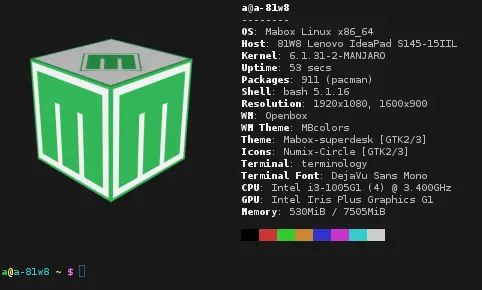
Para no complicar demasiado las cosas. Así es como he probado desde cero:
mabox-linux-23.06-Istredd-230623-linux61.iso – instalación nueva
```auto
cp .config/conky/images/mabox_3d.png .config/neofetch/
yay -S terminology
```
cambio en [config.com](http://config.com) :
595 `image_backend="w3m"`
608 `image_source="$HOME/.config/neofetch/mabox_3d.png"`
Pruebe sus propios cambios paso a paso.
> **Hide a long story**
>
> 
---
### Author:  [@Claudio](https://forum.maboxlinux.org/u/Claudio)
#### Post date: [June 28, 2023, 1:13pm UTC](https://forum.maboxlinux.org/t/neofetch/1370/14 "2023-06-28T13:13:06Z")
Hi, thank you very much, I will try it as you say. Then I will comment on the result. 👍
---
### Author:  [@Claudio](https://forum.maboxlinux.org/u/Claudio)
#### Post date: [June 28, 2023, 11:27pm UTC](https://forum.maboxlinux.org/t/neofetch/1370/15 "2023-06-28T23:27:57Z")
Hi @zolw
I have followed your recommended steps.
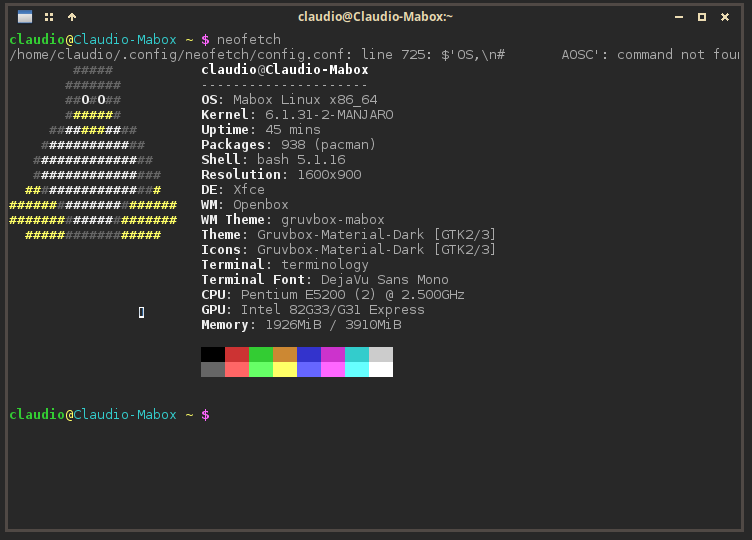
To avoid errors, first I moved everything I had in the /home/claudio/.config/neofetch folder to another folder, then I copied and pasted the commands in the console according to what you posted, now neofetch gets the following error:
_**(/home/claudio/.config/neofetch/config.conf: line 725: $‘OS,\n# AOSC’: command not found)**_
This is line 725 in the file:
_ **# NOTE: AIX, Alpine, Anarchy, Android, Antergos, antiX, “AOSC OS”** _
It is marked as comment (#),
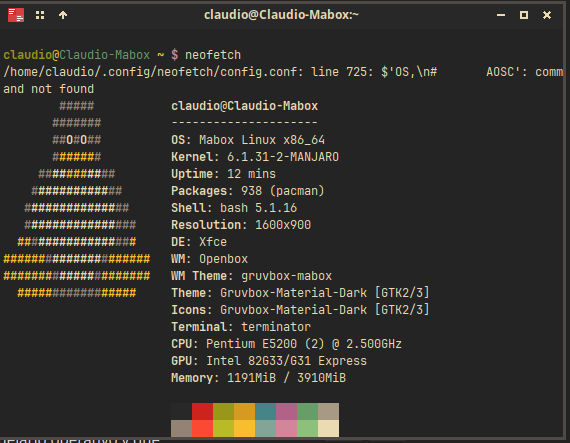
I don't know, I think I'm going to build my config.conf file from zero
In Terminology it looks similar
Translated with [Translate texts & full document files instantly. Accurate translations for individuals and Teams. Millions translate with DeepL every day.](http://www.DeepL.com/Translator) (free version)
---
### Author:  [@Claudio](https://forum.maboxlinux.org/u/Claudio)
#### Post date: [June 29, 2023, 12:44am UTC](https://forum.maboxlinux.org/t/neofetch/1370/16 "2023-06-29T00:44:10Z")
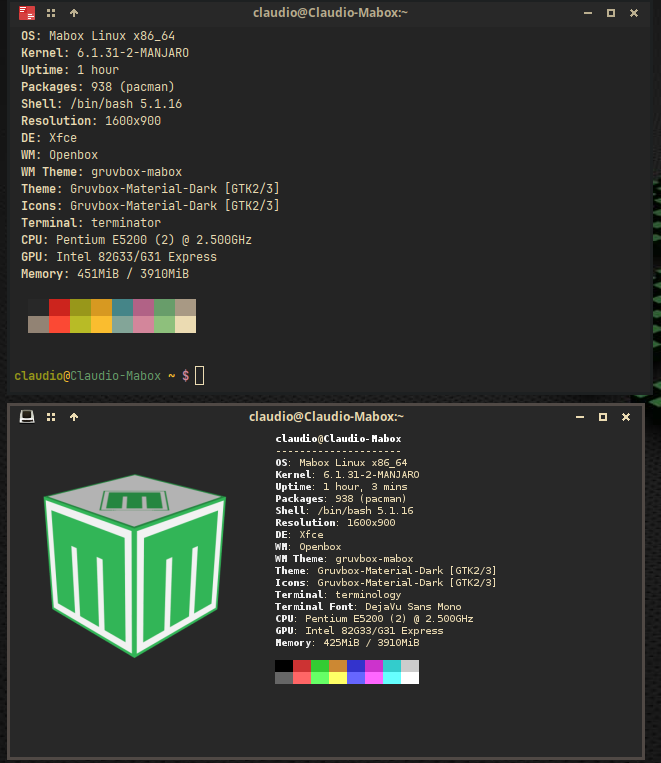
Well, I somehow managed to get it to work on Terminology, but not on Terminator, maybe the way it affects this terminal makes it not work.
Now it remains to figure that out and if I can get it to display the image with one of the other neofetch layouts.
Thank you very much for your support.
I’ll keep insisting until I get it to display the way I want it to on Terminator too and if possible on any terminal.
Translated with [Translate texts & full document files instantly. Accurate translations for individuals and Teams. Millions translate with DeepL every day.](http://www.DeepL.com/Translator) (free version)
---
### Author:  [@Claudio](https://forum.maboxlinux.org/u/Claudio)
#### Post date: [July 5, 2023, 11:54pm UTC](https://forum.maboxlinux.org/t/neofetch/1370/17 "2023-07-05T23:54:13Z")
Well, I found this old conversation on the forum:
> [@Terminator displaying images](https://forum.maboxlinux.org/t/terminator-displaying-images/1130):
>
> Is there a way to get Terminator to show images in terminal. I tried to make it work with w3m but no luck.
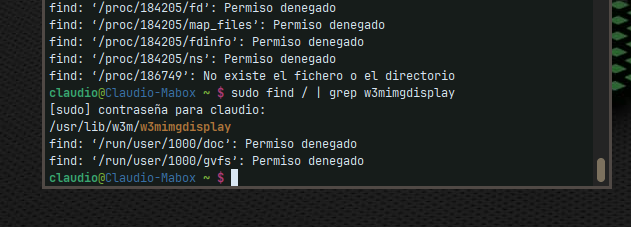
I asked @monster but he didn’t answer me yet, while waiting for the answer I was following the thread, I tried the link and followed the steps, but I get to a point where “access denied” appears in my terminal and from there I don’t know how to continue, I kept looking and found this other answer in Git Hub
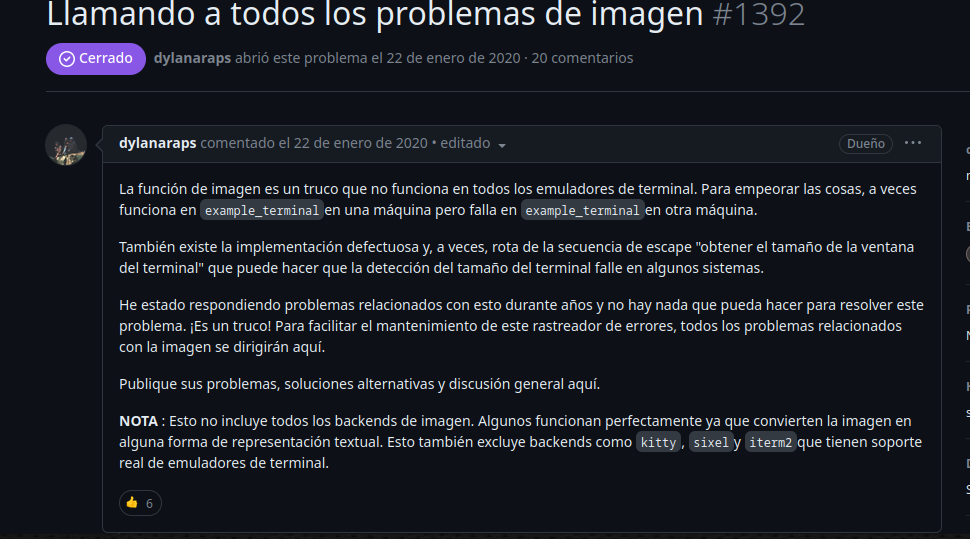
, maybe my Terminator doesn't manage to show images like Terminology does. If you can think of a way to do it, I keep trying, meanwhile I leave it in by pass.
Translated with [Translate texts & full document files instantly. Accurate translations for individuals and Teams. Millions translate with DeepL every day.](http://www.DeepL.com/Translator) (free version)
---
### Author:  [@Claudio](https://forum.maboxlinux.org/u/Claudio)
#### Post date: [July 20, 2024, 11:26pm UTC](https://forum.maboxlinux.org/t/neofetch/1370/18 "2024-07-20T23:26:52Z")
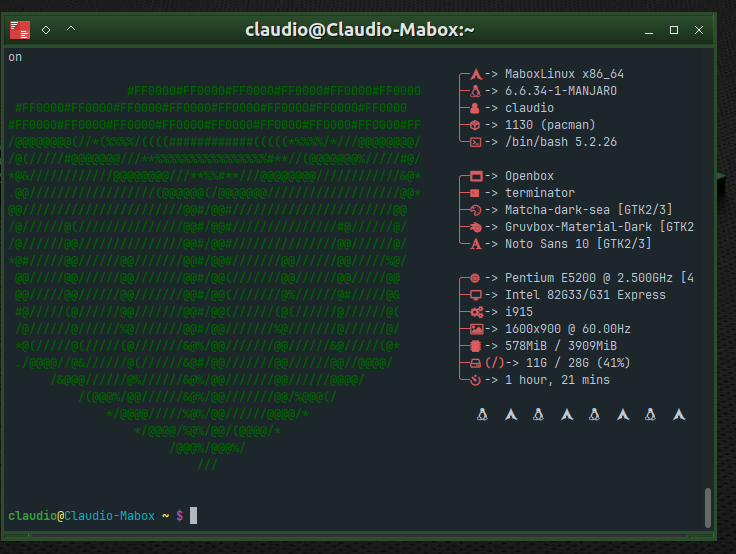
Well, well, after a while and not getting my Terminator to show an image I decided to invest some of my little time in creating a Mabox logo that could show my neofetch, so I made a logo in ascii and modified the file /usr/bin/neofetch where the logos are shown, replaced one that I don’t use (in case it didn’t work) and changed it. Now I have Mabox logo in my neofetch.
It is very rudimentary and something big, I must work on modifying it and make it smaller, that will take me a lot of time, if you are interested in trying and playing with it I share the file for you to use it, anyway, I think I will create one with the word MABOX in two lines and replace this one that I don’t like, then I have to play with the colors.