I will arrange conky things tomorrow or after xmas.
Sure - I can show
Keyboard Control:
  auto repeat:  on    key click percent:  0    LED mask:  00000002
  XKB indicators:
    00: Caps Lock:   off    01: Num Lock:    on     02: Scroll Lock: off
    03: Compose:     off    04: Kana:        off    05: Sleep:       off
    06: Suspend:     off    07: Mute:        off    08: Misc:        off
    09: Mail:        off    10: Charging:    off    11: Shift Lock:  off
    12: Group 2:     off    13: Mouse Keys:  off
  auto repeat delay:  660    repeat rate:  25
  auto repeating keys:  00ffffffdffffbbf
                        fadfffefffedffff
                        9fffffffffffffff
                        fff7ffffffffffff
  bell percent:  0    bell pitch:  400    bell duration:  100
Pointer Control:
  acceleration:  2/1    threshold:  4
Screen Saver:
  prefer blanking:  yes    allow exposures:  yes
  timeout:  600    cycle:  600
Colors:
  default colormap:  0x20    BlackPixel:  0x0    WhitePixel:  0xffffff
Font Path:
  /usr/share/fonts/misc,/usr/share/fonts/TTF,/usr/share/fonts/Type1,/usr/share/fonts/100dpi,/usr/share/fonts/75dpi,built-ins
DPMS (Display Power Management Signaling):
  Standby: 600    Suspend: 600    Off: 600
  DPMS is Enabled
  Monitor is On
At the time i was working with this dpms thing i desided to go the mabox way.
That means commands with xset, and not the use of the gui. (the gui though also uses dpms)
My experience is not good with the gui and mabox.
But that’s me.
So i left the gui. And removed it.
When there is more animo i could have a look to make something userfriendly.
At that time all was also new to me. And setup could be improved.
quick command.
# Set numlock on
xset -c "NumLock" 1

# Set numlock off
xset -c "NumLock" 0
For use with the Gui maybe someone else can help you with that.
I have tried it and working fine. The other solution which I tried was in the scripts that I put the original Mabox lockscreen - in this case Mabox use the same and this way is working too.
I’m not entirely sure about the explanation you give.
When you say, “Mabox uses the same method, and this way works too.”
In short, you’re now using a copy of the default Mabox script from your ~/bin directory that you created yourself.
Longer Explanation:
What you basically did above is this:
I gave you a copy of the original jglockscreen script from Mabox, located in /usr/bin/.
You then copied this script into your ~/bin folder with the adaptation noblank time.
All scripts in the ~/bin directory are prioritized over system scripts in directories like /usr/bin. This means your customized scripts are used first. If a script isn’t found in ~/bin, the system will fall back to the standard directories.
This allows you to use your own modifications without altering the original system scripts.
In other words, be aware that the jglockscreen script you’re using is now an adapted version of the original Mabox script.
Since this script is unlikely to change in the near future, it’s relatively safe to make small tweaks to fit your needs.
Rename or remove jglockscreen and you back to the default Mabox one.
So I have bought a new laptop, and I installed a new system. I did the above mentioned things - and its working fine.
But…:
in this version of Mabox I cant setup the display delay, when turn it off, and so. I cant find the solution. So everything is on default 600sec. I need some help.
Because I have turned off the Power management system (because its need of I3lock - for the lid closing) I cant turn off or adjust my keyboard lights.
For monitor blanking we have script to toggle it, bound to Super + Alt + b
If you like to change blanking time see man xset.
Something like (to set monitor blank time to one hour):
xset dpms 3600 3600 3600
You can put your preferred command to ~/.config/openbox/autostart script.
Don’t forget to run commands in the background (by adding & sign at the end).
When writing @napcok already answerd. this is my answer.
In terminal do.
xset -q
OUTPUT like this.
Keyboard Control:
  auto repeat:  on    key click percent:  0    LED mask:  00000002
  XKB indicators:
    00: Caps Lock:   off    01: Num Lock:    on     02: Scroll Lock: off
    03: Compose:     off    04: Kana:        off    05: Sleep:       off
    06: Suspend:     off    07: Mute:        off    08: Misc:        off
    09: Mail:        off    10: Charging:    off    11: Shift Lock:  off
    12: Group 2:     off    13: Mouse Keys:  off
  auto repeat delay:  250    repeat rate:  25
  auto repeating keys:  00ffffffdffffbbf
                        fadfffefffedffff
                        9fffffffffffffff
                        fff7ffffffffffff
  bell percent:  0    bell pitch:  400    bell duration:  100
Pointer Control:
  acceleration:  2/1    threshold:  4
Screen Saver:
  prefer blanking:  yes    allow exposures:  yes
  timeout:  600    cycle:  600
Colors:
  default colormap:  0x20    BlackPixel:  0x0    WhitePixel:  0xffffff
Font Path:
  /usr/share/fonts/misc,/usr/share/fonts/TTF,/usr/share/fonts/OTF,/usr/share/fonts/Type1,/usr/share/fonts/100dpi,/usr/share/fonts/75dpi,built-ins
DPMS (Display Power Management Signaling):
  Standby: 300    Suspend: 700    Off: 900
  DPMS is Enabled
  Monitor is On
It will show powermanagment output.
set standbysuspendoff with
xset dpms <standby> <suspend> <off>
xset dpms 300 600 900
The first number needs to be lower than the next one. Like example.
600 = 10 min.
In previous post i posted two scripts.
Put them in ~/bin dir and you can use W-A-L to change values.
Also let xset600.sh start at boot. ~/.config/openbox/autostart
Suspend and off need to be done manualy.
When set them allways use the 3 numbers like this.
xset dpms 100 300 600
Hope you can follow it. Most answers are in this post.
will permanently set standby, suspend, off times, and I didnt understand that every reboot I got back the default values. I understand now.
Thank you.
I put the 2 scripts into (xset_600.sh and jglockscreen) home/joe/bin.
I set xset_600.sh to be executive and I something screwed again. Partly working.
Set autostart
#Screenblanking
/home/joe/bin/xset_600.sh &
I cant reach it the from lockscreen, and if I press W-A-L buttons - notthing happens
I dont have this menu in lockscreen.


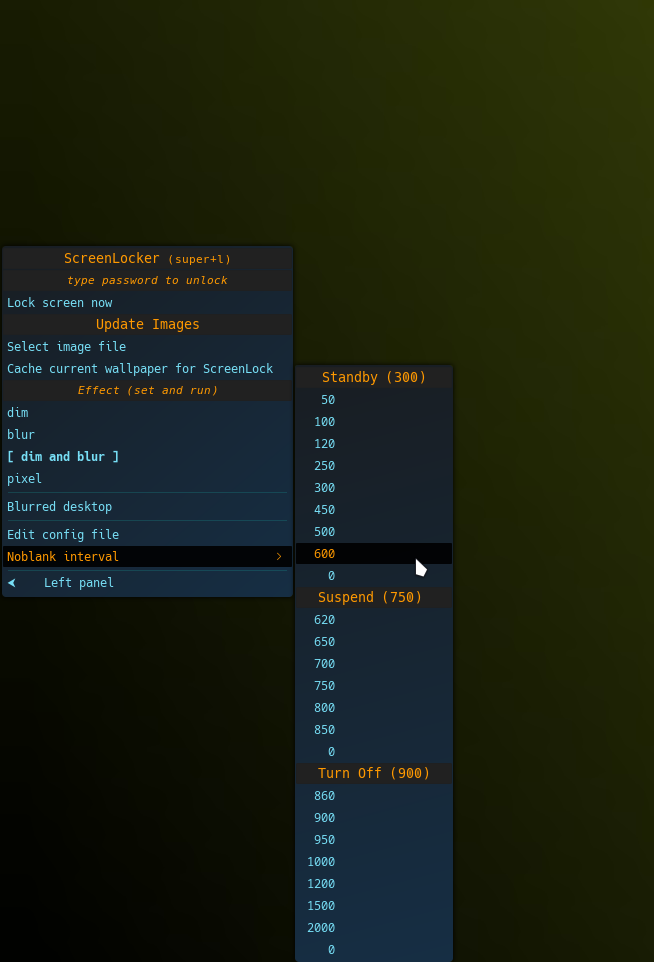


 this is my answer.
