# Kitty and yazi as alternative file manager
**URL:** https://forum.maboxlinux.org/t/kitty-and-yazi-as-alternative-file-manager/2593
**Category:** Basic Help & Support
**Created:** [September 16, 2026, 2:53am UTC](https://forum.maboxlinux.org/t/kitty-and-yazi-as-alternative-file-manager/2593 "2026-09-16T02:53:14Z")
**Posts on this page:** 7
**Page:** 1
### Author:  [@M0nst3r](https://forum.maboxlinux.org/u/M0nst3r)
#### Post date: [September 16, 2026, 2:53am UTC](https://forum.maboxlinux.org/t/kitty-and-yazi-as-alternative-file-manager/2593/1 "2026-09-16T02:53:14Z")
The new -and very powerful- `kitty terminal` fits like a glove with `yazi`. In order to create a custom shortcut, open your `~/.config/openbox/rc.xml` and add (copy/paste) this sequence:
```auto
kitty --title "Yazi File Manager" -e yazi
```
Now, every time you press `Super + Shift + F` this magnificent duo will launch and simply press `q` to exit. Image previews [are supported](https://yazi-rs.github.io/docs/image-preview/) by `kitty` but not in `terminator`. Feel free to change the key combinations.
Enjoy. 😁
---
### Author:  [@muzqs](https://forum.maboxlinux.org/u/muzqs)
#### Post date: [September 16, 2026, 12:21pm UTC](https://forum.maboxlinux.org/t/kitty-and-yazi-as-alternative-file-manager/2593/2 "2026-09-16T12:21:08Z")
> [@M0nst3r](#):
>
> `kitty --title "Yazi File Manager" -e yazi`
_Yazi and Kitty are indeed good companions._😉
## For the interest, this is my setup.
> Kinda F12 mabox-terminal (guake) behaviour.
Jumpapp for easy toggle and Picom for some effecs.
```auto
jumpapp -m kitty --title "Yazi File Manager" -e yazi
```
@include for picom to create a similar effect like F12.
```auto
match = "class_g = 'kitty'";
opacity = 0.95;
dim = 0.0;
corner-radius = 12;
blur-background = true;
animations = (
{
triggers = ["close", "hide"];
preset = "fly-out";
opacity = 1.0;
direction = "up";
duration = 0.5;
delay = 0.2;
},
{
triggers = ["open", "show"];
preset = "fly-in";
opacity = 1.0;
direction = "up";
duration = 0.5;
delay = 0.2;
},
)
```
Add something like this in kitty.conf so it remembers the window position.
```auto
# Window position
window_padding_width 8
hide_window_decorations yes
remember_window_size yes
initial_window_width 1200
initial_window_height 750
```
Change `class_g` to `name` if you want only this kitty(yazi) window with the picom effect.
from
```auto
match = "class_g = 'kitty'";
```
to
```auto
match = "name = 'Yazi File Manager'";
```
🐧
---
### Author:  [@muzqs](https://forum.maboxlinux.org/u/muzqs)
#### Post date: [September 18, 2026, 10:03am UTC](https://forum.maboxlinux.org/t/kitty-and-yazi-as-alternative-file-manager/2593/3 "2026-09-18T10:03:18Z")
**I was wrong with the kitty.conf and position of the terminal.**
To get the terminal on the right place.
Add something like …
```auto
no
256
left
1
```
… to section `` in rc.xml
I found out the way of using.
like
```auto
256
left
```
or
```auto
top
340
```
Not like
```auto
90
340
```
🐧
---
### Author:  [@M0nst3r](https://forum.maboxlinux.org/u/M0nst3r)
#### Post date: [September 18, 2026, 3:07pm UTC](https://forum.maboxlinux.org/t/kitty-and-yazi-as-alternative-file-manager/2593/4 "2026-09-18T15:07:12Z")
Thank you.
I also created a custom launcher for my Favorites menu:
`Yazi File Manager,kitty --title "Yazi File Manager" -e yazi,yazi`
Here:

Yazi launches in Terminator by default right now, I don’t know if good @napcok will include an official launcher down the road.
---
### Author:  [@muzqs](https://forum.maboxlinux.org/u/muzqs)
#### Post date: [September 18, 2026, 4:08pm UTC](https://forum.maboxlinux.org/t/kitty-and-yazi-as-alternative-file-manager/2593/5 "2026-09-18T16:08:52Z")
Do you know…
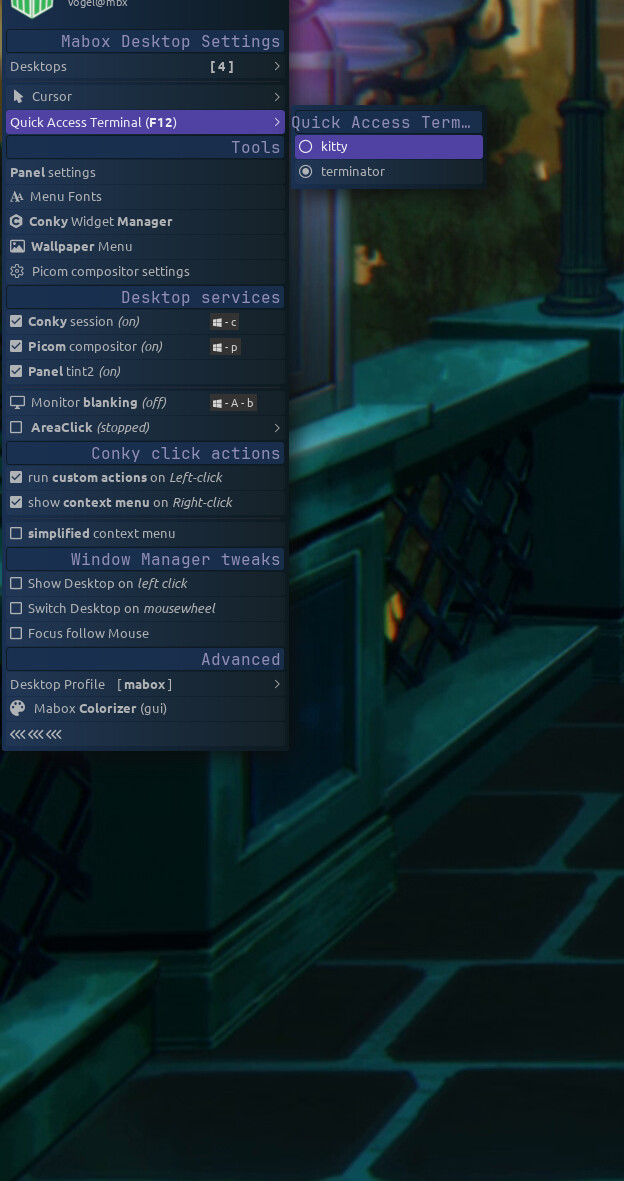
---
### Author:  [@muzqs](https://forum.maboxlinux.org/u/muzqs)
#### Post date: [September 18, 2026, 4:09pm UTC](https://forum.maboxlinux.org/t/kitty-and-yazi-as-alternative-file-manager/2593/6 "2026-09-18T16:09:40Z")
```auto
C-W-left
```
Mabox desktop settings (at the top)
---
### Author:  [@M0nst3r](https://forum.maboxlinux.org/u/M0nst3r)
#### Post date: [September 18, 2026, 4:38pm UTC](https://forum.maboxlinux.org/t/kitty-and-yazi-as-alternative-file-manager/2593/7 "2026-09-18T16:38:18Z")
Yes, I’m aware. 😁
I mean for regular/ocasional use besides `F12` (Quake). In fact, I like the Terminator behavior best for Quake. Added Kitty’s own launcher in `rc.xml` with:
```xml
kitty
```