# \[IDEA\] Power presentation toggle
**URL:** https://forum.maboxlinux.org/t/idea-power-presentation-toggle/1372
**Category:** Tint2 Panels
**Created:** [June 5, 2023, 11:52am UTC](https://forum.maboxlinux.org/t/idea-power-presentation-toggle/1372 "2023-06-05T11:52:42Z")
**Posts on this page:** 20
**Page:** 1
### Author:  [@muzqs](https://forum.maboxlinux.org/u/muzqs)
#### Post date: [June 5, 2023, 11:52am UTC](https://forum.maboxlinux.org/t/idea-power-presentation-toggle/1372/1 "2023-06-05T11:52:42Z")
Hi @napcok ,
_ **I finally switched from xfce4-panel to tint2.** _

I am running into a few things that I used with xfce-panel.
In this case, I want to raise an idea for presentation mode.
Xfce power managment has a checkbox to turn the presentation mode on / off.
I am now using a script so I can use tint2’s power module and switch the presentation mode with notification. A change in color of icon would be nice too.
What do you think, to add presentation mode toggle to the tint2 power module.
_At least no more ugly black xfce4-power icon. 🙂_
These are the lines i use.
> xfconf-query -c xfce4-power-manager -p /xfce4-power-manager/presentation-mode -T
>
> status=“$(xfconf-query -c xfce4-power-manager -p /xfce4-power-manager/presentation-mode -v)”
>
> notify-send -t 60000 “Presentation mode is “$status””
🐦
---
### Author:  [@napcok](https://forum.maboxlinux.org/u/napcok)
#### Post date: [June 5, 2023, 12:14pm UTC](https://forum.maboxlinux.org/t/idea-power-presentation-toggle/1372/2 "2023-06-05T12:14:28Z")
I will be happy to help you with this and possible further things about tint2. (If I remember correctly you are using some kind of launcher for music - made as xfce4 panel - that should be very easy to achieve as tint2 also).
But sorry for my ignorance… what exactly xfce4 presentation mode is? Is this something related to monitor blanking? I played with this but did not notice any changes 😉 Actually I don’t use any power manager at all.
If the thing is related to monitor blanking… we have **noblank** script for that, try W-A-b (super + alt +b) it toggles monitor blanking and shows notification.
Maybe this is enough?
---
### Author:  [@muzqs](https://forum.maboxlinux.org/u/muzqs)
#### Post date: [June 5, 2023, 1:23pm UTC](https://forum.maboxlinux.org/t/idea-power-presentation-toggle/1372/3 "2023-06-05T13:23:25Z")
> [@napcok](#):
>
> Is this something related to monitor blanking?
Indeed, presentation mode is that the screen does not turn off when watching e.g. video
It can be set from the tray icon.
I assume this is the same as W+A+b. Did’t know it was present. Probably enough indeed.
> [@napcok](#):
>
> Actually I don’t use any power manager at all.
When attached to a computer as you are, then power management is indeed useless.
On / Off. 🔋 _you got the power._
- Out of curiosity. Which command is used for W+A+b.
* * *
> [@napcok](#):
>
> (If I remember correctly you are using some kind of launcher for music - made as xfce4 panel - that should be very easy to achieve as tint2 also).
I guess you mean, a genmon script could be translated to tint2.
Audacious output i used as genmon script. Will have a look at it for further investication.
If i have more specific question about this, i know where to go. 🐧😉
🐦
---
### Author:  [@napcok](https://forum.maboxlinux.org/u/napcok)
#### Post date: [June 5, 2023, 1:34pm UTC](https://forum.maboxlinux.org/t/idea-power-presentation-toggle/1372/4 "2023-06-05T13:34:06Z")
**noblank** script:
```auto
napcok@mabox ~ $ cat /usr/local/bin/noblank
#!/usr/bin/env bash
case "$LANG" in
pl*)
DISABLED="Wygaszanie monitora jest WYŁĄCZONE"
ENABLED="Wygaszanie monitora jest WŁĄCZONE"
;;
*)
DISABLED="Monitor blanking is DISABLED"
ENABLED="Monitor blanking is ENABLED"
;;
esac
if (xset q|grep --quiet "DPMS is Enabled");
then
xset s off -dpms
notify-send -i monitor -t 5000 "DPMS" "$DISABLED"
else
xset s on +dpms
notify-send -i monitor -t 5000 "DPMS" "$ENABLED"
fi
```
---
### Author:  [@muzqs](https://forum.maboxlinux.org/u/muzqs)
#### Post date: [June 5, 2023, 2:35pm UTC](https://forum.maboxlinux.org/t/idea-power-presentation-toggle/1372/5 "2023-06-05T14:35:59Z")
## The following I tried and are my findings.
When I use the above script, W+A+b (DPMS), nothing happend.
Both, when I have xfce4-power-manager running or when I kill it.
The only way for me that works is through power-manager toggle.
> xfconf-query -c xfce4-power-manager -p /xfce4-power-manager/presentation-mode -T
I need to turn it into an actual script yet. Now it’s just the three lines.
_tint2 middle click toggle power-manager._
[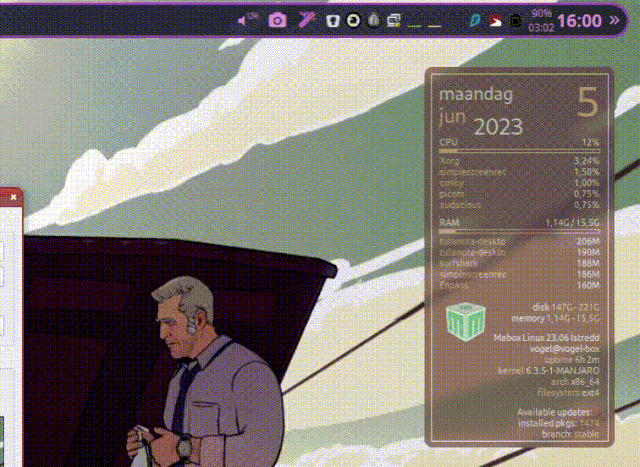](https://ibb.co/sFYdXcd)
Wonder if I’m the only one that DPMS toggle doesn’t work for.
🐦
---
### Author:  [@napcok](https://forum.maboxlinux.org/u/napcok)
#### Post date: [June 5, 2023, 2:40pm UTC](https://forum.maboxlinux.org/t/idea-power-presentation-toggle/1372/6 "2023-06-05T14:40:52Z")
Have you tried just running the script from a terminal?
---
### Author:  [@muzqs](https://forum.maboxlinux.org/u/muzqs)
#### Post date: [June 5, 2023, 2:55pm UTC](https://forum.maboxlinux.org/t/idea-power-presentation-toggle/1372/7 "2023-06-05T14:55:05Z")
- What is the blank time set of the script. _For testing how long to wait till blanking._
- Does it uses xfce4-power manager settings?
But i have to wait first 🙂 test run it from terminal. 🕉
---
### Author:  [@napcok](https://forum.maboxlinux.org/u/napcok)
#### Post date: [June 5, 2023, 3:04pm UTC](https://forum.maboxlinux.org/t/idea-power-presentation-toggle/1372/8 "2023-06-05T15:04:52Z")
- script does not touch blanking time at all. It just disable/enable blanking. I believe default ‘blanking time’ is 600. Check with:
```auto
xset q
```
- script have nothing in common with any xfce4 tool 🙂
I refer to what we have in Mabox by default. And have no idea why script does not work for you.
Maybe you have notification daemon disabled?
Or you removed script keybindings from rc.xml?
---
### Author:  [@muzqs](https://forum.maboxlinux.org/u/muzqs)
#### Post date: [June 5, 2023, 3:28pm UTC](https://forum.maboxlinux.org/t/idea-power-presentation-toggle/1372/9 "2023-06-05T15:28:41Z")
> [@napcok](#):
>
> And have no idea why script does not work for you
I think there is a misunderstanding.
The script runs and gives the notification. Only the blanking proces seems not to work.
> **Samenvatting**
>
> ```auto
> vogel@vogel-box ~/Scripts $ xset q
> Keyboard Control:
> auto repeat: on key click percent: 0 LED mask: 00000002
> XKB indicators:
> 00: Caps Lock: off 01: Num Lock: on 02: Scroll Lock: off
> 03: Compose: off 04: Kana: off 05: Sleep: off
> 06: Suspend: off 07: Mute: off 08: Misc: off
> 09: Mail: off 10: Charging: off 11: Shift Lock: off
> 12: Group 2: off 13: Mouse Keys: off
> auto repeat delay: 660 repeat rate: 25
> auto repeating keys: 00ffffffdffffbbf
> fadfffefffedffff
> 9fffffffffffffff
> fff7ffffffffffff
> bell percent: 0 bell pitch: 400 bell duration: 100
> Pointer Control:
> acceleration: 2/1 threshold: 4
> Screen Saver:
> prefer blanking: yes allow exposures: yes
> timeout: 0 cycle: 600
> Colors:
> default colormap: 0x20 BlackPixel: 0x0 WhitePixel: 0xffffff
> Font Path:
> /usr/share/fonts/misc,/usr/share/fonts/TTF,/usr/share/fonts/OTF,/usr/share/fonts/Type1,/usr/share/fonts/100dpi,/usr/share/fonts/75dpi,built-ins
> DPMS (Display Power Management Signaling):
> Standby: 0 Suspend: 0 Off: 0
> DPMS is Disabled
> vogel@vogel-box ~/Scripts $ noblank
> vogel@vogel-box ~/Scripts $ xset q
> Keyboard Control:
> auto repeat: on key click percent: 0 LED mask: 00000002
> XKB indicators:
> 00: Caps Lock: off 01: Num Lock: on 02: Scroll Lock: off
> 03: Compose: off 04: Kana: off 05: Sleep: off
> 06: Suspend: off 07: Mute: off 08: Misc: off
> 09: Mail: off 10: Charging: off 11: Shift Lock: off
> 12: Group 2: off 13: Mouse Keys: off
> auto repeat delay: 660 repeat rate: 25
> auto repeating keys: 00ffffffdffffbbf
> fadfffefffedffff
> 9fffffffffffffff
> fff7ffffffffffff
> bell percent: 0 bell pitch: 400 bell duration: 100
> Pointer Control:
> acceleration: 2/1 threshold: 4
> Screen Saver:
> prefer blanking: yes allow exposures: yes
> timeout: 600 cycle: 600
> Colors:
> default colormap: 0x20 BlackPixel: 0x0 WhitePixel: 0xffffff
> Font Path:
> /usr/share/fonts/misc,/usr/share/fonts/TTF,/usr/share/fonts/OTF,/usr/share/fonts/Type1,/usr/share/fonts/100dpi,/usr/share/fonts/75dpi,built-ins
> DPMS (Display Power Management Signaling):
> Standby: 0 Suspend: 0 Off: 0
> DPMS is Enabled
> Monitor is On
>
> ```
To get to the **default mabox** situation.
What to do . . .
- do i need to remove xfce power manager.
- can blanking time be changed with xset.
---
### Author:  [@muzqs](https://forum.maboxlinux.org/u/muzqs)
#### Post date: [June 5, 2023, 3:33pm UTC](https://forum.maboxlinux.org/t/idea-power-presentation-toggle/1372/10 "2023-06-05T15:33:23Z")
Starting reading arch wiki.
[https://wiki.archlinux.org/title/Display\_Power\_Management\_Signaling](https://wiki.archlinux.org/title/Display_Power_Management_Signaling)
---
### Author:  [@muzqs](https://forum.maboxlinux.org/u/muzqs)
#### Post date: [June 5, 2023, 7:51pm UTC](https://forum.maboxlinux.org/t/idea-power-presentation-toggle/1372/11 "2023-06-05T19:51:09Z")
_edit:change gif anim._
[](https://ibb.co/HhywDJf)
It seems that xset dpms is working. Needed more patient.
Nice to learn the script part of tint2. Even simpler than Genmon.
SET : Battery not showing below 70%.
DOT: shows if blanking is on or not.
RED: Blanking is On.
Green: Blanking Off.
```auto
#!/usr/bin/env sh
## switch between icon set.
readonly noblank_on="${HOME}/.icons/dot-rood.svg"
readonly noblank_off="${HOME}/.icons/dot-green.svg"
DPMS_check="$(xset q | grep "Enabled" | wc -l)"
if test $DPMS_check -gt 0
then
echo "$noblank_on"
else
echo "$noblank_off"
fi
```
🐦
---
### Author:  [@muzqs](https://forum.maboxlinux.org/u/muzqs)
#### Post date: [June 5, 2023, 8:39pm UTC](https://forum.maboxlinux.org/t/idea-power-presentation-toggle/1372/12 "2023-06-05T20:39:17Z")
> [@napcok](#):
>
> notify-send -i monitor
I am not sure but is `computer` compatible with more icon theme’s. At least when i try different theme’s, `computer` seems to work.
Kind of similar symbol as `monitor`?
---
### Author:  [@napcok](https://forum.maboxlinux.org/u/napcok)
#### Post date: [June 5, 2023, 8:46pm UTC](https://forum.maboxlinux.org/t/idea-power-presentation-toggle/1372/13 "2023-06-05T20:46:42Z")
You’re probably right 🙂
```auto
napcok@mabox ~ $ fd "^computer\." /usr/share/icons |wc -l
129
napcok@mabox ~ $ fd "^monitor\." /usr/share/icons |wc -l
32
```
---
### Author:  [@muzqs](https://forum.maboxlinux.org/u/muzqs)
#### Post date: [June 5, 2023, 10:17pm UTC](https://forum.maboxlinux.org/t/idea-power-presentation-toggle/1372/14 "2023-06-05T22:17:15Z")
I couldn’t resist. From dot to icon.
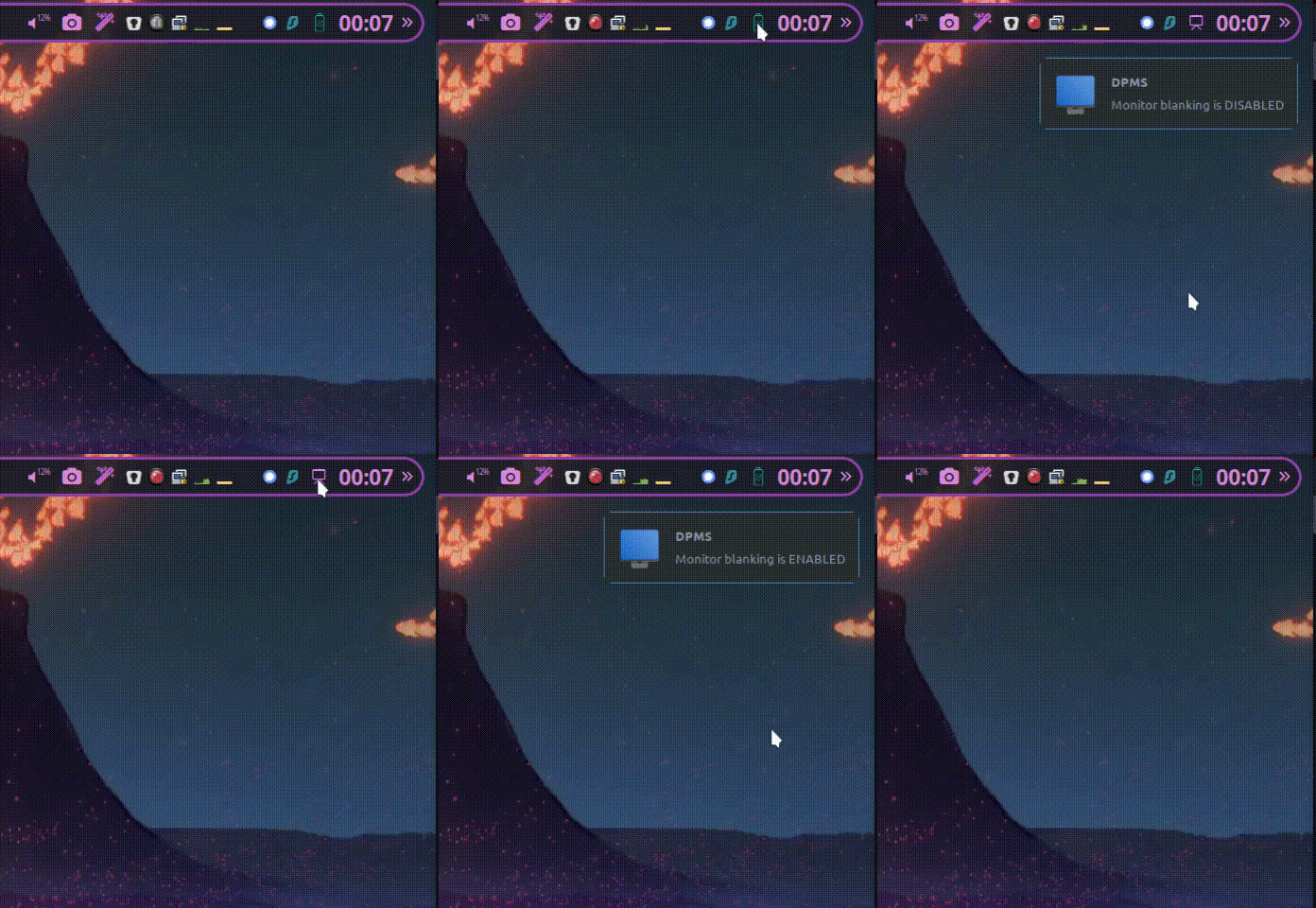


---
### Author:  [@muzqs](https://forum.maboxlinux.org/u/muzqs)
#### Post date: [June 6, 2023, 8:52am UTC](https://forum.maboxlinux.org/t/idea-power-presentation-toggle/1372/15 "2023-06-06T08:52:49Z")
For the sake of sharing … 🤸♂️

Tint2 script. `noblank-notif.sh`
```auto
#!/usr/bin/env sh
## switch between icon set.
readonly noblank_on="path/to/icon"
readonly noblank_off="path/to/icon"
DPMS_check="$(xset q | grep "Enabled" | wc -l)"
if test $DPMS_check -gt 0
then
echo "$noblank_on"
else
echo "$noblank_off"
fi
```
\*Click:
Delay Standby `xset-600.sh`.
Mabox `noblank`
> L: changes the delay time between 250 & 600
> MW: noblank on/off
```auto
#!/usr/bin/env sh
DPMS_delay="$(xset q | grep "Standby: 600" | wc -l)"
if test $DPMS_delay -gt 0
then
xset dpms 250 700 900
notify-send -i computer -t 5000 "Sleep time set to 250"
else
xset dpms 600 700 900
notify-send -i computer -t 5000 "Sleep time set to 600"
fi
```
_Structure_
`xset dpms 250 700 900`
`Standby: 250 Suspend: 700 Off: 900`
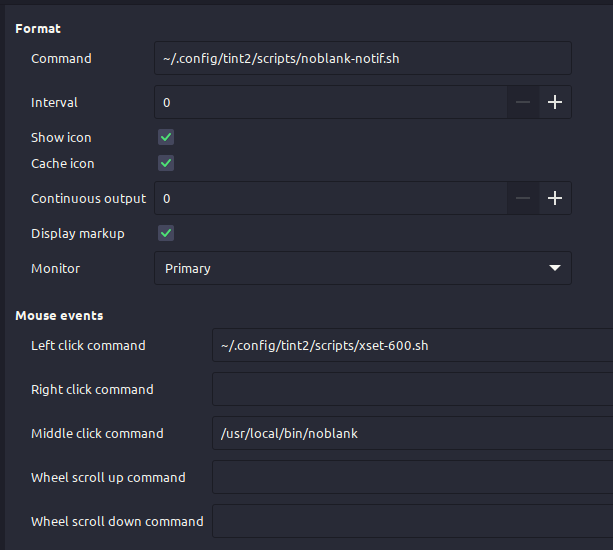
🐦
_edit: added script to make the post complete._
---
### Author:  [@muzqs](https://forum.maboxlinux.org/u/muzqs)
#### Post date: [June 15, 2023, 2:02pm UTC](https://forum.maboxlinux.org/t/idea-power-presentation-toggle/1372/16 "2023-06-15T14:02:43Z")
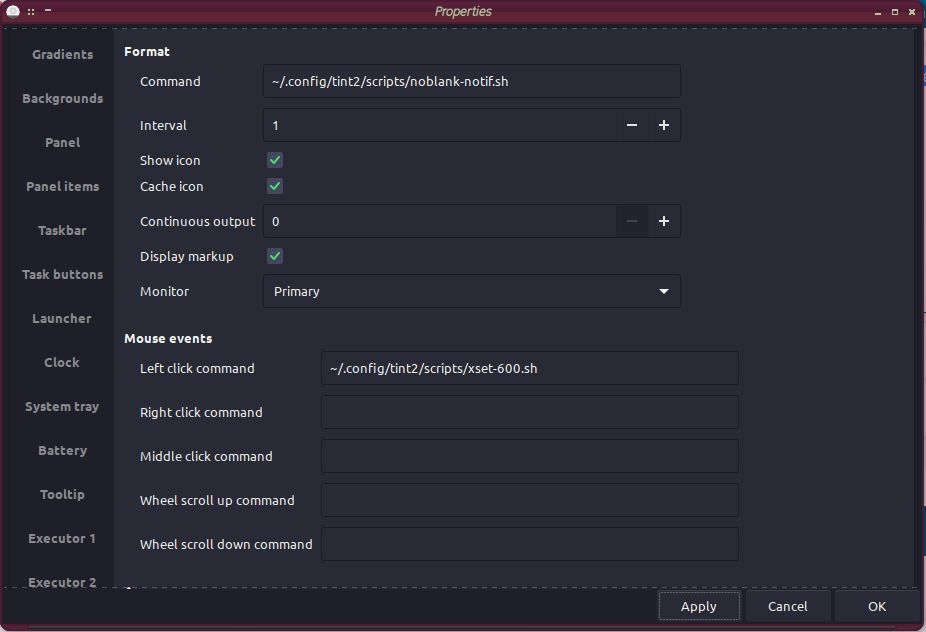
### Noblank` W+b` ‘management’… Update…
I like to share my modified tint2 script for sleeptime management.
Icon only visible in noblank/Presentation modes. (see previous post for icon)
Mouse click on icon changes time between 250 or 600 sec for blanking screen.
* * *
### Executor tint2 : `noblank-notif.sh`
Shows only an icon when in noblank modes.
_check icon path and modify to yours._
```auto
#!/bin/env bash
## icon path.
noblank_on=${HOME}/.icons/power-save.svg
noblank_off=${HOME}/.icons/powerpoint.svg
# check noblank state. [on|off]
function DPMS_check {
! xset q | grep Enabled
}
if DPMS_check
then
echo "$noblank_off"
else
echo ""
fi
```
### Mouse click script: `xset-600.sh`
For changing delay time. Between 250 or 600 sec.
Can only be used when icon is visible.
```auto
#!/bin/env bash
# check if delay is set to 600 or not.
DPMS_delay="$(xset q | grep -c "Standby: 600" )"
if test $DPMS_delay -gt 0
then
xset dpms 250 700 900 # set to 250 and activate blanking.
xset -dpms # disable blanking.
notify-send -i computer -t 5000 "Sleep time set to 250"
else
xset dpms 600 700 900 # set to 600 and activate blanking.
xset -dpms # disable blanking.
notify-send -i computer -t 5000 "Sleep time set to 600"
fi
```
> [@M0nst3r](#):
>
> Thank you @muzqs for your idea. I’m going to throw my two cents with the following tips.
>
> You can replace:
>
> ```auto
> xset q | grep "Standby: 600" | wc -l
>
> ```
>
> With just:
>
> `xset q | grep -c "Standby: 600"`
EDIT : Removed `| wc -l`.
🐦
---
### Author:  [@M0nst3r](https://forum.maboxlinux.org/u/M0nst3r)
#### Post date: [June 15, 2023, 9:33pm UTC](https://forum.maboxlinux.org/t/idea-power-presentation-toggle/1372/17 "2023-06-15T21:33:49Z")
Thank you @muzqs for your idea. I’m going to throw my two cents with the following tips.
You can replace:
```auto
xset q | grep "Standby: 600" | wc -l
```
With just:
```auto
xset q | grep -c "Standby: 600"
```
That said, **xset** , sadly, doesn’t include any parameters in order to isolate its values, meaning that you must relay on word filtering to do so. I _think_ (please correct me, @napcok and other guys with no Latin alphabets) this could be a problem. My proposal to extract the **Standby** value directly is:
```auto
xset -q | awk '!/^[[:space:]]/ {i++}; i==6 {getline; print $2; exit}'
```
Because is using the very output format instead of words it should work fine with any Latin alphabet (English, Spanish, etc). The command’s translation is “_find the 6th section of **xset** ’s output_ [DPMS]_, then the line just below and finally the second column_ [600]”
---
### Author:  [@muzqs](https://forum.maboxlinux.org/u/muzqs)
#### Post date: [June 16, 2023, 7:15am UTC](https://forum.maboxlinux.org/t/idea-power-presentation-toggle/1372/18 "2023-06-16T07:15:36Z")
> [@M0nst3r](#):
>
> My proposal to extract the **Standby** value directly is:
>
> `xset -q | awk '!/^[[:space:]]/ {i++}; i==6 {getline; print $2; exit}'`
I will have a look later at your proposal. 🌟
🐦
---
### Author:  [@muzqs](https://forum.maboxlinux.org/u/muzqs)
#### Post date: [June 16, 2023, 7:35am UTC](https://forum.maboxlinux.org/t/idea-power-presentation-toggle/1372/19 "2023-06-16T07:35:25Z")
> [@M0nst3r](#):
>
> Because is using the very output format instead of words it should work fine with any Latin alphabet (English, Spanish, etc). The command’s translation is “_find the 6th section of **xset** ’s output_ [DPMS]_, then the line just below and finally the second column_ [600]”
I am a bit slow. But your proposal make sense for multi language indeed.
---
### Author:  [@muzqs](https://forum.maboxlinux.org/u/muzqs)
#### Post date: [June 16, 2023, 10:15am UTC](https://forum.maboxlinux.org/t/idea-power-presentation-toggle/1372/20 "2023-06-16T10:15:56Z")
Updated version …
```auto
#!/bin/env bash
DMPS_delay=$(xset -q | awk '!/^[[:space:]]/ {i++}; i==6 {getline; print $2; exit}' | grep -c 600)
if [$DMPS_delay -eq 0]; then
xset dpms 600 700 900
xset -dpms
notify-send -i computer -t 5000 "Sleep time set to 600"
else
xset dpms 250 700 900
xset -dpms
notify-send -i computer -t 5000 "Sleep time set to 250"
fi
```
_Thanks @M0nst3r for the tip. Always welcome. 🐧_
🐦
[Next page](https://forum.maboxlinux.org/t/idea-power-presentation-toggle/1372.md?page=2)