# \[IDEA\] Mabox simplified profile
**URL:** https://forum.maboxlinux.org/t/idea-mabox-simplified-profile/2210
**Category:** Mabox Lab
**Created:** [April 1, 2025, 2:04pm UTC](https://forum.maboxlinux.org/t/idea-mabox-simplified-profile/2210 "2025-04-01T14:04:23Z")
**Posts on this page:** 6
**Page:** 1
### Author:  [@napcok](https://forum.maboxlinux.org/u/napcok)
#### Post date: [April 1, 2025, 2:04pm UTC](https://forum.maboxlinux.org/t/idea-mabox-simplified-profile/2210/1 "2025-04-01T14:04:23Z")
Mabox is already a good system for an intermediate/advanced user. And even better for a X11 Window Manager maniac, like me 😉
When it comes to non-technical users, regular users, or older users, the situation is different. We currently have too many gadgets available and exposed by default.
So, the idea is to provide a simplified profile…
> This idea was already discussed by me and our forum colleague @bernd some time ago. Now that we have 95% of the low-level scripts ready, it’s time to refine and implement it . This will mean that the next big release of Mabox - Jaskier is ready 🙂
### Ideas for simplified profile
_One-click_ or/and _one-command_ switching between **default** and **simplified** profile
#### Fonts
- little bigger font everywhere
#### Tint2 panel
- no arrow icons launching Side panels
- toggleShowDesktop button
- no terminal launcher
- random wallpaper button
- no resource monitor in systemtray
- no screenshot tool executor
- only one desktop (simplified taskbar)
- position: bottom (?)
#### Desktop
- only one workspace (so not switch desktop on mousewheel)
- no unusual things like AreaClick
- no _left-click-on-desktop_ action (toggle show desktop)
#### Menus
- simplified as possible
#### Conky
- only one Conky (or two: default + Quoter)
- remove _on-click_ Conky actions (maybe)
* * *
> **My personal use-case**
> I installed Mabox on my mom’s old laptop
> My mom:
>
> - doesn’t know what a terminal or command line is
> - does not use keyboard shortcuts
> - uses mainly a web browser (for mails, videos, banking and e-shopping)
> - also sometimes plays simple games like Solitaire, some Marbles, etc.
> - she is delighted with how well her old laptop works now
> - previously a more popular system was installed there, and the laptop was almost unusable
>
> I install updates from time to time. Sometimes remotely via RustDesk.
> No problems 🙂
>
> _Changes in the default configuration - simplifying Mabox took me a dozen or so minutes. It would be nice to do it with one click next time_ 🙂
What do you think?
Share your thoughts and ideas.
---
### Author:  [@muzqs](https://forum.maboxlinux.org/u/muzqs)
#### Post date: [April 2, 2025, 12:28pm UTC](https://forum.maboxlinux.org/t/idea-mabox-simplified-profile/2210/2 "2025-04-02T12:28:36Z")
A thought…
> [@napcok](#):
>
> Tint2 panel
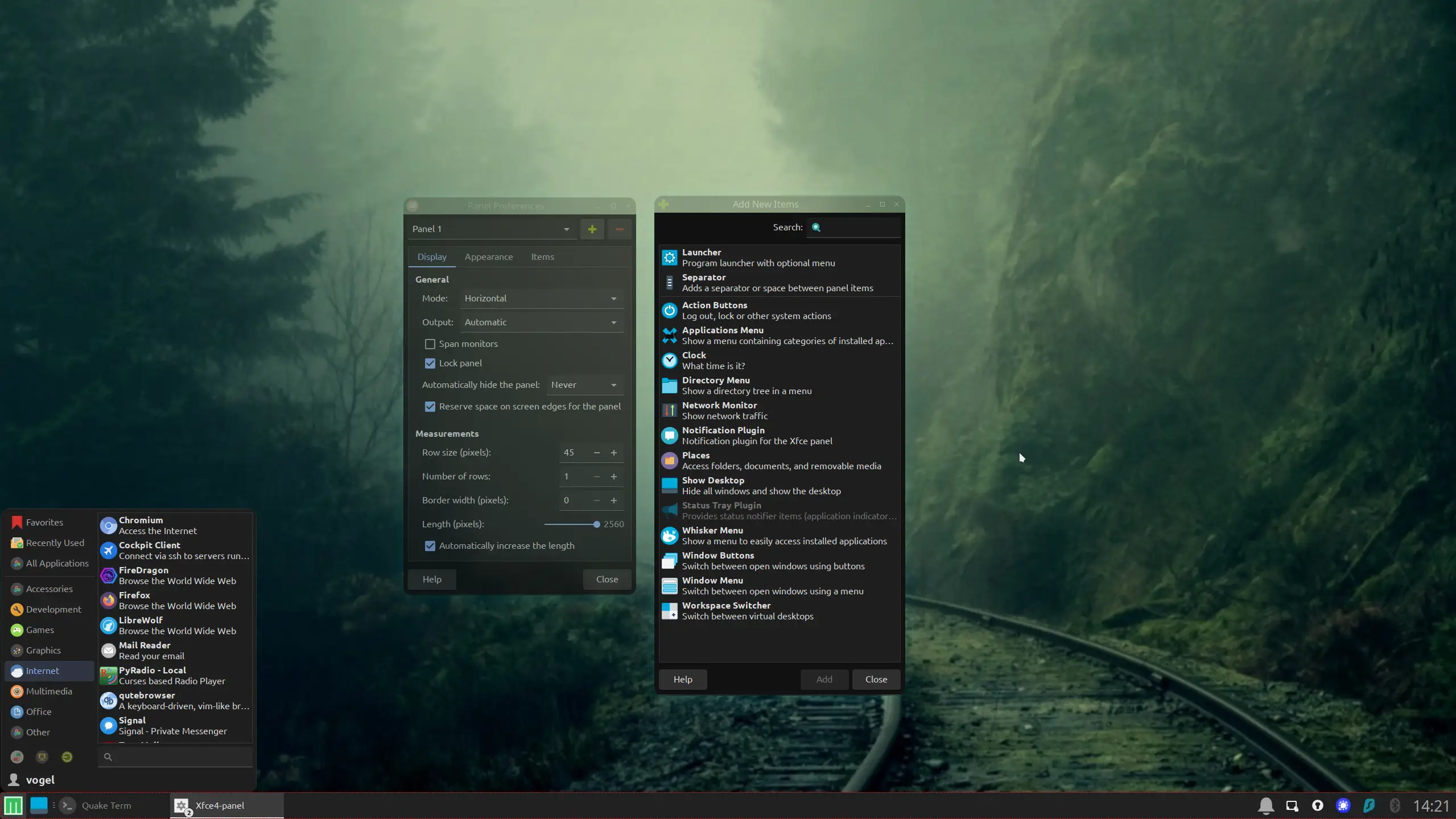
Replace tint2 for xfce4-panel when choosing for simplified Mabox session.
### Why Xfce4-Panel?
- **Easy to add elements and configure** – No need to edit config files manually.
- **Whisker Menu** – A modern application menu that looks similar to the Windows start menu.
- **Built-in widgets** – Volume control, battery indicator, network manager, and more.
🐦
---
### Author:  [@napcok](https://forum.maboxlinux.org/u/napcok)
#### Post date: [April 2, 2025, 1:42pm UTC](https://forum.maboxlinux.org/t/idea-mabox-simplified-profile/2210/3 "2025-04-02T13:42:33Z")
> [@muzqs](#):
>
> Replace tint2 for xfce4-panel when choosing for simplified Mabox session.
Not now… but
this (xfce4-panel) is already on to-do/to-consider list… but after Jaskier release - when: re-thinking, rewrite, cleaning and replacing some components is planned 🙂
Question is: for how long, will XFCE work on X11? I’m not sure about that.
Anyway… replacing tint2 with xfce4-panel is straightforward. Just remove script for autostarting tint2 ( **mb-tint2-session** placed in `~/.config/openbox/autostart`) and add xfce4-panel.
---
### Author:  [@shortarcflyer](https://forum.maboxlinux.org/u/shortarcflyer)
#### Post date: [April 2, 2025, 6:09pm UTC](https://forum.maboxlinux.org/t/idea-mabox-simplified-profile/2210/4 "2025-04-02T18:09:49Z")
Keep Tint2. Adding/subtracting items is easy through the graphical tint2 settings panel. I rather Tint2 over the xfce4-panel. No buttons for side panels, simplfy the menus, make the default Tint2 panel position at the bottom. Just my two cents.
---
### Author:  [@muzqs](https://forum.maboxlinux.org/u/muzqs)
#### Post date: [April 3, 2025, 6:17am UTC](https://forum.maboxlinux.org/t/idea-mabox-simplified-profile/2210/5 "2025-04-03T06:17:36Z")
> [@napcok](#):
>
> for how long, will XFCE work on X11
Because of wayland..?
> [@napcok](#):
>
> #### Conky
>
> - only one Conky (or two: default + Quoter)
> - remove _on-click_ Conky actions (maybe)
A few years ago, I turned off Conky (toggle button MX Linux) for my sister (55+) because the technical information on her desktop was too overwhelming for her.
I guess most beginners/dummies prefer using the desktop to store files and directories for quick access, rather than having system info displayed.
🐦
---
### Author:  [@bernd](https://forum.maboxlinux.org/u/bernd)
#### Post date: [April 8, 2025, 11:58am UTC](https://forum.maboxlinux.org/t/idea-mabox-simplified-profile/2210/6 "2025-04-08T11:58:36Z")
I’m really curious how the new script works. I’ve been a bit scarce on the forum lately. Why? Mabox just works. After setting everything up and playing around with it, the system is very stable and requires little attention. In my opinion, it’s a good choice, especially for older systems. Now I’m curious to see what the “Grandpa Edition” script will be able to do.