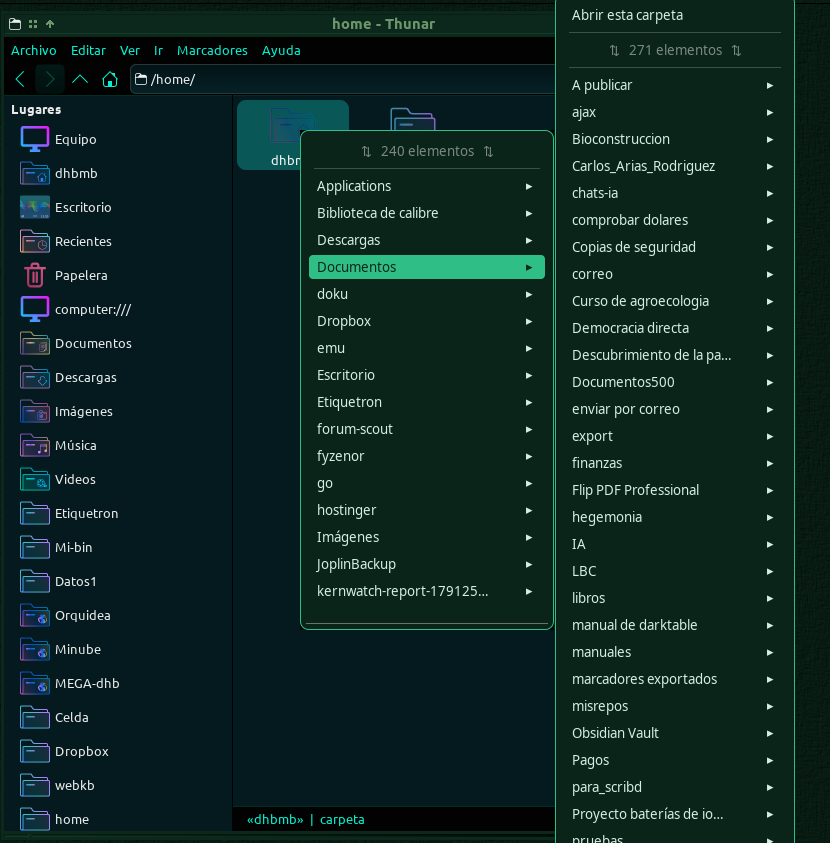
Un script que me resulta muy útil para los administradores de archivos:
Abre un popup con las subcarpetas y sus archivos para operar con ellos, o abrir su carpeta contenedora (click derecho “Explorar”).
A script that I find very useful for file managers:
Opens a pop-up window with the subfolders and their files to work with them, or opens the folder that contains them (right-click on “Explore” or the text you have chosen).
jgmenu-dir.sh:
#!/usr/bin/env bash
# Uso: jgmenu-dir.sh DIR         -> abre el popup / Open the popup
#      jgmenu-dir.sh --list DIR  -> imprime las entradas (submenús) / Print the entries (submenus)
self="$(readlink -f "$0")"
mode=popup
if [ "$1" = "--list" ]; then mode=list; shift; fi
dir="${1:-$PWD}"
[ -d "$dir" ] || exit 1
cd "$dir" || exit 1
shopt -s nullglob

max=24   # largo máximo del nombre mostrado / maximum length of displayed name
ICON_DIR=/usr/share/icons/Papirus-Dark/24x24

short() {
  local s="${1//,/ }"
  if [ "${#s}" -gt "$max" ]; then
    s="${s:0:$((max-1))}…"
  fi
  printf '%s' "$s"
}

# in case if you want icons in the menu:

icon_for() {
  case "${1,,}" in
    *.png|*.jpg|*.jpeg|*.gif|*.webp|*.svg|*.bmp) echo image-x-generic ;;
    *.mp3|*.flac|*.ogg|*.wav|*.m4a|*.opus) echo audio-x-generic ;;
    *.mp4|*.mkv|*.avi|*.webm|*.mov) echo video-x-generic ;;
    *.pdf) echo application-pdf ;;
    *.zip|*.tar|*.gz|*.xz|*.7z|*.rar|*.bz2) echo package-x-generic ;;
    *.sh|*.py|*.js|*.php|*.html|*.css) echo text-x-script ;;
    *) echo text-x-generic ;;
  esac
}

# Convierte un nombre de ícono en ruta completa (si la encuentra)
# Converts an icon name to a full path (if found)
icon_path() {
  local c
  for c in places mimetypes apps; do
    if [ -e "$ICON_DIR/$c/$1.svg" ]; then
      printf '%s' "$ICON_DIR/$c/$1.svg"
      return
    fi
  done
  printf '%s' "$1"
}

entries() {
  local items=( * )
  if [ "$mode" = list ]; then
    printf 'Abrir esta carpeta,xdg-open %q,%s\n' "$dir" "$(icon_path folder-open)"
    printf '^sep()\n'
  fi
  printf '^sep(⇅   %s elementos   ⇅)\n' "${#items[@]}"
  printf '^sep()\n'
  for d in */; do
    d="${d%/}"
    printf '%s,^pipe(%q --list %q),%s\n' "$(short "$d")" "$self" "$dir/$d" "$(icon_path folder)"
  done
  for f in *; do
    [ -f "$f" ] || continue
    printf '%s,xdg-open %q,%s\n' "$(short "$f")" "$dir/$f" "$(icon_path "$(icon_for "$f")")"
  done

}

#You may need to create the folder `$HOME/.config/jgmenu/`

if [ "$mode" = list ]; then
  entries
else
  entries | jgmenu --simple --at-pointer --config-file="$HOME/.config/jgmenu/dir.rc"
fi
In Pcmanfm:
crear el archivo jgmenu-dir.desktop en ~/.local/share/file-manager/actions/ con el contenido:
create the file jgmenu-dir.desktop in ~/.local/share/file-manager/actions/ with the content:
[Desktop Entry]
Type=Action
Icon=search
Name=Explorar
Profiles=profile-zero;

[X-Action-Profile profile-zero]
MimeTypes=inode/directory;
Exec=sh -c '/home/YOUR USER/YOUR PATH/jgmenu-dir.sh "$1"' _ %f
In Thunar:
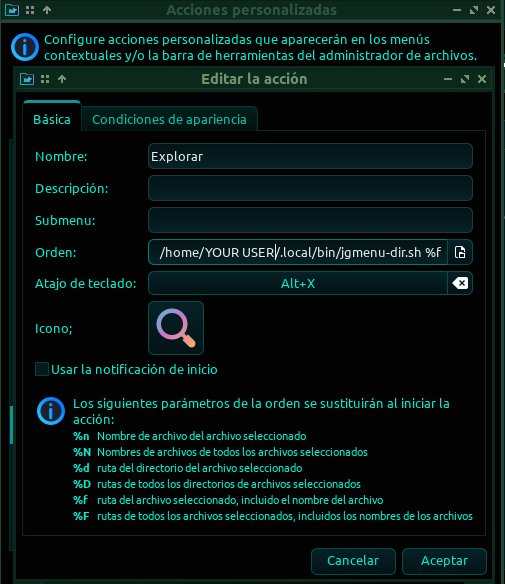
Menú Edtar->Configurar acciones personalizadas->“+”
Edit menu->Custom actions->“+”
(adecuar a tu usuario y el path del script / adjust to your user and the script path))
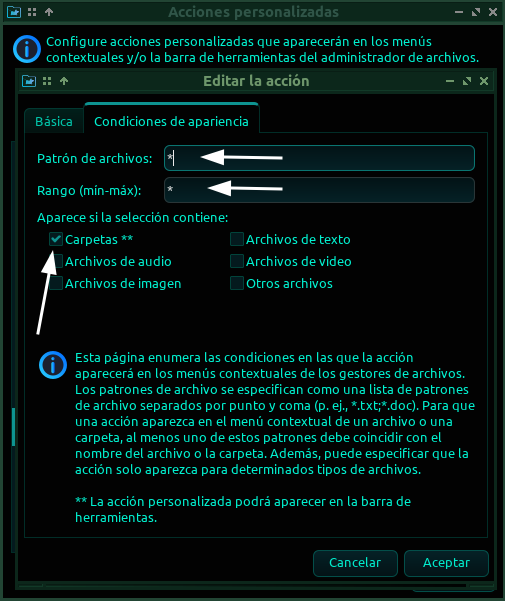
Carpetas= Folders