# Dell laptop hide volume icon
**URL:** https://forum.maboxlinux.org/t/dell-laptop-hide-volume-icon/1568
**Category:** Laptops
**Created:** [December 14, 2023, 1:01pm UTC](https://forum.maboxlinux.org/t/dell-laptop-hide-volume-icon/1568 "2023-12-14T13:01:07Z")
**Posts on this page:** 8
**Page:** 1
### Author:  [@mumus](https://forum.maboxlinux.org/u/mumus)
#### Post date: [December 14, 2023, 1:01pm UTC](https://forum.maboxlinux.org/t/dell-laptop-hide-volume-icon/1568/1 "2023-12-14T13:01:07Z")
Hi, can you help me?
When I use the keyboard to increase the volume, I don’t see the volume icon on the screen. When I use the keyboard to lighten or dim the screen, the icon does not appear. Is there any way to adjust this?
The solution presented here did not help: [https://forum.maboxlinux.org/t/no-volume-display-with-audiokeys/238](https://forum.maboxlinux.org/t/no-volume-display-with-audiokeys/238)
Dell Lalitude e7240 Laptop, Kernel: 5.4.263-1-MANJARO
Thanks for the tips!
---
### Author:  [@zolw](https://forum.maboxlinux.org/u/zolw)
#### Post date: [December 14, 2023, 6:13pm UTC](https://forum.maboxlinux.org/t/dell-laptop-hide-volume-icon/1568/2 "2023-12-14T18:13:06Z")
Hi,
Do you use tint2 panel? Most of them have volume icon with cca 3 variable icons and beside a tiny numerical value of the level.
or Press Sup+V if you want an ‘ugly’ volume control feed-back.
I can imagine what GUI you miss. You may find some external scripts.
Edit:
As I see the problem is solved. In tinkering category here is my script to play with:
```auto
#!/bin/sh
# retrieve & set volume level within a timeout period
YAD_VALUE=$(amixer sget Master | grep "Left:" | cut -d "[" -f2 | cut -d "%" -f1)
yad \
--title="Volume" --mouse --geometry="200x50+900+10" \
--on-top --scale --print-partial --timeout=20 \
--no-buttons --undecorated \
--value="$YAD_VALUE" | while read line ;
do (amixer sset 'Master' ${line}% ) done
```
---
### Author:  [@mumus](https://forum.maboxlinux.org/u/mumus)
#### Post date: [December 15, 2023, 4:44am UTC](https://forum.maboxlinux.org/t/dell-laptop-hide-volume-icon/1568/3 "2023-12-15T04:44:08Z")
Thank you! The tint2 panel is not visible on full screen when watching movies, which is why you need the pop-up volume and brightness icons.
I’m new to Manjaro linux, I’ve been using Ubuntu-Debian systems so far. That’s where I got used to pop-up icons.
---
### Author:  [@muzqs](https://forum.maboxlinux.org/u/muzqs)
#### Post date: [December 15, 2023, 11:48am UTC](https://forum.maboxlinux.org/t/dell-laptop-hide-volume-icon/1568/4 "2023-12-15T11:48:11Z")
Hi @mumus ,
I think the notification for volume media keys should be working by default with mabox.
Look at Notification and play with settings. Maybe other theme.
Sometimes logout and in again after changes.
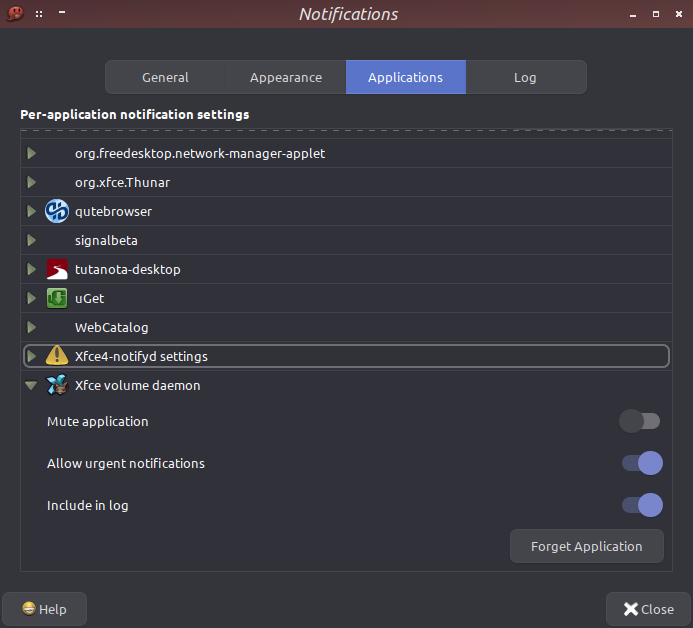
Do you get other notifications.
_this is what i have installed._
```auto
1 maboxlinux/notify-send.sh 1.2-1 (8.2 KiB 12.1 KiB) (Installed)
# this one is responsible for the volume icon
1 aur/xfce4-volumed-pulse 0.2.4-1 (+31 0.00) (Installed)
```
🐦
---
### Author:  [@mumus](https://forum.maboxlinux.org/u/mumus)
#### Post date: [December 15, 2023, 1:26pm UTC](https://forum.maboxlinux.org/t/dell-laptop-hide-volume-icon/1568/5 "2023-12-15T13:26:31Z")
Thank you! Solved.
---
### Author:  [@M0nst3r](https://forum.maboxlinux.org/u/M0nst3r)
#### Post date: [December 15, 2023, 2:30pm UTC](https://forum.maboxlinux.org/t/dell-laptop-hide-volume-icon/1568/6 "2023-12-15T14:30:34Z")
Great. 😃
Could you please share which solution worked for you so other fellow _Maboxers_ in the future can do the same?
---
### Author:  [@muzqs](https://forum.maboxlinux.org/u/muzqs)
#### Post date: [December 15, 2023, 3:43pm UTC](https://forum.maboxlinux.org/t/dell-laptop-hide-volume-icon/1568/7 "2023-12-15T15:43:35Z")
> [@M0nst3r](#):
>
> please share which solution worked
@mumus, Your solution would be nice indeed. 🐧
* * *
This maybe… added to startup. Forgot this one earlier.
```auto
xfce4-volumed-pulse &
```
🐦
---
### Author:  [@mumus](https://forum.maboxlinux.org/u/mumus)
#### Post date: [December 16, 2023, 4:37am UTC](https://forum.maboxlinux.org/t/dell-laptop-hide-volume-icon/1568/8 "2023-12-16T04:37:30Z")
That’s how I managed it. Here:.config/autostart/xfce4-volumed-pulse.desktop had to delete this line: OnlyShowIn=XFCE;