# Custom Action for Localsend
**URL:** https://forum.maboxlinux.org/t/custom-action-for-localsend/2528
**Category:** Userland
**Created:** [May 30, 2026, 3:03am UTC](https://forum.maboxlinux.org/t/custom-action-for-localsend/2528 "2026-05-30T03:03:43Z")
**Posts on this page:** 2
**Page:** 1
### Author:  [@M0nst3r](https://forum.maboxlinux.org/u/M0nst3r)
#### Post date: [May 30, 2026, 3:03am UTC](https://forum.maboxlinux.org/t/custom-action-for-localsend/2528/1 "2026-05-30T03:03:43Z")
For those using this marvelous app, here is how you can create a Custom Action (Right-click) for PCManFM.
First, `localsend` doesn’t have any headless command-line interface and there is no sign it will be implemented any time soon. Luckily for us the binary is flexible enough and works quite good for our need.
- Create a new, empty file and save it like, for example “Send-to-Localsend.txt”.
- Copy this file into your `~/.local/share/file-manager/actions` folder.
- Rename the file from **txt** to **desktop** via command or directly in your file manager:
- All done. You can now right-click on files and folders while in `pcmanfm` and see the new option.
Enjoy. 😁
---
### Author:  [@M0nst3r](https://forum.maboxlinux.org/u/M0nst3r)
#### Post date: [May 30, 2026, 3:10am UTC](https://forum.maboxlinux.org/t/custom-action-for-localsend/2528/2 "2026-05-30T03:10:38Z")
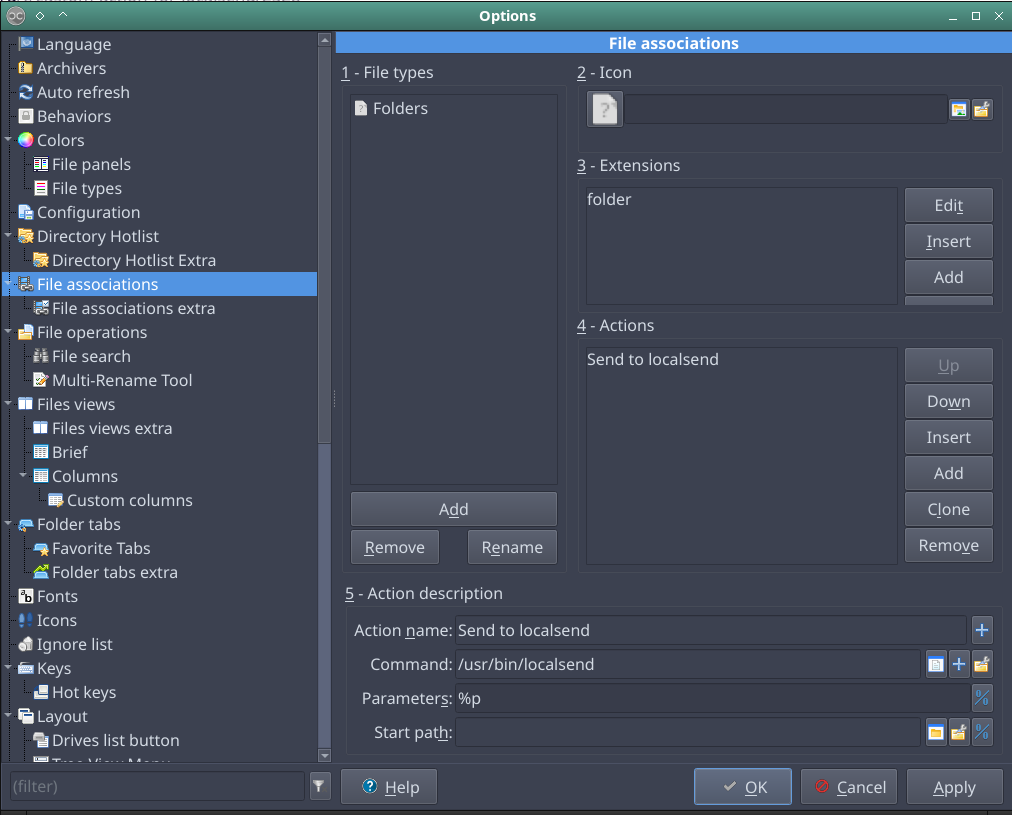
If you want the same for `Double Commander` is different because this app has a way in the Options menu. Here is a quick example of how to do it _for_ _folders only_: