# Brightness/Battery indicator
**URL:** https://forum.maboxlinux.org/t/brightness-battery-indicator/1301
**Category:** Hardware and Drivers
**Created:** [March 30, 2023, 10:34am UTC](https://forum.maboxlinux.org/t/brightness-battery-indicator/1301 "2023-03-30T10:34:01Z")
**Posts on this page:** 20
**Page:** 1
### Author:  [@giukas](https://forum.maboxlinux.org/u/giukas)
#### Post date: [March 30, 2023, 10:34am UTC](https://forum.maboxlinux.org/t/brightness-battery-indicator/1301/1 "2023-03-30T10:34:01Z")
Hello
I installed this fantastic distro on a iota 360 2in1 laptop.
Everything works out the box except no battery indicator and more importantly brightness. I went into preference but can’t find any brightness slider.
I’m on openbox
I don’t have any brightness keys on the keyboard for some reason.
Any suggestion anybody?
---
### Author:  [@zolw](https://forum.maboxlinux.org/u/zolw)
#### Post date: [March 30, 2023, 8:25pm UTC](https://forum.maboxlinux.org/t/brightness-battery-indicator/1301/2 "2023-03-30T20:25:42Z")
Hello @giukas,
`yay -S brightnessctl`
(Should it be missing.)
insert sg like this into `~/.config/openbox/rc.xml`
```auto
brightnessctl s 5%-
brightnessctl s 5%+
```
Super + F11 decreases, Super + F12 increases brightness in this case.
`brightnessctl -h`
shows help
---
### Author:  [@M0nst3r](https://forum.maboxlinux.org/u/M0nst3r)
#### Post date: [March 30, 2023, 11:52pm UTC](https://forum.maboxlinux.org/t/brightness-battery-indicator/1301/3 "2023-03-30T23:52:14Z")
@giukas
I have been looking for iOTA Flo 360 images and all of them have clearly marked the brightness keys.
This may be obvious but press **Fn + F4** and **Fn + F5** key combination. 🤔
---
### Author:  [@giukas](https://forum.maboxlinux.org/u/giukas)
#### Post date: [March 31, 2023, 6:28am UTC](https://forum.maboxlinux.org/t/brightness-battery-indicator/1301/4 "2023-03-31T06:28:32Z")
Hi . I got an iota 360. The flo is another model. At F4 and F5 I have volume.👍
---
### Author:  [@giukas](https://forum.maboxlinux.org/u/giukas)
#### Post date: [March 31, 2023, 6:30am UTC](https://forum.maboxlinux.org/t/brightness-battery-indicator/1301/5 "2023-03-31T06:30:15Z")
Great. I’ll try. And I presume I could set any other key in place if F11 and F12?
---
### Author:  [@zolw](https://forum.maboxlinux.org/u/zolw)
#### Post date: [March 31, 2023, 7:53am UTC](https://forum.maboxlinux.org/t/brightness-battery-indicator/1301/6 "2023-03-31T07:53:38Z")
Sure. Search for - in rc.xml to avoid collision.
`xev` may help you to find the name of some non-trivial key-
---
### Author:  [@napcok](https://forum.maboxlinux.org/u/napcok)
#### Post date: [March 31, 2023, 8:21am UTC](https://forum.maboxlinux.org/t/brightness-battery-indicator/1301/7 "2023-03-31T08:21:10Z")
Battery indicator should appear in panel when battery is less than 90% loaded (if your Mabox installation is relatively fresh - this was added in Dec 2022 release IIRC). It only shows percentage.
You can also install and use **cbatticon** - lightweight battery icon for the system tray.
---
### Author:  [@giukas](https://forum.maboxlinux.org/u/giukas)
#### Post date: [April 2, 2023, 3:17pm UTC](https://forum.maboxlinux.org/t/brightness-battery-indicator/1301/8 "2023-04-02T15:17:09Z")
Thank you all for your feedback. Got it working in the end
---
### Author:  [@biemster](https://forum.maboxlinux.org/u/biemster)
#### Post date: [April 5, 2023, 12:32pm UTC](https://forum.maboxlinux.org/t/brightness-battery-indicator/1301/9 "2023-04-05T12:32:16Z")
Power Manager also has a System tray icon, which can be enabled on the General tab.
@napcok can the new battery indicator be coerced to always show, instead of only below 90%?
---
### Author:  [@napcok](https://forum.maboxlinux.org/u/napcok)
#### Post date: [April 5, 2023, 12:43pm UTC](https://forum.maboxlinux.org/t/brightness-battery-indicator/1301/10 "2023-04-05T12:43:01Z")
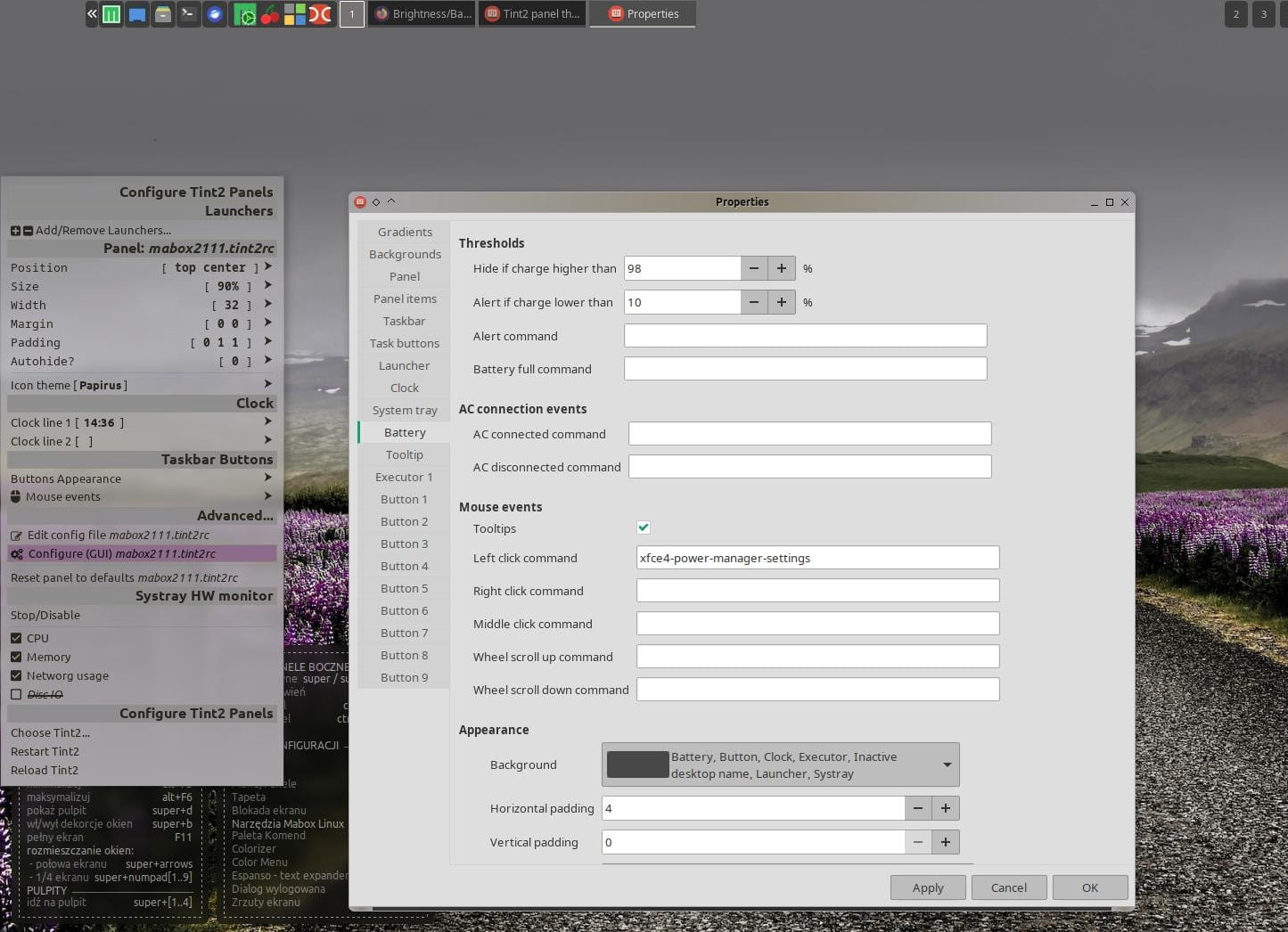
@biemster you can configure the battery indicator to your needs. By editing a configuration file or by GUI.
super + alt + p - will show you Mabox’s panel quick configuration menu, when you can find menu items to edit config file or configure tint2 by GUI.
Tint2 docs about battery indicator → [doc/tint2.md · master · o9000 / tint2 · GitLab](https://gitlab.com/o9000/tint2/-/blob/master/doc/tint2.md#battery)
---
### Author:  [@Guillaume](https://forum.maboxlinux.org/u/Guillaume)
#### Post date: [April 5, 2023, 2:43pm UTC](https://forum.maboxlinux.org/t/brightness-battery-indicator/1301/11 "2023-04-05T14:43:51Z")
Hello @zolw
I follow your advices: Super+F11 and Super+F12 is good for me. Thank You.
---
### Author:  [@Guillaume](https://forum.maboxlinux.org/u/Guillaume)
#### Post date: [April 5, 2023, 2:50pm UTC](https://forum.maboxlinux.org/t/brightness-battery-indicator/1301/12 "2023-04-05T14:50:15Z")
Hello, @giukas
I writing a script for obtein a indicator battery on the conky.
Maybe is good for you.
> [@Script for indicator of the battery charge](https://forum.maboxlinux.org/t/script-for-indicator-of-the-battery-charge/925):
>
> Hello, the community! I’ve been use Mabox for a year now. I likt it’s simplicity and the different fonctions available. I bought my first laptop ten years ago and was then confronted to three faulty issues: not updated and obsolete softwares, a keyboard and a broken battery. When I discovered Mabox, I searched for a code for the battery on the conky but I not found. I decided to write my first code line to obtein a indicator of the battery charge. Today, my script bash is ready and I want …
Guillaume
---
### Author:  [@giukas](https://forum.maboxlinux.org/u/giukas)
#### Post date: [April 8, 2023, 2:07pm UTC](https://forum.maboxlinux.org/t/brightness-battery-indicator/1301/13 "2023-04-08T14:07:32Z")
It would be fantastic
---
### Author:  [@napcok](https://forum.maboxlinux.org/u/napcok)
#### Post date: [April 8, 2023, 2:42pm UTC](https://forum.maboxlinux.org/t/brightness-battery-indicator/1301/14 "2023-04-08T14:42:35Z")
You can use Conky variable for that:
> **[Conky – Variables](https://conky.cc/variables#battery)**
>
> Conky object variables documentation
---
### Author:  [@Imnewhere](https://forum.maboxlinux.org/u/Imnewhere)
#### Post date: [April 14, 2023, 7:56am UTC](https://forum.maboxlinux.org/t/brightness-battery-indicator/1301/15 "2023-04-14T07:56:09Z")
does it matter WHERE you insert text into rc.xml?
---
### Author:  [@zolw](https://forum.maboxlinux.org/u/zolw)
#### Post date: [April 14, 2023, 10:02am UTC](https://forum.maboxlinux.org/t/brightness-battery-indicator/1301/16 "2023-04-14T10:02:57Z")
@Imnewhere Not really. I suggest searching for similar key combination and there.
I inserted after jgconky-pipe /keybind. There are 2 level key combinations. Avoid that.
Edit:
```auto
```
This is the end of keyboard definition and the beginning of mouse defininitions. over line 1030 with me
---
### Author:  [@Imnewhere](https://forum.maboxlinux.org/u/Imnewhere)
#### Post date: [April 16, 2023, 3:38pm UTC](https://forum.maboxlinux.org/t/brightness-battery-indicator/1301/17 "2023-04-16T15:38:33Z")
thanks, this helped tremendously!
---
### Author:  [@Imnewhere](https://forum.maboxlinux.org/u/Imnewhere)
#### Post date: [April 18, 2023, 8:41pm UTC](https://forum.maboxlinux.org/t/brightness-battery-indicator/1301/18 "2023-04-18T20:41:46Z")
i cant seem to get cbatticon to stay in my panel. It will appear if I type it into terminator but it doesn’t stay. So I need to edit a .config file to get it to stay?
---
### Author:  [@napcok](https://forum.maboxlinux.org/u/napcok)
#### Post date: [April 18, 2023, 8:53pm UTC](https://forum.maboxlinux.org/t/brightness-battery-indicator/1301/19 "2023-04-18T20:53:18Z")
Just add command to Openbox’s autostart script `~/.config/openbox/autostart`
Something like that should work:
```auto
cbatticon &
```
For available options and examples, see: [GitHub - valr/cbatticon: A lightweight and fast battery icon that sits in your system tray](https://github.com/valr/cbatticon)
---
### Author:  [@Imnewhere](https://forum.maboxlinux.org/u/Imnewhere)
#### Post date: [April 18, 2023, 9:31pm UTC](https://forum.maboxlinux.org/t/brightness-battery-indicator/1301/20 "2023-04-18T21:31:57Z")
that worked!
learn something new everyday with this distro.