# Bash CTRL Keys Cheat Sheet For Linux and Unix Terminal
**URL:** https://forum.maboxlinux.org/t/bash-ctrl-keys-cheat-sheet-for-linux-and-unix-terminal/740
**Category:** Scripts, Tutorials & Tips
**Created:** [November 30, 2021, 11:47pm UTC](https://forum.maboxlinux.org/t/bash-ctrl-keys-cheat-sheet-for-linux-and-unix-terminal/740 "2021-11-30T23:47:35Z")
**Posts on this page:** 5
**Page:** 1
### Author:  [@napcok](https://forum.maboxlinux.org/u/napcok)
#### Post date: [November 30, 2021, 11:47pm UTC](https://forum.maboxlinux.org/t/bash-ctrl-keys-cheat-sheet-for-linux-and-unix-terminal/740/1 "2021-11-30T23:47:35Z")
Found on reddit.
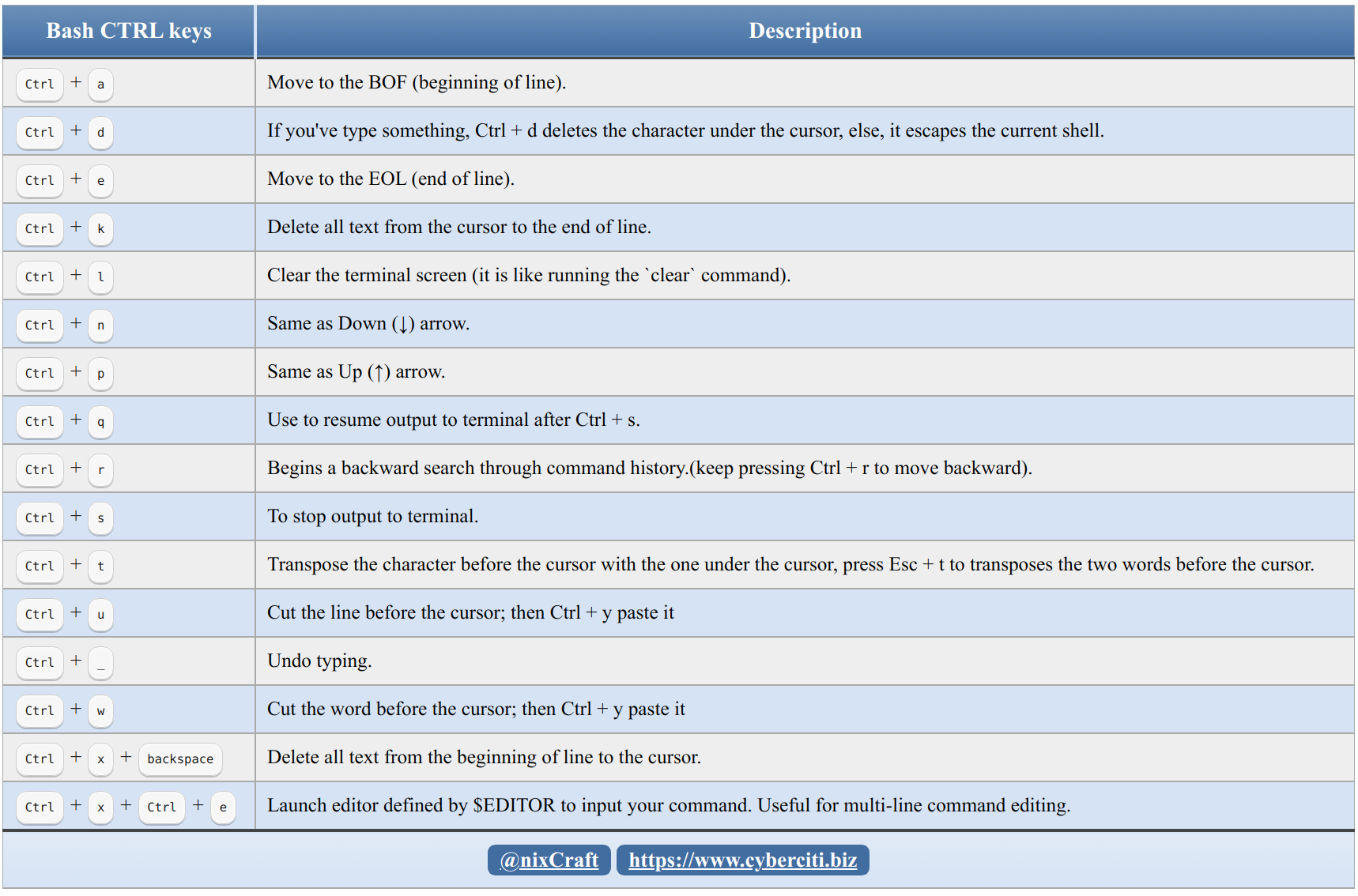
I use Ctrl + r, Ctrl + l and Ctrl + d a lot.
And I hate Ctrl + s - always hit it by mistake. Good to remember Ctrl + q in that case.
Whats your favorites?
---
### Author:  [@LiquidSky](https://forum.maboxlinux.org/u/LiquidSky)
#### Post date: [November 30, 2021, 11:54pm UTC](https://forum.maboxlinux.org/t/bash-ctrl-keys-cheat-sheet-for-linux-and-unix-terminal/740/2 "2021-11-30T23:54:59Z")
I use Ctrl + a and Ctrl + e a lot, especially if I forget to begin with “sudo”.
I just noticed Ctrl + c isn’t listed, unless it’s the same as Ctrl + s.
---
### Author:  [@napcok](https://forum.maboxlinux.org/u/napcok)
#### Post date: [December 1, 2021, 12:51am UTC](https://forum.maboxlinux.org/t/bash-ctrl-keys-cheat-sheet-for-linux-and-unix-terminal/740/3 "2021-12-01T00:51:58Z")
No Ctrl+C is not the same as Ctrl+s
Ctrl+C is for killing process running in the terminal, while Ctrl+S just stop all output to the screen.
---
### Author:  [@LiquidSky](https://forum.maboxlinux.org/u/LiquidSky)
#### Post date: [December 1, 2021, 2:06am UTC](https://forum.maboxlinux.org/t/bash-ctrl-keys-cheat-sheet-for-linux-and-unix-terminal/740/4 "2021-12-01T02:06:22Z")
Speaking of bash, the cli way to clear bash\_history is:
```auto
history -c && history -w
```
I found this on DistroWatch some time ago and made note of it.
Jesse wrote:
- To both wipe the contents of your shell’s history from memory and from the .bash\_history file you need to first clear your history from memory and then write the blank history to disk. To do this you can run: history -c && history -w
- Some people might be wondering why those two commands cannot simply be combined, using “history -cw”. I haven’t looked into the details as to why this doesn’t work, but I can confirm it will not have the desired effect. Perhaps it is a bug or the history command may write its memory to disk before wiping memory. Either way, be sure to split the history purge commands into two parts as shown above.
---
### Author:  [@lobaluna](https://forum.maboxlinux.org/u/lobaluna)
#### Post date: [December 16, 2023, 9:03pm UTC](https://forum.maboxlinux.org/t/bash-ctrl-keys-cheat-sheet-for-linux-and-unix-terminal/740/5 "2023-12-16T21:03:19Z")
I see that `C-r` now has history search (`fzf`) superpowers, and `C-t` has changed to a file search with superpowers (`fzf`).
My favorites are C-a and C-e 😅